极简风格
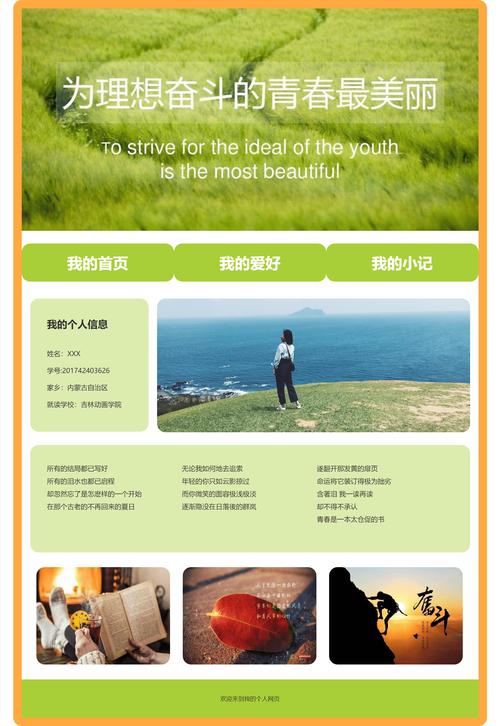
这个模板非常简洁,重点突出姓名和联系方式,适合设计师、艺术家或喜欢极简主义风格的人。
(图片来源网络,侵删)
HTML 代码 (index.html)
<!DOCTYPE html>
<html lang="zh-CN">
<head>
    <meta charset="UTF-8">
    <meta name="viewport" content="width=device-width, initial-scale=1.0">张三 - 个人简介</title>
    <link rel="stylesheet" href="style.css">
    <link rel="stylesheet" href="https://cdnjs.cloudflare.com/ajax/libs/font-awesome/6.4.0/css/all.min.css">
</head>
<body>
    <div class="container">
        <header>
            <img src="https://via.placeholder.com/150" alt="张三的头像" class="avatar">
            <h1>张三</h1>
            <p class="title">前端开发工程师 & UI设计师</p>
        </header>
        <main>
            <section class="about">
                <h2>关于我</h2>
                <p>你好!我是一名充满激情的前端开发工程师,专注于创造美观、高效且用户友好的网络体验,我热爱将设计转化为代码,并不断学习新技术来提升自己。</p>
            </section>
            <section class="contact">
                <h2>联系方式</h2>
                <ul>
                    <li><i class="fas fa-envelope"></i> <a href="mailto:zhangsan@example.com">zhangsan@example.com</a></li>
                    <li><i class="fab fa-github"></i> <a href="https://github.com/zhangsan" target="_blank">github.com/zhangsan</a></li>
                    <li><i class="fab fa-linkedin"></i> <a href="https://linkedin.com/in/zhangsan" target="_blank">linkedin.com/in/zhangsan</a></li>
                    <li><i class="fab fa-twitter"></i> <a href="https://twitter.com/zhangsan" target="_blank">@zhangsan</a></li>
                </ul>
            </section>
        </main>
    </div>
</body>
</html>
CSS 代码 (style.css)
/* --- 全局样式 --- */
@import url('https://fonts.googleapis.com/css2?family=Noto+Sans+SC:wght@300;400;500;700&display=swap');
* {
    margin: 0;
    padding: 0;
    box-sizing: border-box;
}
body {
    font-family: 'Noto Sans SC', sans-serif;
    background-color: #f4f4f4;
    color: #333;
    line-height: 1.6;
}
.container {
    max-width: 800px;
    margin: 40px auto;
    padding: 20px;
    background-color: #fff;
    border-radius: 8px;
    box-shadow: 0 2px 10px rgba(0, 0, 0, 0.1);
}
/* --- 头部样式 --- */
header {
    text-align: center;
    margin-bottom: 40px;
    padding-bottom: 30px;
    border-bottom: 1px solid #eee;
}
.avatar {
    width: 150px;
    height: 150px;
    border-radius: 50%;
    margin-bottom: 20px;
    border: 5px solid #fff;
    box-shadow: 0 2px 5px rgba(0, 0, 0, 0.1);
}
header h1 {
    font-size: 2.5em;
    margin-bottom: 10px;
    color: #2c3e50;
}
{
    font-size: 1.2em;
    color: #7f8c8d;
    font-weight: 300;
}
/* --- 主要内容样式 --- */
main section {
    margin-bottom: 40px;
}
main section h2 {
    font-size: 1.8em;
    margin-bottom: 15px;
    color: #2c3e50;
    border-left: 4px solid #3498db;
    padding-left: 15px;
}
main section p {
    font-size: 1em;
    color: #555;
    text-align: justify;
}
/* --- 联系方式样式 --- */
.contact ul {
    list-style: none;
}
.contact li {
    margin-bottom: 15px;
    font-size: 1em;
}
.contact a {
    color: #3498db;
    text-decoration: none;
    transition: color 0.3s ease;
}
.contact a:hover {
    color: #2980b9;
    text-decoration: underline;
}
.contact i {
    width: 20px;
    margin-right: 10px;
    color: #7f8c8d;
}
现代卡片风格
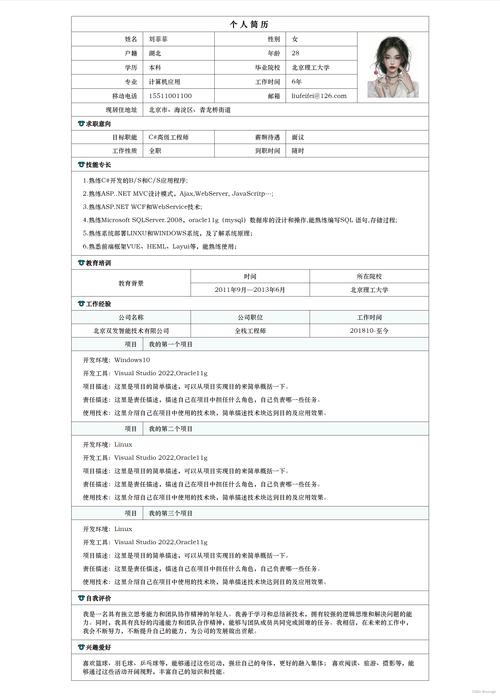
这个模板使用卡片式布局,视觉层次分明,内容区域可以扩展更多,如技能、项目经历等。
HTML 代码 (index.html)
<!DOCTYPE html>
<html lang="zh-CN">
<head>
    <meta charset="UTF-8">
    <meta name="viewport" content="width=device-width, initial-scale=1.0">李四 - 个人简介</title>
    <link rel="stylesheet" href="style.css">
    <link rel="stylesheet" href="https://cdnjs.cloudflare.com/ajax/libs/font-awesome/6.4.0/css/all.min.css">
</head>
<body>
    <div class="profile-card">
        <!-- 头部信息 -->
        <div class="card-header">
            <img src="https://via.placeholder.com/200" alt="李四的头像" class="profile-img">
            <h1>李四</h1>
            <p class="job-title">全栈开发工程师</p>
            <p class="bio">热爱编程,喜欢探索新技术,致力于构建高质量的软件产品。</p>
        </div>
        <!-- 内容区 -->
        <div class="card-content">
            <!-- 关于我 -->
            <div class="content-section">
                <h2><i class="fas fa-user"></i> 关于我</h2>
                <p>
                    拥有5年以上的软件开发经验,精通JavaScript、Python和Java,在前后端开发、数据库设计和云服务部署方面有丰富的实践经验。
                </p>
            </div>
            <!-- 技能 -->
            <div class="content-section">
                <h2><i class="fas fa-code"></i> 技能</h2>
                <div class="skills">
                    <span class="skill-tag">JavaScript</span>
                    <span class="skill-tag">React</span>
                    <span class="skill-tag">Vue.js</span>
                    <span class="skill-tag">Node.js</span>
                    <span class="skill-tag">Python</span>
                    <span class="skill-tag">Django</span>
                    <span class="skill-tag">MySQL</span>
                    <span class="skill-tag">Docker</span>
                </div>
            </div>
            <!-- 联系方式 -->
            <div class="content-section">
                <h2><i class="fas fa-envelope"></i> 联系我</h2>
                <div class="contact-links">
                    <a href="mailto:lisi@example.com" class="contact-link"><i class="fas fa-paper-plane"></i> Email</a>
                    <a href="https://github.com/lisi" class="contact-link" target="_blank"><i class="fab fa-github"></i> GitHub</a>
                    <a href="https://linkedin.com/in/lisi" class="contact-link" target="_blank"><i class="fab fa-linkedin"></i> LinkedIn</a>
                </div>
            </div>
        </div>
    </div>
</body>
</html>
CSS 代码 (style.css)
/* --- 全局样式 --- */
@import url('https://fonts.googleapis.com/css2?family=Poppins:wght@300;400;500;600;700&display=swap');
* {
    margin: 0;
    padding: 0;
    box-sizing: border-box;
}
body {
    font-family: 'Poppins', sans-serif;
    background: linear-gradient(135deg, #667eea 0%, #764ba2 100%);
    min-height: 100vh;
    display: flex;
    justify-content: center;
    align-items: center;
    color: #333;
}
.profile-card {
    background-color: #fff;
    border-radius: 20px;
    box-shadow: 0 15px 35px rgba(0, 0, 0, 0.1);
    width: 90%;
    max-width: 450px;
    overflow: hidden;
    transition: transform 0.3s ease;
}
.profile-card:hover {
    transform: translateY(-10px);
}
/* --- 头部样式 --- */
.card-header {
    background: linear-gradient(to right, #6a11cb 0%, #2575fc 100%);
    color: #fff;
    text-align: center;
    padding: 40px 20px;
}
.profile-img {
    width: 120px;
    height: 120px;
    border-radius: 50%;
    border: 5px solid #fff;
    margin-bottom: 20px;
    box-shadow: 0 5px 15px rgba(0, 0, 0, 0.2);
}
.card-header h1 {
    font-size: 2em;
    margin-bottom: 5px;
}
{
    font-size: 1em;
    font-weight: 300;
    opacity: 0.9;
    margin-bottom: 15px;
}
.bio {
    font-size: 0.9em;
    font-weight: 300;
    line-height: 1.5;
}
/* --- 内容区样式 --- */
.card-content {
    padding: 30px;
}
.content-section {
    margin-bottom: 25px;
}
.content-section h2 {
    font-size: 1.2em;
    margin-bottom: 15px;
    color: #555;
    display: flex;
    align-items: center;
}
.content-section h2 i {
    margin-right: 10px;
    color: #667eea;
}
.content-section p {
    color: #666;
    line-height: 1.6;
}
/* --- 技能标签 --- */
.skills {
    display: flex;
    flex-wrap: wrap;
    gap: 10px;
}
.skill-tag {
    background-color: #f0f0f0;
    color: #555;
    padding: 5px 12px;
    border-radius: 20px;
    font-size: 0.85em;
    font-weight: 500;
}
/* --- 联系方式链接 --- */
.contact-links {
    display: flex;
    flex-direction: column;
    gap: 12px;
}
.contact-link {
    display: flex;
    align-items: center;
    justify-content: center;
    color: #fff;
    background-color: #667eea;
    text-decoration: none;
    padding: 12px 20px;
    border-radius: 8px;
    font-weight: 500;
    transition: background-color 0.3s ease, transform 0.2s ease;
}
.contact-link:hover {
    background-color: #5a67d8;
    transform: scale(1.03);
}
.contact-link i {
    margin-right: 10px;
}
如何使用这些模板
-
创建文件:
- 在你的电脑上创建一个新的文件夹,
my-profile。 - 在该文件夹中,创建两个文件:
index.html和style.css。
- 在你的电脑上创建一个新的文件夹,
-
复制代码:
- 将你喜欢的模板的 HTML 代码复制并粘贴到
index.html文件中。 - 将对应的 CSS 代码复制并粘贴到
style.css文件中。
- 将你喜欢的模板的 HTML 代码复制并粘贴到
-
个性化修改:
 (图片来源网络,侵删)
- 图片:将
<img src="https://via.placeholder.com/150">中的链接替换为你自己头像图片的URL(可以上传到图床或使用本地路径)。 - 文本:修改所有
<h1>,<p>,<a>标签中的文本内容,如你的姓名、职位、简介、联系方式等。 - 颜色:在
style.css文件中,你可以修改background-color,color等属性来改变网站的颜色主题。 - 图标:这些模板使用了 Font Awesome 图标库,你可以访问 Font Awesome 官网 查找更多图标,并替换 HTML 中的
<i>标签类名。
- 图片:将
-
预览:
- 用浏览器(如 Chrome, Firefox, Edge)打开
index.html文件,你就可以看到你的个人简介网页了。
- 用浏览器(如 Chrome, Firefox, Edge)打开
进阶建议
- :你可以在 HTML 中添加更多的
section,工作经历”、“教育背景”、“项目展示”等。 - 响应式设计:上述模板已经包含了一些基础的响应式设计(如使用
max-width和 单位),你可以通过添加@media查询来为手机等小屏幕设备提供更优的布局。 - 添加动画:可以使用 CSS
@keyframes或 JavaScript (如 AOS.js 库) 为页面元素添加滚动动画,让网页更生动。 - 部署上线:当你完成所有修改后,可以将
my-profile文件夹上传到 GitHub Pages、Netlify 或 Vercel 等免费托管服务,让你的个人简介在互联网上可见。
希望这些模板能帮助你快速搭建出满意的个人简介网页!
(图片来源网络,侵删)


