您可以直接将以下所有代码复制到一个 .html 文件中,然后用浏览器打开即可看到效果。
(图片来源网络,侵删)
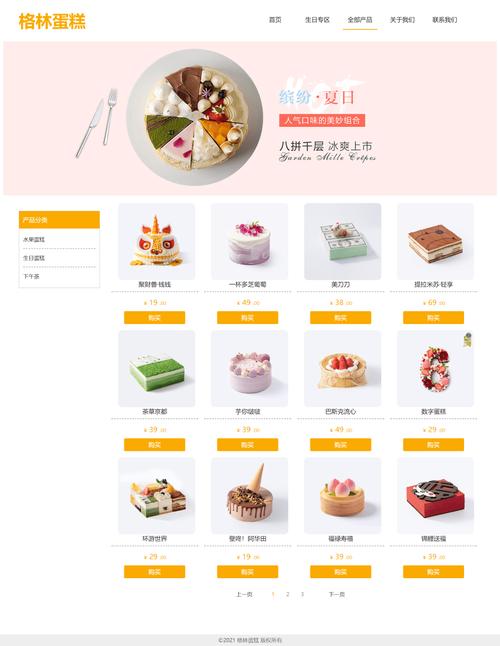
设计特点
- 响应式设计:适配桌面、平板和手机。
- 现代美观:使用柔和的配色和阴影效果,营造温馨的蛋糕店氛围。
- 功能完整:包含导航栏、轮播广告、产品展示、购物车、联系表单和页脚。
- 代码清晰:使用 HTML5 语义化标签,CSS3 进行样式美化,JavaScript 实现交互功能。
完整代码 (Single File)
<!DOCTYPE html>
<html lang="zh-CN">
<head>
<meta charset="UTF-8">
<meta name="viewport" content="width=device-width, initial-scale=1.0">甜蜜时刻 - 您身边的蛋糕专家</title>
<style>
/* --- 全局样式 --- */
* {
margin: 0;
padding: 0;
box-sizing: border-box;
font-family: 'Segoe UI', Tahoma, Geneva, Verdana, sans-serif;
}
body {
line-height: 1.6;
color: #333;
background-color: #fef9f3;
}
.container {
width: 90%;
max-width: 1200px;
margin: 0 auto;
padding: 0 20px;
}
h1, h2, h3 {
margin-bottom: 15px;
color: #8b4513; /* 巧克力色 */
}
h2 {
text-align: center;
font-size: 2.5rem;
margin-bottom: 40px;
}
/* --- 导航栏 --- */
header {
background-color: #fff;
box-shadow: 0 2px 5px rgba(0,0,0,0.1);
position: sticky;
top: 0;
z-index: 1000;
}
nav {
display: flex;
justify-content: space-between;
align-items: center;
padding: 15px 0;
}
.logo {
font-size: 1.8rem;
font-weight: bold;
color: #d2691e; /* 巧克力色 */
}
.nav-links {
display: flex;
list-style: none;
}
.nav-links li {
margin-left: 25px;
}
.nav-links a {
text-decoration: none;
color: #333;
font-weight: 500;
transition: color 0.3s;
}
.nav-links a:hover {
color: #d2691e;
}
.cart-icon {
position: relative;
cursor: pointer;
font-size: 1.5rem;
}
.cart-count {
position: absolute;
top: -8px;
right: -8px;
background-color: #ff6b6b;
color: white;
border-radius: 50%;
width: 20px;
height: 20px;
display: flex;
justify-content: center;
align-items: center;
font-size: 0.8rem;
}
/* --- 轮播图 --- */
.carousel {
position: relative;
height: 500px;
overflow: hidden;
margin-top: 20px;
border-radius: 10px;
box-shadow: 0 4px 15px rgba(0,0,0,0.1);
}
.carousel-inner {
display: flex;
transition: transform 0.5s ease-in-out;
height: 100%;
}
.carousel-item {
min-width: 100%;
height: 100%;
background-size: cover;
background-position: center;
display: flex;
justify-content: center;
align-items: center;
}
.carousel-caption {
background-color: rgba(0, 0, 0, 0.5);
color: white;
padding: 20px 40px;
border-radius: 10px;
text-align: center;
}
.carousel-caption h2 {
color: white;
}
.carousel-indicators {
position: absolute;
bottom: 20px;
left: 50%;
transform: translateX(-50%);
display: flex;
gap: 10px;
}
.indicator {
width: 12px;
height: 12px;
border-radius: 50%;
background-color: rgba(255, 255, 255, 0.5);
cursor: pointer;
transition: background-color 0.3s;
}
.indicator.active {
background-color: white;
}
/* --- 产品展示 --- */
#products {
padding: 60px 0;
}
.product-grid {
display: grid;
grid-template-columns: repeat(auto-fit, minmax(280px, 1fr));
gap: 30px;
}
.product-card {
background-color: #fff;
border-radius: 10px;
overflow: hidden;
box-shadow: 0 4px 10px rgba(0,0,0,0.1);
transition: transform 0.3s, box-shadow 0.3s;
}
.product-card:hover {
transform: translateY(-10px);
box-shadow: 0 8px 20px rgba(0,0,0,0.15);
}
.product-image {
height: 220px;
background-size: cover;
background-position: center;
}
.product-info {
padding: 20px;
}
.product-info h3 {
font-size: 1.3rem;
margin-bottom: 10px;
}
.product-price {
font-size: 1.5rem;
color: #ff6b6b;
font-weight: bold;
margin-bottom: 15px;
}
.add-to-cart-btn {
width: 100%;
padding: 12px;
background-color: #d2691e;
color: white;
border: none;
border-radius: 5px;
font-size: 1rem;
cursor: pointer;
transition: background-color 0.3s;
}
.add-to-cart-btn:hover {
background-color: #a0522d;
}
/* --- 购物车模态框 --- */
.modal {
display: none;
position: fixed;
z-index: 2000;
left: 0;
top: 0;
width: 100%;
height: 100%;
background-color: rgba(0,0,0,0.5);
}
.modal-content {
background-color: #fef9f3;
margin: 5% auto;
padding: 20px;
border-radius: 10px;
width: 80%;
max-width: 600px;
max-height: 80vh;
overflow-y: auto;
position: relative;
}
.close {
position: absolute;
right: 20px;
top: 15px;
font-size: 28px;
font-weight: bold;
cursor: pointer;
color: #aaa;
}
.close:hover {
color: #000;
}
.cart-item {
display: flex;
justify-content: space-between;
align-items: center;
padding: 15px 0;
border-bottom: 1px solid #ddd;
}
.cart-item img {
width: 60px;
height: 60px;
object-fit: cover;
border-radius: 5px;
}
.cart-total {
text-align: right;
font-size: 1.5rem;
font-weight: bold;
margin-top: 20px;
color: #d2691e;
}
.empty-cart {
text-align: center;
padding: 40px;
color: #888;
}
/* --- 联系我们 --- */
#contact {
padding: 60px 0;
background-color: #fff;
}
.contact-form {
max-width: 600px;
margin: 0 auto;
}
.form-group {
margin-bottom: 20px;
}
.form-group label {
display: block;
margin-bottom: 5px;
font-weight: 500;
}
.form-group input,
.form-group textarea {
width: 100%;
padding: 12px;
border: 1px solid #ccc;
border-radius: 5px;
font-size: 1rem;
}
.form-group textarea {
height: 150px;
resize: vertical;
}
.submit-btn {
display: block;
width: 200px;
margin: 0 auto;
padding: 12px 20px;
background-color: #d2691e;
color: white;
border: none;
border-radius: 5px;
font-size: 1rem;
cursor: pointer;
transition: background-color 0.3s;
}
.submit-btn:hover {
background-color: #a0522d;
}
/* --- 页脚 --- */
footer {
background-color: #333;
color: #fff;
text-align: center;
padding: 20px 0;
}
/* --- 响应式设计 --- */
@media (max-width: 768px) {
.nav-links, .cart-icon {
display: none; /* 简单起见,移动端隐藏部分导航 */
}
.carousel {
height: 300px;
}
h2 {
font-size: 2rem;
}
}
</style>
</head>
<body>
<!-- 导航栏 -->
<header>
<div class="container">
<nav>
<div class="logo">🍰 甜蜜时刻</div>
<ul class="nav-links">
<li><a href="#home">首页</a></li>
<li><a href="#products">蛋糕系列</a></li>
<li><a href="#contact">联系我们</a></li>
</ul>
<div class="cart-icon" onclick="openCart()">
🛒
<span class="cart-count" id="cart-count">0</span>
</div>
</nav>
</div>
</header>
<main>
<!-- 轮播图 -->
<section id="home" class="container">
<div class="carousel">
<div class="carousel-inner" id="carousel-inner">
<div class="carousel-item" style="background-image: url('https://images.unsplash.com/photo-1565299624946-b28f40a0ca4b?ixlib=rb-4.0.3&ixid=M3wxMjA3fDB8MHxwaG90by1wYWdlfHx8fGVufDB8fHx8fA%3D%3D&auto=format&fit=crop&w=1770&q=80');">
<div class="carousel-caption">
<h2>生日快乐,甜蜜加倍</h2>
<p>定制您的专属生日蛋糕</p>
</div>
</div>
<div class="carousel-item" style="background-image: url('https://images.unsplash.com/photo-1563729780434-be0f979853d2?ixlib=rb-4.0.3&ixid=M3wxMjA3fDB8MHxwaG90by1wYWdlfHx8fGVufDB8fHx8fA%3D%3D&auto=format&fit=crop&w=1770&q=80');">
<div class="carousel-caption">
<h2>法式精致,品味生活</h2>
<p>探索我们的经典法式甜点</p>
</div>
</div>
<div class="carousel-item" style="background-image: url('https://images.unsplash.com/photo-1567620905732-2d1ec7ab7445?ixlib=rb-4.0.3&ixid=M3wxMjA3fDB8MHxwaG90by1wYWdlfHx8fGVufDB8fHx8fA%3D%3D&auto=format&fit=crop&w=1770&q=80');">
<div class="carousel-caption">
<h2>新鲜出炉,每日供应</h2>
<p>用最新鲜的原料,做最美味的蛋糕</p>
</div>
</div>
</div>
<div class="carousel-indicators" id="carousel-indicators"></div>
</div>
</section>
<!-- 产品展示 -->
<section id="products">
<div class="container">
<h2>蛋糕系列</h2>
<div class="product-grid" id="product-grid">
<!-- 产品将通过 JavaScript 动态生成 -->
</div>
</div>
</section>
<!-- 联系我们 -->
<section id="contact">
<div class="container">
<h2>联系我们</h2>
<form class="contact-form" onsubmit="handleSubmit(event)">
<div class="form-group">
<label for="name">您的姓名</label>
<input type="text" id="name" name="name" required>
</div>
<div class="form-group">
<label for="email">电子邮箱</label>
<input type="email" id="email" name="email" required>
</div>
<div class="form-group">
<label for="message">留言</label>
<textarea id="message" name="message" required></textarea>
</div>
<button type="submit" class="submit-btn">发送留言</button>
</form>
</div>
</section>
</main>
<!-- 购物车模态框 -->
<div id="cart-modal" class="modal">
<div class="modal-content">
<span class="close" onclick="closeCart()">×</span>
<h2>您的购物车</h2>
<div id="cart-items">
<p class="empty-cart">购物车是空的</p>
</div>
<div class="cart-total" id="cart-total">总计: ¥0</div>
</div>
</div>
<!-- 页脚 -->
<footer>
<div class="container">
<p>© 2025 甜蜜时刻蛋糕店. All rights reserved. | 地址: 甜蜜街 123 号 | 电话: 123-456-7890</p>
</div>
</footer>
<script>
// 产品数据
const products = [
{ id: 1, name: '经典巧克力蛋糕', price: 158, image: 'https://images.unsplash.com/photo-1563729780434-be0f979853d2?ixlib=rb-4.0.3&ixid=M3wxMjA3fDB8MHxwaG90by1wYWdlfHx8fGVufDB8fHx8fA%3D%3D&auto=format&fit=crop&w=1770&q=80' },
{ id: 2, name: '草莓慕斯蛋糕', price: 168, image: 'https://images.unsplash.com/photo-1505252585461-04db1eb84625?ixlib=rb-4.0.3&ixid=M3wxMjA3fDB8MHxwaG90by1wYWdlfHx8fGVufDB8fHx8fA%3D%3D&auto=format&fit=crop&w=1770&q=80' },
{ id: 3, name: '香草芝士蛋糕', price: 148, image: 'https://images.unsplash.com/photo-1488477181946-6428a0291777?ixlib=rb-4.0.3&ixid=M3wxMjA3fDB8MHxwaG90by1wYWdlfHx8fGVufDB8fHx8fA%3D%3D&auto=format&fit=crop&w=1770&q=80' },
{ id: 4, name: '红丝线蛋糕', price: 188, image: 'https://images.unsplash.com/photo-1550989460-0adf9ea622e2?ixlib=rb-4.0.3&ixid=M3wxMjA3fDB8MHxwaG90by1wYWdlfHx8fGVufDB8fHx8fA%3D%3D&auto=format&fit=crop&w=1770&q=80' },
{ id: 5, name: '抹茶千层蛋糕', price: 178, image: 'https://images.unsplash.com/photo-1576107616104-496e48092fac?ixlib=rb-4.0.3&ixid=M3wxMjA3fDB8MHxwaG90by1wYWdlfHx8fGVufDB8fHx8fA%3D%3D&auto=format&fit=crop&w=1770&q=80' },
{ id: 6, name: '水果奶油蛋糕', price: 138, image: 'https://images.unsplash.com/photo-1550989460-0adf9ea622e2?ixlib=rb-4.0.3&ixid=M3wxMjA3fDB8MHxwaG90by1wYWdlfHx8fGVufDB8fHx8fA%3D%3D&auto=format&fit=crop&w=1770&q=80' }
];
// 购物车数据
let cart = [];
// 渲染产品列表
function renderProducts() {
const productGrid = document.getElementById('product-grid');
productGrid.innerHTML = products.map(product => `
<div class="product-card">
<div class="product-image" style="background-image: url('${product.image}')"></div>
<div class="product-info">
<h3>${product.name}</h3>
<p class="product-price">¥${product.price}</p>
<button class="add-to-cart-btn" onclick="addToCart(${product.id})">加入购物车</button>
</div>
</div>
`).join('');
}
// 添加到购物车
function addToCart(productId) {
const product = products.find(p => p.id === productId);
const existingItem = cart.find(item => item.id === productId);
if (existingItem) {
existingItem.quantity += 1;
} else {
cart.push({ ...product, quantity: 1 });
}
updateCartUI();
showNotification('已添加到购物车!');
}
// 更新购物车UI
function updateCartUI() {
const cartCount = document.getElementById('cart-count');
const cartItems = document.getElementById('cart-items');
const cartTotal = document.getElementById('cart-total');
// 更新购物车数量
const totalItems = cart.reduce((sum, item) => sum + item.quantity, 0);
cartCount.textContent = totalItems;
// 更新购物车内容
if (cart.length === 0) {
cartItems.innerHTML = '<p class="empty-cart">购物车是空的</p>';
cartTotal.textContent = '总计: ¥0';
} else {
cartItems.innerHTML = cart.map(item => `
<div class="cart-item">
<img src="${item.image}" alt="${item.name}">
<div>
<h4>${item.name}</h4>
<p>¥${item.price} x ${item.quantity}</p>
</div>
<button onclick="removeFromCart(${item.id})">删除</button>
</div>
`).join('');
const total = cart.reduce((sum, item) => sum + (item.price * item.quantity), 0);
cartTotal.textContent = `总计: ¥${total}`;
}
}
// 从购物车移除
function removeFromCart(productId) {
cart = cart.filter(item => item.id !== productId);
updateCartUI();
}
// 打开/关闭购物车模态框
function openCart() {
document.getElementById('cart-modal').style.display = 'block';
}
function closeCart() {
document.getElementById('cart-modal').style.display = 'none';
}
// 点击模态框外部关闭
window.onclick = function(event) {
const modal = document.getElementById('cart-modal');
if (event.target == modal) {
closeCart();
}
}
// 处理联系表单提交
function handleSubmit(event) {
event.preventDefault();
const name = document.getElementById('name').value;
showNotification(`感谢您的留言,${name}!我们会尽快回复您,`);
event.target.reset();
}
// 显示通知 (替代 alert)
function showNotification(message) {
const notification = document.createElement('div');
notification.style.position = 'fixed';
notification.style.top = '20px';
notification.style.right = '20px';
notification.style.backgroundColor = '#4CAF50';
notification.style.color = 'white';
notification.style.padding = '15px';
notification.style.borderRadius = '5px';
notification.style.boxShadow = '0 4px 8px rgba(0,0,0,0.2)';
notification.style.zIndex = '3000';
notification.textContent = message;
document.body.appendChild(notification);
setTimeout(() => {
notification.remove();
}, 3000);
}
// 轮播图功能
let currentSlide = 0;
const carouselInner = document.getElementById('carousel-inner');
const indicatorsContainer = document.getElementById('carousel-indicators');
// 创建指示器
products.slice(0, 3).forEach((_, index) => {
const indicator = document.createElement('div');
indicator.className = 'indicator';
if (index === 0) indicator.classList.add('active');
indicator.onclick = () => goToSlide(index);
indicatorsContainer.appendChild(indicator);
});
function goToSlide(index) {
currentSlide = index;
carouselInner.style.transform = `translateX(-${currentSlide * 100}%)`;
// 更新指示器
document.querySelectorAll('.indicator').forEach((ind, i) => {
ind.classList.toggle('active', i === currentSlide);
});
}
// 自动轮播
setInterval(() => {
currentSlide = (currentSlide + 1) % 3;
goToSlide(currentSlide);
}, 5000);
// 页面加载时初始化
document.addEventListener('DOMContentLoaded', () => {
renderProducts();
updateCartUI();
});
</script>
</body>
</html>
如何使用
- 创建文件:在您的电脑上创建一个新的文本文件。
- 复制粘贴:将上面所有的代码完整地复制并粘贴到这个新文件中。
- 保存文件:将文件另存为
index.html或任何您喜欢的.html文件名。 - 打开浏览器:找到您保存的文件,用 Chrome、Firefox、Edge 等任何现代网页浏览器打开它。
您将看到一个功能齐全、设计精美的蛋糕店网页。
代码结构解析
-
<!DOCTYPE html>到<head>:- 定义了文档类型和字符集。
- 设置了视口 (
viewport),确保在移动设备上正确显示。 - 包含了
<title>页面标题。 <style>: 所有 CSS 样式都写在这里,它负责定义网页的视觉外观,包括布局、颜色、字体、阴影和响应式规则。
-
<body>:<header>: 网站的头部,包含 Logo 和导航链接。<main>: 网页的主要内容区域。- 轮播图 (
<section id="home">): 使用纯 CSS 和 JavaScript 实现的图片轮播效果,带有自动播放和手动指示器。 - 产品展示 (
<section id="products">): 使用 CSS Grid 布局的产品卡片列表。 - 联系表单 (
<section id="contact">): 一个简单的 HTML 表单。
- 轮播图 (
<footer>: 网站的页脚,包含版权和联系信息。- 购物车模态框 (
<div id="cart-modal">): 默认隐藏,点击购物车图标时显示的弹出窗口。
-
<script>: (图片来源网络,侵删)
- 所有 JavaScript 代码都写在这里,用于实现交互功能。
- 产品数据: 一个
products数组,存储了所有蛋糕的信息。 - 购物车逻辑:
addToCart,removeFromCart,updateCartUI等函数管理购物车的状态和界面更新。 - UI 渲染:
renderProducts函数根据产品数据动态生成 HTML。 - 事件处理: 处理“加入购物车”、“表单提交”等用户操作。
- 通知系统: 一个友好的
showNotification函数,替代了传统的alert弹窗。 - 轮播图逻辑: 控制轮播图的切换和自动播放。
这个实例是一个很好的起点,您可以根据自己的需求进一步修改和扩展,例如添加真实的后端 API、集成支付网关、增加更多动画效果等。
(图片来源网络,侵删)


