基础轮播 (纯 CSS 实现)
这个方案最简单,不依赖任何外部库,仅使用 CSS 即可实现自动轮播,它非常适合简单的展示需求。

(图片来源网络,侵删)
特点:
- 自动轮播
- 平滑过渡效果
- 结构简单,代码量少
代码示例:
<!DOCTYPE html>
<html lang="zh-CN">
<head>
    <meta charset="UTF-8">
    <meta name="viewport" content="width=device-width, initial-scale=1.0">纯CSS轮播</title>
    <style>
        * {
            margin: 0;
            padding: 0;
            box-sizing: border-box;
        }
        body {
            font-family: Arial, sans-serif;
        }
        .carousel-container {
            width: 800px;
            height: 450px;
            margin: 50px auto;
            overflow: hidden; /* 隐藏超出容器大小的图片 */
            position: relative;
        }
        .carousel-slide {
            display: flex; /* 使用 Flexbox 让图片水平排列 */
            width: 400%; /* 四张图片,所以宽度是 400% */
            height: 100%;
            animation: slide 15s infinite; /* 定义动画,15秒循环一次 */
        }
        .carousel-slide img {
            width: 25%; /* 每张图片占容器宽度的 25% */
            height: 100%;
            object-fit: cover; /* 保证图片填满容器且不变形 */
        }
        /* 定义关键帧动画 */
        @keyframes slide {
            0% {
                transform: translateX(0); /* 显示第一张图 */
            }
            25% {
                transform: translateX(-25%); /* 显示第二张图 */
            }
            50% {
                transform: translateX(-50%); /* 显示第三张图 */
            }
            75% {
                transform: translateX(-75%); /* 显示第四张图 */
            }
            100% {
                transform: translateX(0); /* 回到第一张图,形成循环 */
            }
        }
        /* 可选:添加标题或描述 */
        .slide-content {
            position: absolute;
            bottom: 20px;
            left: 20px;
            color: white;
            background-color: rgba(0, 0, 0, 0.5);
            padding: 10px 15px;
            border-radius: 5px;
        }
    </style>
</head>
<body>
    <div class="carousel-container">
        <div class="carousel-slide">
            <img src="https://images.unsplash.com/photo-1506905925346-21bda4d32df4?ixlib=rb-4.0.3&ixid=M3wxMjA3fDB8MHxwaG90by1wYWdlfHx8fGVufDB8fHx8fA%3D%3D&auto=format&fit=crop&w=1000&q=80" alt="风景1">
            <img src="https://images.unsplash.com/photo-1542291026-7eec264c27ff?ixlib=rb-4.0.3&ixid=M3wxMjA3fDB8MHxwaG90by1wYWdlfHx8fGVufDB8fHx8fA%3D%3D&auto=format&fit=crop&w=1000&q=80" alt="风景2">
            <img src="https://images.unsplash.com/photo-1519904981063-b0cf448d479e?ixlib=rb-4.0.3&ixid=M3wxMjA3fDB8MHxwaG90by1wYWdlfHx8fGVufDB8fHx8fA%3D%3D&auto=format&fit=crop&w=1000&q=80" alt="风景3">
            <img src="https://images.unsplash.com/photo-1506905925346-21bda4d32df4?ixlib=rb-4.0.3&ixid=M3wxMjA3fDB8MHxwaG90by1wYWdlfHx8fGVufDB8fHx8fA%3D%3D&auto=format&fit=crop&w=1000&q=80" alt="风景4">
        </div>
        <div class="slide-content">
            <h2>美丽的自然风光</h2>
            <p>探索世界的壮丽景色</p>
        </div>
    </div>
</body>
</html>
功能丰富的轮播 (原生 JavaScript 实现)
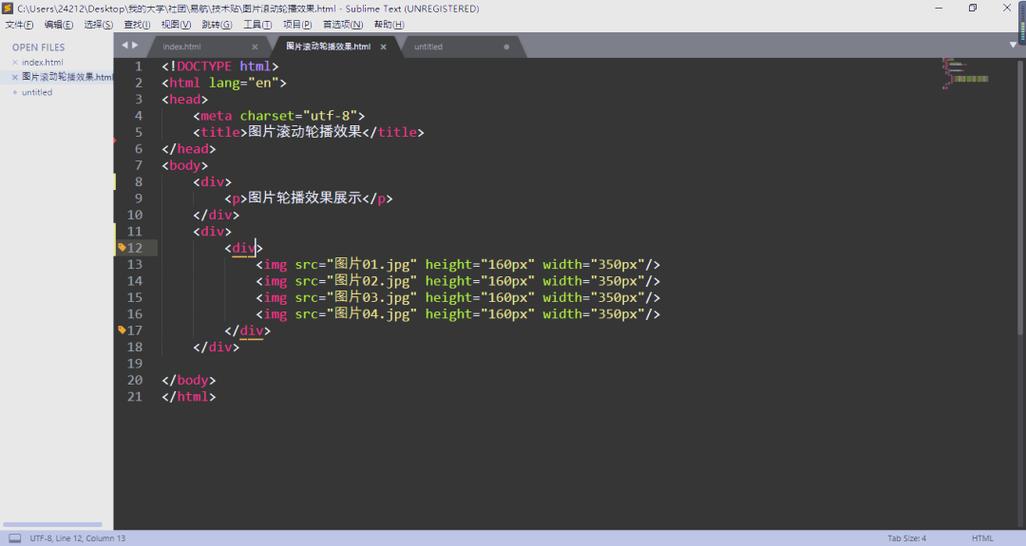
这个方案使用原生 JavaScript,提供了更完整的功能,如手动切换、指示器和箭头导航。
特点:
(图片来源网络,侵删)
- 自动轮播
- 左右箭头切换
- 底部指示器 (小圆点)
- 鼠标悬停时暂停自动播放
- 点击指示器直接跳转到对应图片
代码示例:
<!DOCTYPE html>
<html lang="zh-CN">
<head>
<meta charset="UTF-8">
<meta name="viewport" content="width=device-width, initial-scale=1.0">JavaScript轮播</title>
<style>
* {
margin: 0;
padding: 0;
box-sizing: border-box;
}
body {
font-family: 'Arial', sans-serif;
background-color: #f4f4f4;
display: flex;
justify-content: center;
align-items: center;
min-height: 100vh;
}
.carousel-wrapper {
position: relative;
width: 800px;
max-width: 100%;
overflow: hidden;
box-shadow: 0 4px 8px rgba(0, 0, 0, 0.1);
}
.carousel {
display: flex;
transition: transform 0.5s ease-in-out;
}
.carousel-item {
min-width: 100%;
position: relative;
}
.carousel-item img {
width: 100%;
height: auto;
display: block;
}
.carousel-caption {
position: absolute;
bottom: 0;
left: 0;
right: 0;
background: rgba(0, 0, 0, 0.5);
color: white;
padding: 15px;
text-align: center;
}
/* 箭头样式 */
.carousel-arrow {
position: absolute;
top: 50%;
transform: translateY(-50%);
background-color: rgba(255, 255, 255, 0.7);
color: #333;
border: none;
font-size: 2rem;
padding: 10px 15px;
cursor: pointer;
border-radius: 50%;
transition: background-color 0.3s;
z-index: 10;
}
.carousel-arrow:hover {
background-color: rgba(255, 255, 255, 0.9);
}
.carousel-arrow.prev {
left: 10px;
}
.carousel-arrow.next {
right: 10px;
}
/* 指示器样式 */
.carousel-indicators {
position: absolute;
bottom: 20px;
left: 50%;
transform: translateX(-50%);
display: flex;
gap: 10px;
z-index: 10;
}
.indicator {
width: 12px;
height: 12px;
border-radius: 50%;
background-color: rgba(255, 255, 255, 0.5);
cursor: pointer;
transition: background-color 0.3s;
}
.indicator.active {
background-color: white;
}
</style>
</head>
<body>
<div class="carousel-wrapper">
<div class="carousel">
<div class="carousel-item">
<img src="https://images.unsplash.com/photo-1506905925346-21bda4d32df4?ixlib=rb-4.0.3&ixid=M3wxMjA3fDB8MHxwaG90by1wYWdlfHx8fGVufDB8fHx8fA%3D%3D&auto=format&fit=crop&w=1000&q=80" alt="Slide 1">
<div class="carousel-caption">
<h3>山脉湖泊</h3>
<p>宁静致远,山水相依</p>
</div>
</div>
<div class="carousel-item">
<img src="https://images.unsplash.com/photo-1542291026-7eec264c27ff?ixlib=rb-4.0.3&ixid=M3wxMjA3fDB8MHxwaG90by1wYWdlfHx8fGVufDB8fHx8fA%3D%3D&auto=format&fit=crop&w=1000&q=80" alt="Slide 2">
<div class="carousel-caption">
<h3>森林小径</h3>
<p>漫步林间,呼吸自然</p>
</div>
</div>
<div class="carousel-item">
<img src="https://images.unsplash.com/photo-1519904981063-b0cf448d479e?ixlib=rb-4.0.3&ixid=M3wxMjA3fDB8MHxwaG90by1wYWdlfHx8fGVufDB8fHx8fA%3D%3D&auto=format&fit=crop&w=1000&q=80" alt="Slide 3">
<div class="carousel-caption">
<h3>城市夜景</h3>
<p>灯火阑珊,繁华都市</p>
</div>
</div>
<div class="carousel-item">
<img src="https://images.unsplash.com/photo-1604537466158-719b1973d5de?ixlib=rb-4.0.3&ixid=M3wxMjA3fDB8MHxwaG90by1wYWdlfHx8fGVufDB8fHx8fA%3D%3D&auto=format&fit=crop&w=1000&q=80" alt="Slide 4">
<div class="carousel-caption">
<h3>金色麦田</h3>
<p>丰收的季节,满载希望</p>
</div>
</div>
</div>
<button class="carousel-arrow prev">❮</button>
<button class="carousel-arrow next">❯</button>
<div class="carousel-indicators"></div>
</div>
<script>
document.addEventListener('DOMContentLoaded', () => {
const carousel = document.querySelector('.carousel');
const items = document.querySelectorAll('.carousel-item');
const prevButton = document.querySelector('.carousel-arrow.prev');
const nextButton = document.querySelector('.carousel-arrow.next');
const indicatorsContainer = document.querySelector('.carousel-indicators');
const totalItems = items.length;
let currentIndex = 0;
let intervalId;
// 创建指示器
for (let i = 0; i < totalItems; i++) {
const indicator = document.createElement('div');
indicator.classList.add('indicator');
if (i === 0) indicator.classList.add('active');
indicator.addEventListener('click', () => goToSlide(i));
indicatorsContainer.appendChild(indicator);
}
const indicators = document.querySelectorAll('.indicator');
function updateCarousel() {
carousel.style.transform = `translateX(-${currentIndex * 100}%)`;
// 更新指示器状态
indicators.forEach((indicator, index) => {
indicator.classList.toggle('active', index === currentIndex);
});
}
function goToSlide(index) {
currentIndex = index;
updateCarousel();
resetAutoPlay();
}
function nextSlide() {
currentIndex = (currentIndex + 1) % totalItems;
updateCarousel();
}
function prevSlide() {
currentIndex = (currentIndex - 1 + totalItems) % totalItems;
updateCarousel();
}
function startAutoPlay() {
intervalId = setInterval(nextSlide, 3000); // 每3秒切换一次
}
function resetAutoPlay() {
clearInterval(intervalId);
startAutoPlay();
}
// 事件监听
nextButton.addEventListener('click', () => {
nextSlide();
resetAutoPlay();
});
prevButton.addEventListener('click', () => {
prevSlide();
resetAutoPlay();
});
// 鼠标悬停时暂停,移出时继续
const carouselWrapper = document.querySelector('.carousel-wrapper');
carouselWrapper.addEventListener('mouseenter', () => {
clearInterval(intervalId);
});
carouselWrapper.addEventListener('mouseleave', () => {
startAutoPlay();
});
// 启动自动播放
startAutoPlay();
});
</script>
</body>
</html>
使用第三方库 (Swiper.js)
在实际项目中,我们通常会使用成熟、强大的轮播库,如 Swiper.js,它提供了丰富的功能、流畅的动画和优秀的性能,并且支持触摸滑动。
特点:
- 功能极其强大(无缝轮播、3D效果、分页、滚动条、键盘控制等)
- 性能优化好
- 支持触摸滑动
- 文档完善,社区活跃
- 使用简单,只需引入CSS和JS文件
代码示例:

(图片来源网络,侵删)
你需要在HTML的<head>中引入Swiper的CSS文件,在</body>前引入JS文件。
<!DOCTYPE html>
<html lang="zh-CN">
<head>
    <meta charset="UTF-8">
    <meta name="viewport" content="width=device-width, initial-scale=1.0">Swiper轮播</title>
    <!-- Swiper CSS -->
    <link rel="stylesheet" href="https://cdn.jsdelivr.net/npm/swiper@11/swiper-bundle.min.css" />
    <style>
        body {
            background-color: #eee;
            font-family: Helvetica Neue, Helvetica, Arial, sans-serif;
            font-size: 14px;
            color: #000;
            margin: 0;
            padding: 0;
        }
        .swiper {
            width: 100%;
            height: 500px;
            padding-top: 50px;
            padding-bottom: 50px;
        }
        .swiper-slide {
            text-align: center;
            font-size: 18px;
            background: #fff;
            display: flex;
            justify-content: center;
            align-items: center;
            border-radius: 10px;
            box-shadow: 0 4px 8px rgba(0,0,0,0.1);
        }
        .swiper-slide img {
            display: block;
            width: 100%;
            height: 100%;
            object-fit: cover;
        }
    </style>
</head>
<body>
    <!-- Swiper -->
    <div class="swiper mySwiper">
        <div class="swiper-wrapper">
            <div class="swiper-slide">
                <img src="https://images.unsplash.com/photo-1506905925346-21bda4d32df4?ixlib=rb-4.0.3&ixid=M3wxMjA3fDB8MHxwaG90by1wYWdlfHx8fGVufDB8fHx8fA%3D%3D&auto=format&fit=crop&w=1000&q=80" alt="Swiper Image 1">
            </div>
            <div class="swiper-slide">
                <img src="https://images.unsplash.com/photo-1542291026-7eec264c27ff?ixlib=rb-4.0.3&ixid=M3wxMjA3fDB8MHxwaG90by1wYWdlfHx8fGVufDB8fHx8fA%3D%3D&auto=format&fit=crop&w=1000&q=80" alt="Swiper Image 2">
            </div>
            <div class="swiper-slide">
                <img src="https://images.unsplash.com/photo-1519904981063-b0cf448d479e?ixlib=rb-4.0.3&ixid=M3wxMjA3fDB8MHxwaG90by1wYWdlfHx8fGVufDB8fHx8fA%3D%3D&auto=format&fit=crop&w=1000&q=80" alt="Swiper Image 3">
            </div>
            <div class="swiper-slide">
                <img src="https://images.unsplash.com/photo-1604537466158-719b1973d5de?ixlib=rb-4.0.3&ixid=M3wxMjA3fDB8MHxwaG90by1wYWdlfHx8fGVufDB8fHx8fA%3D%3D&auto=format&fit=crop&w=1000&q=80" alt="Swiper Image 4">
            </div>
            <div class="swiper-slide">
                <img src="https://images.unsplash.com/photo-1470071459604-3b5ec3a7fe05?ixlib=rb-4.0.3&ixid=M3wxMjA3fDB8MHxwaG90by1wYWdlfHx8fGVufDB8fHx8fA%3D%3D&auto=format&fit=crop&w=1000&q=80" alt="Swiper Image 5">
            </div>
        </div>
        <!-- 如果需要分页器 -->
        <div class="swiper-pagination"></div>
        <!-- 如果需要导航按钮 -->
        <div class="swiper-button-next"></div>
        <div class="swiper-button-prev"></div>
        <!-- 如果需要滚动条 -->
        <div class="swiper-scrollbar"></div>
    </div>
    <!-- Swiper JS -->
    <script src="https://cdn.jsdelivr.net/npm/swiper@11/swiper-bundle.min.js"></script>
    <!-- 初始化 Swiper -->
    <script>
        var swiper = new Swiper(".mySwiper", {
            // 自动播放
            autoplay: {
                delay: 2500,
                disableOnInteraction: false,
            },
            // 循环模式
            loop: true,
            // 分页器
            pagination: {
                el: ".swiper-pagination",
                clickable: true,
            },
            // 导航按钮
            navigation: {
                nextEl: ".swiper-button-next",
                prevEl: ".swiper-button-prev",
            },
            // 滚动条
            scrollbar: {
                el: ".swiper-scrollbar",
            },
        });
    </script>
</body>
</html>
总结与建议
| 方案 | 优点 | 缺点 | 适用场景 |
|---|---|---|---|
| 纯 CSS | 代码量极少,无需JS,性能好 | 功能单一,难以实现复杂交互 | 简单的、不需要用户控制的图片展示 |
| 原生 JS | 灵活可控,无外部依赖,功能可定制 | 需要自己编写JS逻辑,代码量稍多 | 需要特定功能且不想引入外部库的项目 |
| Swiper.js | 功能强大,性能好,支持触摸,文档全 | 需要引入外部文件,有轻微的学习成本 | 绝大多数商业项目、个人博客、官网等的首选 |
对于初学者或追求效率的开发者,强烈推荐方案三 (Swiper.js),它能够让你以最小的代价实现专业级的轮播效果,如果你是想学习前端原理,可以从方案二开始,自己动手实现一个轮播组件,方案一则可以作为CSS动画学习的一个小例子。


