- 移动优先设计: 专为手机屏幕优化,在小屏幕上体验最佳,同时通过媒体查询适配平板和桌面。
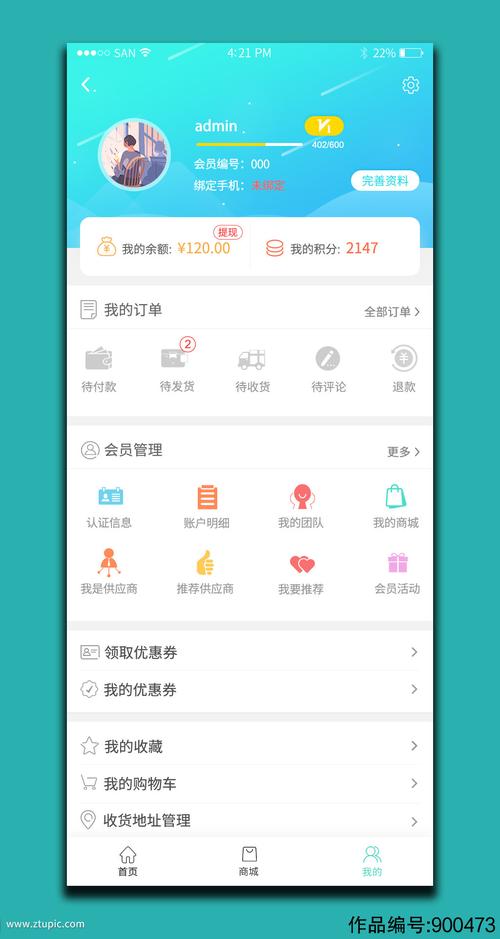
- 现代UI风格: 采用卡片式布局、清晰的图标和柔和的阴影,符合当前主流设计趋势。
- 组件化结构: 将不同功能模块(如个人信息、订单、设置等)拆分为独立的卡片,便于理解和修改。
- 纯HTML/CSS/JS: 无需任何外部框架(如Vue/React),开箱即用,易于二次开发。
- 交互细节: 包含了简单的交互效果,如点击反馈、下拉刷新模拟等,提升用户体验。
最终效果预览
这是一个模拟的手机界面,您可以在浏览器中打开 index.html 文件,然后调整浏览器窗口大小来查看响应式效果。
(图片来源网络,侵删)
模板代码
您可以直接复制以下所有代码,保存为一个 index.html 文件,然后在浏览器中打开即可。
<!DOCTYPE html>
<html lang="zh-CN">
<head>
<meta charset="UTF-8">
<meta name="viewport" content="width=device-width, initial-scale=1.0, maximum-scale=1.0, user-scalable=no">个人中心</title>
<style>
/* --- 全局与基础样式 --- */
* {
margin: 0;
padding: 0;
box-sizing: border-box;
-webkit-tap-highlight-color: transparent; /* 移除点击高亮 */
}
body {
font-family: -apple-system, BlinkMacSystemFont, 'Segoe UI', 'PingFang SC', 'Hiragino Sans GB', 'Microsoft YaHei', 'Helvetica Neue', Helvetica, Arial, sans-serif;
background-color: #f5f5f5;
color: #333;
font-size: 16px;
line-height: 1.5;
}
.container {
max-width: 750px; /* 限制最大宽度,适配大屏 */
margin: 0 auto;
background-color: #fff;
min-height: 100vh;
}
a {
text-decoration: none;
color: inherit;
}
ul {
list-style: none;
}
.flex-center {
display: flex;
align-items: center;
justify-content: center;
}
.flex-between {
display: flex;
align-items: center;
justify-content: space-between;
}
/* --- 头部 --- */
.header {
background-color: #ff6b6b; /* 主题色 */
color: #fff;
padding: 20px;
text-align: center;
position: relative;
}
.header h1 {
font-size: 20px;
font-weight: 500;
}
/* --- 个人信息卡片 --- */
.profile-card {
background-color: #fff;
margin-top: -30px; /* 与头部重叠 */
margin: 0 15px -30px;
padding: 30px 20px 20px;
border-radius: 12px;
box-shadow: 0 4px 12px rgba(0, 0, 0, 0.08);
display: flex;
align-items: center;
}
.avatar {
width: 80px;
height: 80px;
border-radius: 50%;
background-color: #f0f0f0;
margin-right: 20px;
overflow: hidden;
border: 3px solid #fff;
box-shadow: 0 2px 8px rgba(0,0,0,0.1);
}
.avatar img {
width: 100%;
height: 100%;
object-fit: cover;
}
.profile-info h2 {
font-size: 22px;
font-weight: 500;
margin-bottom: 5px;
}
.profile-info p {
font-size: 14px;
color: #999;
}
/* --- 功能列表 --- */
.function-list {
margin-top: 20px;
}
.function-item {
background-color: #fff;
margin-bottom: 10px;
padding: 15px;
display: flex;
align-items: center;
justify-content: space-between;
transition: background-color 0.2s;
}
.function-item:active {
background-color: #f0f0f0;
}
.function-item-left {
display: flex;
align-items: center;
}
.function-icon {
width: 24px;
height: 24px;
margin-right: 15px;
color: #ff6b6b; /* 图标使用主题色 */
}
.function-item-title {
font-size: 16px;
}
.function-item-right {
display: flex;
align-items: center;
}
.function-item-count {
background-color: #ff6b6b;
color: #fff;
font-size: 12px;
padding: 2px 8px;
border-radius: 10px;
margin-right: 10px;
}
.arrow-icon {
color: #ccc;
font-size: 18px;
}
/* --- 订单状态卡片 --- */
.order-card {
background-color: #fff;
margin: 15px;
padding: 20px;
border-radius: 12px;
}
.order-card-header {
display: flex;
align-items: center;
justify-content: space-between;
margin-bottom: 15px;
}
.order-card-title {
font-size: 16px;
font-weight: 500;
}
.order-card-more {
font-size: 14px;
color: #999;
}
.order-status-list {
display: flex;
justify-content: space-around;
text-align: center;
}
.order-status-item {
flex: 1;
}
.order-status-icon {
font-size: 24px;
color: #ff6b6b;
margin-bottom: 5px;
}
.order-status-text {
font-size: 12px;
color: #666;
}
/* --- 底部导航栏 --- */
.bottom-nav {
position: fixed;
bottom: 0;
left: 0;
right: 0;
max-width: 750px;
margin: 0 auto;
background-color: #fff;
box-shadow: 0 -2px 10px rgba(0,0,0,0.05);
display: flex;
justify-content: space-around;
padding: 8px 0;
z-index: 100;
}
.nav-item {
flex: 1;
text-align: center;
padding: 5px;
}
.nav-icon {
font-size: 24px;
color: #999;
margin-bottom: 4px;
}
.nav-item.active .nav-icon {
color: #ff6b6b;
}
.nav-text {
font-size: 12px;
color: #999;
}
.nav-item.active .nav-text {
color: #ff6b6b;
}
/* --- 内容区域,防止被底部导航遮挡 --- */
.main-content {
padding-bottom: 60px; /* 高度与底部导航一致 */
}
/* --- 响应式调整 --- */
@media (min-width: 768px) {
.container {
border: 1px solid #eee;
border-radius: 8px;
box-shadow: 0 0 20px rgba(0,0,0,0.1);
}
}
</style>
</head>
<body>
<div class="container">
<!-- 头部 -->
<header class="header">
<h1>个人中心</h1>
</header>
<!-- 主要内容区 -->
<main class="main-content">
<!-- 个人信息卡片 -->
<section class="profile-card">
<div class="avatar">
<img src="https://i.pravatar.cc/150?u=user1" alt="用户头像">
</div>
<div class="profile-info">
<h2>张三丰</h2>
<p>ID: 168888</p>
</div>
</section>
<!-- 订单状态卡片 -->
<section class="order-card">
<div class="order-card-header flex-between">
<span class="order-card-title">我的订单</span>
<a href="#" class="order-card-more">查看全部 ></a>
</div>
<div class="order-status-list">
<div class="order-status-item">
<div class="order-status-icon">💰</div>
<div class="order-status-text">待付款</div>
</div>
<div class="order-status-item">
<div class="order-status-icon">📦</div>
<div class="order-status-text">待发货</div>
</div>
<div class="order-status-item">
<div class="order-status-icon">🚚</div>
<div class="order-status-text">待收货</div>
</div>
<div class="order-status-item">
<div class="order-status-icon">⭐</div>
<div class="order-status-text">待评价</div>
</div>
<div class="order-status-item">
<div class="order-status-icon">🔄</div>
<div class="order-status-text">退换货</div>
</div>
</div>
</section>
<!-- 功能列表 -->
<section class="function-list">
<a href="#" class="function-item">
<div class="function-item-left">
<span class="function-icon">📍</span>
<span class="function-item-title">收货地址</span>
</div>
<div class="function-item-right">
<span class="function-item-count">3</span>
<span class="arrow-icon">></span>
</div>
</a>
<a href="#" class="function-item">
<div class="function-item-left">
<span class="function-icon">❤️</span>
<span class="function-item-title">我的收藏</span>
</div>
<div class="function-item-right">
<span class="arrow-icon">></span>
</div>
</a>
<a href="#" class="function-item">
<div class="function-item-left">
<span class="function-icon">💬</span>
<span class="function-item-title">我的评价</span>
</div>
<div class="function-item-right">
<span class="arrow-icon">></span>
</div>
</a>
<a href="#" class="function-item">
<div class="function-item-left">
<span class="function-icon">🎫</span>
<span class="function-item-title">优惠券</span>
</div>
<div class="function-item-right">
<span class="function-item-count">5</span>
<span class="arrow-icon">></span>
</div>
</a>
<a href="#" class="function-item">
<div class="function-item-left">
<span class="function-icon">⚙️</span>
<span class="function-item-title">账号与安全</span>
</div>
<div class="function-item-right">
<span class="arrow-icon">></span>
</div>
</a>
<a href="#" class="function-item">
<div class="function-item-left">
<span class="function-icon">❓</span>
<span class="function-item-title">帮助与客服</span>
</div>
<div class="function-item-right">
<span class="arrow-icon">></span>
</div>
</a>
<a href="#" class="function-item">
<div class="function-item-left">
<span class="function-icon">🚪</span>
<span class="function-item-title">退出登录</span>
</div>
<div class="function-item-right">
<span class="arrow-icon">></span>
</div>
</a>
</section>
</main>
<!-- 底部导航栏 -->
<nav class="bottom-nav">
<a href="#" class="nav-item">
<div class="nav-icon">🏠</div>
<div class="nav-text">首页</div>
</a>
<a href="#" class="nav-item">
<div class="nav-icon">🔍</div>
<div class="nav-text">发现</div>
</a>
<a href="#" class="nav-item active">
<div class="nav-icon">👤</div>
<div class="nav-text">我的</div>
</a>
<a href="#" class="nav-item">
<div class="nav-icon">🛒</div>
<div class="nav-text">购物车</div>
</a>
</nav>
</div>
<script>
// --- 简单的交互逻辑 ---
// 1. 处理功能列表项的点击
// 为了演示,我们在这里阻止默认的链接行为,并显示一个提示
document.querySelectorAll('.function-item').forEach(item => {
item.addEventListener('click', function(e) {
// 阻止默认的链接跳转行为
e.preventDefault();
const title = this.querySelector('.function-item-title').textContent;
// 使用一个简单的 alert 来模拟页面跳转或弹窗
// 在实际项目中,这里会使用更友好的模态框或跳转到新页面
if (title === '退出登录') {
if (confirm('确定要退出登录吗?')) {
alert('已退出登录');
}
} else {
// 使用一个更友好的提示,而不是 alert
showTip(`您点击了「${title}」`);
}
});
});
// 2. 创建一个简单的提示函数,替代 alert
function showTip(message) {
// 创建提示元素
const tip = document.createElement('div');
tip.style.cssText = `
position: fixed;
top: 50%;
left: 50%;
transform: translate(-50%, -50%);
background-color: rgba(0, 0, 0, 0.8);
color: white;
padding: 15px 25px;
border-radius: 8px;
font-size: 16px;
z-index: 1000;
animation: fadeIn 0.3s ease;
`;
tip.textContent = message;
// 添加淡入动画
const style = document.createElement('style');
style.textContent = `
@keyframes fadeIn {
from { opacity: 0; }
to { opacity: 1; }
}
`;
document.head.appendChild(style);
document.body.appendChild(tip);
// 2秒后自动移除提示
setTimeout(() => {
tip.style.animation = 'fadeIn 0.3s ease reverse';
setTimeout(() => {
document.body.removeChild(tip);
}, 300);
}, 2000);
}
// 3. 模拟下拉刷新 (高级功能)
// 在移动端,用户从顶部向下拉动页面时,可以触发刷新
let startY = 0;
let isPulling = false;
document.addEventListener('touchstart', function(e) {
// 只在页面顶部时才能下拉刷新
if (window.scrollY === 0) {
startY = e.touches[0].pageY;
isPulling = true;
}
});
document.addEventListener('touchmove', function(e) {
if (!isPulling) return;
const currentY = e.touches[0].pageY;
const pullDistance = currentY - startY;
// 如果下拉距离超过50px,可以显示刷新提示
if (pullDistance > 50) {
showTip('松开刷新...');
// 可以在这里添加更复杂的动画,如下拉箭头等
}
});
document.addEventListener('touchend', function(e) {
if (!isPulling) return;
isPulling = false;
const endY = e.changedTouches[0].pageY;
const pullDistance = endY - startY;
if (pullDistance > 50) {
showTip('正在刷新...');
// 这里执行实际的刷新逻辑,比如重新获取数据
setTimeout(() => {
showTip('刷新完成!');
}, 1500);
}
});
</script>
</body>
</html>
如何使用和二次开发
-
直接使用:
- 将上述所有代码复制并粘贴到一个新的文本文件中。
- 将文件另存为
index.html。 - 用任何现代浏览器(如 Chrome, Firefox, Safari)打开该文件。
- 为了获得最佳体验,请使用浏览器的“开发者工具”(F12)切换到手机模拟模式,或者直接在手机上打开该HTML文件。
-
修改主题色:
- 在
<style>标签中,搜索#ff6b6b,这就是当前的主题色,您可以将其替换为您喜欢的任何颜色代码(如#4a90e2蓝色,#50c878绿色等)。
- 在
-
修改个人信息:
 (图片来源网络,侵删)
- 在
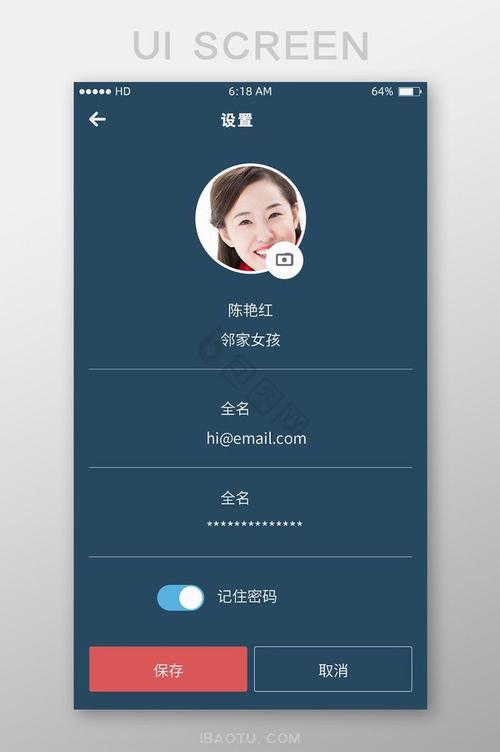
<main class="main-content">部分,找到<h2>张三丰</h2>和<p>ID: 168888</p>,直接修改其中的文本即可。 - 头像图片的链接在
<img src="https://i.pravatar.cc/150?u=user1" alt="用户头像">,您可以将其替换为您自己的图片链接或本地图片路径。
- 在
-
添加/删除功能项:
- 在
<section class="function-list">内部,每个<a class="function-item">就是一个功能项。 - 添加: 复制一个完整的
<a class="function-item">...</a>标签块,修改其中的图标、标题和逻辑。 - 删除: 直接删除不需要的
<a class="function-item">...</a>标签块即可。
- 在
-
集成到实际项目:
- 这个模板是一个静态页面,在实际项目中,您需要通过 JavaScript (如 Fetch API 或 Axios) 从服务器获取用户数据,然后动态地填充到页面中。
fetch('/api/user/profile').then(res => res.json()).then(data => { document.querySelector('.profile-info h2').textContent = data.name; });
这个模板为您提供了一个坚实的基础,您可以在此基础上根据具体需求进行扩展和美化。
(图片来源网络,侵删)


