- 投票展示:在页面上列出所有候选人及其当前得票数。
- 投票功能:用户点击投票按钮,为支持的候选人投票。
- 防重复投票:通过 Session 技术防止同一用户在同一个会话中重复投票。
- 后台管理:一个简单的管理页面,可以查看投票结果、重置投票。
第一部分:数据库设计
我们需要一个数据库来存储候选人信息和投票记录,我们使用最简单的 Access 数据库(.mdb 文件),因为它与 ASP 集成非常方便。
(图片来源网络,侵删)
- 创建数据库:
- 使用 Microsoft Access 创建一个新的空数据库,命名为
vote.mdb。 - 在数据库中创建一个表,命名为
Candidates。 - 为
Candidates表设计以下字段:
- 使用 Microsoft Access 创建一个新的空数据库,命名为
| 字段名 | 数据类型 | 说明 |
|---|---|---|
ID |
自动编号 | 主键,唯一标识每个候选人 |
Name |
文本 | 候选人姓名 |
Photo |
文本 | 候选人照片的文件名(zhangsan.jpg) |
Votes |
数字 | 候选人当前得票数 |
- 插入示例数据:
- 在
Candidates表中插入几条示例数据,方便测试。
- 在
| ID | Name | Photo | Votes |
|---|---|---|---|
| 1 | 张三 | zhangsan.jpg | 15 |
| 2 | 李四 | lisi.jpg | 8 |
| 3 | 王五 | wangwu.jpg | 22 |
将创建好的 vote.mdb 文件放置在你的网站根目录下。
第二部分:ASP 文件代码
我们需要创建三个核心的 ASP 文件。
index.asp (投票主页面)
这是用户访问投票系统时首先看到的页面,用于展示候选人和投票。
<%@ Language=VBScript %>
<%
' 设置编码,防止中文乱码
Session.CodePage = 65001
Response.Charset = "UTF-8"
%>
<!DOCTYPE html>
<html lang="zh-CN">
<head>
    <meta charset="UTF-8">网上人物投票系统</title>
    <style>
        body { font-family: 'Microsoft YaHei', Arial, sans-serif; background-color: #f4f4f4; margin: 0; padding: 20px; }
        .container { max-width: 800px; margin: auto; background: #fff; padding: 20px; border-radius: 8px; box-shadow: 0 0 10px rgba(0,0,0,0.1); }
        h1, h2 { color: #333; text-align: center; }
        .candidate-list { list-style: none; padding: 0; }
        .candidate-item { display: flex; align-items: center; padding: 15px; border: 1px solid #ddd; margin-bottom: 10px; border-radius: 5px; background-color: #fff; }
        .candidate-photo { width: 80px; height: 80px; border-radius: 50%; object-fit: cover; margin-right: 20px; }
        .candidate-info { flex-grow: 1; }
        .candidate-name { font-size: 1.2em; font-weight: bold; margin-bottom: 5px; }
        .vote-count { color: #666; }
        .vote-button { background-color: #007bff; color: white; border: none; padding: 10px 20px; border-radius: 5px; cursor: pointer; font-size: 1em; transition: background-color 0.3s; }
        .vote-button:hover { background-color: #0056b3; }
        .message { text-align: center; padding: 10px; margin: 10px 0; border-radius: 5px; }
        .info { background-color: #d1ecf1; color: #0c5460; border: 1px solid #bee5eb; }
        .warning { background-color: #fff3cd; color: #856404; border: 1px solid #ffeeba; }
    </style>
</head>
<body>
    <div class="container">
        <h1>网上人物投票系统</h1>
        <%
            ' 检查 Session,如果已经投过票,则显示提示信息
            If Session("HasVoted") = True Then
        %>
            <div class="message info">
                您已经在本会话中投过票了,感谢您的参与!
            </div>
        <%
            End If
        %>
        <%
            ' --- 数据库连接 ---
            Dim conn, connStr, rs, sql
            connStr = "Provider=Microsoft.Jet.OLEDB.4.0;Data Source=" & Server.MapPath("vote.mdb")
            Set conn = Server.CreateObject("ADODB.Connection")
            conn.Open connStr
            ' --- 读取候选人信息 ---
            sql = "SELECT * FROM Candidates ORDER BY ID"
            Set rs = Server.CreateObject("ADODB.Recordset")
            rs.Open sql, conn, 1, 1 ' 1,1 表示只读,向前游标
            ' --- 显示候选人列表 ---
            If Not rs.EOF Then
        %>
                <h2>请选择您支持的候选人</h2>
                <ul class="candidate-list">
        <%
                Do While Not rs.EOF
        %>
                    <li class="candidate-item">
                        <img src="images/<%= rs("Photo") %>" alt="<%= rs("Name") %>" class="candidate-photo">
                        <div class="candidate-info">
                            <div class="candidate-name"><%= rs("Name") %></div>
                            <div class="vote-count">当前票数: <%= rs("Votes") %></div>
                        </div>
                        <form action="vote.asp" method="post">
                            <input type="hidden" name="candidate_id" value="<%= rs("ID") %>">
                            <button type="submit" class="vote-button" <%= Session("HasVoted") = True Then "disabled" "" %>>投票</button>
                        </form>
                    </li>
        <%
                    rs.MoveNext
                Loop
        %>
                </ul>
        <%
            Else
        %>
                <p>暂无候选人信息。</p>
        <%
            End If
            ' --- 关闭记录集和连接 ---
            rs.Close
            Set rs = Nothing
            conn.Close
            Set conn = Nothing
        %>
    </div>
</body>
</html>
vote.asp (处理投票逻辑的页面)
这个页面接收 index.asp 发来的投票请求,更新数据库,并重定向回首页。

(图片来源网络,侵删)
<%@ Language=VBScript %>
<%
' 设置编码
Session.CodePage = 65001
Response.Charset = "UTF-8"
' 检查用户是否已经投过票 (Session防重复投票)
If Session("HasVoted") = True Then
    ' 如果已投过票,直接重定向回首页,不处理投票
    Response.Redirect("index.asp")
    Response.End
End If
' 获取前端传来的候选人ID
Dim candidateId
candidateId = Request.Form("candidate_id")
' 验证ID是否有效
If IsNumeric(candidateId) And candidateId <> "" Then
    ' --- 数据库连接 ---
    Dim conn, connStr, sql, affectedRows
    connStr = "Provider=Microsoft.Jet.OLEDB.4.0;Data Source=" & Server.MapPath("vote.mdb")
    Set conn = Server.CreateObject("ADODB.Connection")
    conn.Open connStr
    ' --- 更新票数 ---
    ' 使用 SQL 的 UPDATE 语句,将对应ID的候选人的票数加1
    sql = "UPDATE Candidates SET Votes = Votes + 1 WHERE ID = " & candidateId
    conn.Execute sql, affectedRows
    ' --- 关闭连接 ---
    conn.Close
    Set conn = Nothing
    ' 标记用户已投票
    Session("HasVoted") = True
    ' 重定向回首页,并显示成功信息
    Response.Redirect("index.asp")
Else
    ' 如果ID无效,重定向回首页
    Response.Redirect("index.asp")
End If
%>
admin.asp (后台管理页面)
这个页面只有管理员可以访问(实际项目中需要更复杂的权限验证,这里简化处理),用于查看和重置投票。
<%@ Language=VBScript %>
<%
' 设置编码
Session.CodePage = 65001
Response.Charset = "UTF-8"
' --- 简单的权限验证 ---
' 在实际应用中,这里应该检查用户名和密码是否正确
' 这里我们用一个简单的Session来模拟已登录状态
If Session("IsAdmin") <> "True" Then
    ' 如果不是管理员,跳转到登录页面或提示无权限
    Response.Write "<h1>访问被拒绝</h1><p>您没有权限访问此页面。</p>"
    Response.End
End If
' 处理重置投票的请求
If Request.Form("action") = "reset" Then
    Dim conn, connStr, sql
    connStr = "Provider=Microsoft.Jet.OLEDB.4.0;Data Source=" & Server.MapPath("vote.mdb")
    Set conn = Server.CreateObject("ADODB.Connection")
    conn.Open connStr
    ' 将所有候选人的票数重置为0
    sql = "UPDATE Candidates SET Votes = 0"
    conn.Execute sql
    conn.Close
    Set conn = Nothing
    ' 重置后重定向回管理页面,并显示成功信息
    Response.Redirect("admin.asp?reset=success")
End If
%>
<!DOCTYPE html>
<html lang="zh-CN">
<head>
    <meta charset="UTF-8">投票系统 - 后台管理</title>
    <style>
        body { font-family: 'Microsoft YaHei', Arial, sans-serif; background-color: #f4f4f4; margin: 0; padding: 20px; }
        .container { max-width: 800px; margin: auto; background: #fff; padding: 20px; border-radius: 8px; box-shadow: 0 0 10px rgba(0,0,0,0.1); }
        h1, h2 { color: #333; text-align: center; }
        table { width: 100%; border-collapse: collapse; margin-top: 20px; }
        th, td { padding: 12px; border: 1px solid #ddd; text-align: left; }
        th { background-color: #f2f2f2; }
        .reset-button { background-color: #dc3545; color: white; border: none; padding: 10px 20px; border-radius: 5px; cursor: pointer; }
        .reset-button:hover { background-color: #c82333; }
        .logout-button { background-color: #6c757d; color: white; border: none; padding: 8px 15px; border-radius: 5px; cursor: pointer; float: right; }
        .message { text-align: center; padding: 10px; margin: 10px 0; border-radius: 5px; background-color: #d4edda; color: #155724; border: 1px solid #c3e6cb; }
    </style>
</head>
<body>
    <div class="container">
        <h1>后台管理
            <a href="logout.asp" class="logout-button">退出登录</a>
        </h1>
        <%
            ' 显示重置成功的消息
            If Request.QueryString("reset") = "success" Then
        %>
                <div class="message">
                    投票数据已成功重置!
                </div>
        <%
            End If
        %>
        <h2>当前投票结果</h2>
        <table>
            <thead>
                <tr>
                    <th>ID</th>
                    <th>姓名</th>
                    <th>票数</th>
                </tr>
            </thead>
            <tbody>
                <%
                    ' --- 数据库连接和读取数据 ---
                    Dim conn, connStr, rs, sql
                    connStr = "Provider=Microsoft.Jet.OLEDB.4.0;Data Source=" & Server.MapPath("vote.mdb")
                    Set conn = Server.CreateObject("ADODB.Connection")
                    conn.Open connStr
                    sql = "SELECT * FROM Candidates ORDER BY Votes DESC"
                    Set rs = Server.CreateObject("ADODB.Recordset")
                    rs.Open sql, conn, 1, 1
                    If Not rs.EOF Then
                        Do While Not rs.EOF
                %>
                            <tr>
                                <td><%= rs("ID") %></td>
                                <td><%= rs("Name") %></td>
                                <td><%= rs("Votes") %></td>
                            </tr>
                <%
                            rs.MoveNext
                        Loop
                    Else
                %>
                        <tr>
                            <td colspan="3">暂无数据</td>
                        </tr>
                <%
                    End If
                    rs.Close
                    Set rs = Nothing
                    conn.Close
                    Set conn = Nothing
                %>
            </tbody>
        </table>
        <h2>管理操作</h2>
        <form action="admin.asp" method="post" onsubmit="return confirm('确定要重置所有投票数据吗?此操作不可撤销!');">
            <input type="hidden" name="action" value="reset">
            <button type="submit" class="reset-button">重置所有投票</button>
        </form>
    </div>
</body>
</html>
login.asp (管理员登录页面)
为了演示 admin.asp 的功能,我们添加一个简单的登录页面。
<%@ Language=VBScript %>
<%
Session.CodePage = 65001
Response.Charset = "UTF-8"
' 如果已经登录,直接跳转到管理页面
If Session("IsAdmin") = "True" Then
    Response.Redirect("admin.asp")
End If
' 处理登录逻辑
If Request.ServerVariables("REQUEST_METHOD") = "POST" Then
    Dim username, password
    username = Request.Form("username")
    password = Request.Form("password")
    ' 这里是硬编码的用户名和密码,实际项目中应该从数据库或配置文件中读取
    If username = "admin" And password = "password" Then
        Session("IsAdmin") = "True"
        Response.Redirect("admin.asp")
    Else
        Response.Write "<p style='color:red;'>用户名或密码错误!</p>"
    End If
End If
%>
<!DOCTYPE html>
<html lang="zh-CN">
<head>
    <meta charset="UTF-8">管理员登录</title>
    <style>
        body { font-family: 'Microsoft YaHei', Arial, sans-serif; background-color: #f4f4f4; display: flex; justify-content: center; align-items: center; height: 100vh; margin: 0; }
        .login-form { background: #fff; padding: 30px; border-radius: 8px; box-shadow: 0 0 10px rgba(0,0,0,0.1); width: 300px; }
        h2 { text-align: center; color: #333; }
        input[type="text"], input[type="password"] { width: 100%; padding: 10px; margin-bottom: 15px; border: 1px solid #ddd; border-radius: 4px; box-sizing: border-box; }
        input[type="submit"] { width: 100%; padding: 10px; background-color: #007bff; color: white; border: none; border-radius: 4px; cursor: pointer; font-size: 1em; }
    </style>
</head>
<body>
    <div class="login-form">
        <h2>管理员登录</h2>
        <form action="login.asp" method="post">
            <input type="text" name="username" placeholder="用户名" required>
            <input type="password" name="password" placeholder="密码" required>
            <input type="submit" value="登录">
        </form>
    </div>
</body>
</html>
logout.asp (管理员退出页面)
<%@ Language=VBScript %>
<%
Session.CodePage = 65001
Response.Charset = "UTF-8"
' 清除管理员Session
Session("IsAdmin") = ""
Session.Abandon
' 重定向到登录页面
Response.Redirect("login.asp")
%>
第三部分:文件结构和图片
-
文件结构: 将所有文件放在你的网站根目录下(
C:\inetpub\wwwroot\vote_system\)。vote_system/ ├── index.asp ├── vote.asp ├── admin.asp ├── login.asp ├── logout.asp ├── vote.mdb └── images/ ├── zhangsan.jpg ├── lisi.jpg └── wangwu.jpg -
图片文件夹: 创建一个名为
images的文件夹,并将候选人的照片放入其中,文件名必须与数据库Candidates表中的Photo字段值完全一致。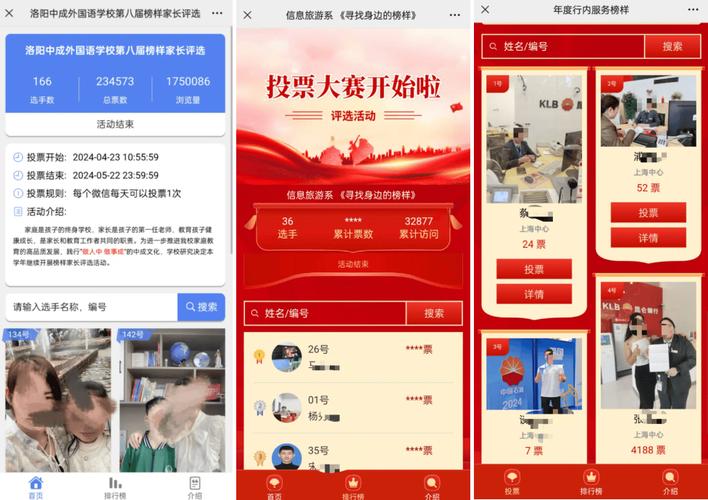 (图片来源网络,侵删)
第四部分:部署和测试
-
安装IIS:
- 如果你使用的是 Windows 10/11,请确保已安装 "Internet Information Services (IIS)"。
- 可以通过 "控制面板" -> "程序" -> "启用或关闭 Windows 功能" 来安装。
-
配置网站:
- 打开 IIS 管理器。
- 在左侧的 "连接" 窗格中,右键点击 "网站",选择 "添加网站..."。
- 网站名称:填写一个你喜欢的名字,如
VoteSystem。 - 物理路径:选择你刚才创建的
vote_system文件夹路径。 - 端口:可以使用默认的 80 端口,或者一个未被占用的其他端口(如 8080)。
- 点击 "确定"。
-
设置默认文档:
- 在 IIS 管理器中,选中你刚刚创建的
VoteSystem网站。 - 在中间的 "操作" 窗格中,双击 "默认文档"。
- 在右侧列表中,确保
index.asp存在,如果不存在,点击 "添加...",输入index.asp并确定,然后可以拖动它到列表的最顶部。
- 在 IIS 管理器中,选中你刚刚创建的
-
启动网站:
- 选中
VoteSystem网站,在 "操作" 窗格中点击 "启动"。
- 选中
-
测试:
- 打开你的浏览器,在地址栏输入
http://localhost:端口号/(http://localhost:8080/)。 - 你应该能看到投票主页面
index.asp。 - 尝试为某个候选人投票,你会发现按钮变为禁用状态,且页面顶部提示已投票,关闭浏览器再重新打开,Session失效,又可以投票了(这是正常的,因为Session是基于浏览器的)。
- 访问
http://localhost:端口号/login.asp,使用用户名admin和密码password登录,进入管理页面查看和重置投票。
- 打开你的浏览器,在地址栏输入
总结与扩展
这个模板是一个功能完整且结构清晰的 ASP 投票系统。
可以进一步扩展的方向:
- 更安全的防刷票:除了 Session,还可以将用户的 IP 地址或 Cookie 存储在数据库中,限制同一 IP 或 Cookie 在一段时间内(如 24 小时)只能投一次票。
- 更完善的权限管理:
admin.asp的登录非常简单,可以改为从数据库中验证管理员账号密码。 - 更丰富的功能:增加候选人信息的增、删、改功能;增加图表展示(如饼图)来可视化投票结果;增加投票截止日期等。
- 代码优化:可以将数据库连接字符串等配置信息单独放在一个
config.asp文件中,方便管理和修改。
希望这个详细的模板能帮助你快速构建一个 ASP 投票系统!


