- HTML结构:页面的骨架。
- CSS样式:页面的外观和布局。
- 响应式设计:在手机、平板和电脑上都能良好显示。
您可以直接复制下面的代码,保存为 .html 文件,然后用浏览器打开即可。
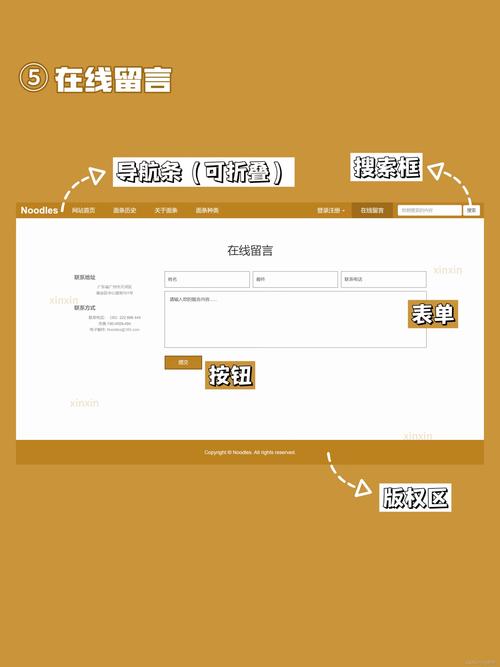
(图片来源网络,侵删)
模板1:个人作品集 / 博客主页
这是一个简洁、现代的单页模板,非常适合展示您的个人作品、博客或作为个人主页。
特点:
- 全屏的欢迎区域
- 关于我简介
- 作品展示网格
- 联系方式
代码:
<!DOCTYPE html>
<html lang="zh-CN">
<head>
<meta charset="UTF-8">
<meta name="viewport" content="width=device-width, initial-scale=1.0">我的个人主页</title>
<style>
/* --- 全局样式 --- */
* {
margin: 0;
padding: 0;
box-sizing: border-box;
font-family: 'Arial', sans-serif;
}
body {
line-height: 1.6;
color: #333;
background-color: #f4f4f4;
}
.container {
width: 90%;
max-width: 1200px;
margin: 0 auto;
padding: 20px;
}
h1, h2 {
margin-bottom: 20px;
color: #0056b3;
}
/* --- 导航栏 --- */
.navbar {
background: #fff;
padding: 1rem 2rem;
box-shadow: 0 2px 5px rgba(0,0,0,0.1);
position: sticky;
top: 0;
z-index: 100;
}
.navbar ul {
list-style: none;
display: flex;
justify-content: center;
}
.navbar a {
text-decoration: none;
color: #333;
margin: 0 20px;
font-weight: bold;
transition: color 0.3s;
}
.navbar a:hover {
color: #0056b3;
}
/* --- 英雄区域 --- */
.hero {
background: linear-gradient(rgba(0, 0, 0, 0.5), rgba(0, 0, 0, 0.5)), url('https://images.unsplash.com/photo-1557804506-669a67965ba0?ixlib=rb-4.0.3&ixid=M3wxMjA3fDB8MHxwaG90by1wYWdlfHx8fGVufDB8fHx8fA%3D%3D&auto=format&fit=crop&w=1770&q=80') no-repeat center center/cover;
height: 80vh;
display: flex;
justify-content: center;
align-items: center;
text-align: center;
color: white;
}
.hero-content h1 {
font-size: 3.5rem;
margin-bottom: 1rem;
}
.hero-content p {
font-size: 1.2rem;
margin-bottom: 2rem;
}
.btn {
display: inline-block;
background: #0056b3;
color: #fff;
padding: 12px 25px;
border: none;
border-radius: 5px;
text-decoration: none;
font-weight: bold;
transition: background 0.3s;
}
.btn:hover {
background: #004494;
}
/* --- 内容区域 --- */
.section {
padding: 60px 0;
}
.section-title {
text-align: center;
font-size: 2.5rem;
margin-bottom: 40px;
}
/* 关于我 */
.about {
background: #fff;
border-radius: 10px;
padding: 40px;
box-shadow: 0 5px 15px rgba(0,0,0,0.1);
}
/* 作品集 */
.portfolio-grid {
display: grid;
grid-template-columns: repeat(auto-fit, minmax(300px, 1fr));
gap: 20px;
}
.portfolio-item {
background: #fff;
border-radius: 10px;
overflow: hidden;
box-shadow: 0 5px 15px rgba(0,0,0,0.1);
transition: transform 0.3s;
}
.portfolio-item:hover {
transform: translateY(-10px);
}
.portfolio-item img {
width: 100%;
height: 200px;
object-fit: cover;
}
.portfolio-content {
padding: 20px;
}
/* 联系我 */
.contact {
background: #fff;
border-radius: 10px;
padding: 40px;
box-shadow: 0 5px 15px rgba(0,0,0,0.1);
text-align: center;
}
.contact p {
margin-bottom: 10px;
}
.social-links a {
display: inline-block;
margin: 0 15px;
color: #0056b3;
font-size: 1.5rem;
text-decoration: none;
}
/* 页脚 */
footer {
text-align: center;
padding: 20px;
background: #333;
color: #fff;
margin-top: 40px;
}
/* --- 响应式设计 --- */
@media (max-width: 768px) {
.hero-content h1 {
font-size: 2.5rem;
}
.navbar ul {
flex-direction: column;
text-align: center;
}
.navbar a {
margin: 10px 0;
}
}
</style>
</head>
<body>
<!-- 导航栏 -->
<nav class="navbar">
<ul>
<li><a href="#home">首页</a></li>
<li><a href="#about">关于我</a></li>
<li><a href="#portfolio">作品集</a></li>
<li><a href="#contact">联系我</a></li>
</ul>
</nav>
<!-- 英雄区域 -->
<section id="home" class="hero">
<div class="hero-content">
<h1>你好,我是张三</h1>
<p>一名充满热情的前端开发与设计师</p>
<a href="#portfolio" class="btn">查看我的作品</a>
</div>
</section>
<div class="container">
<!-- 关于我 -->
<section id="about" class="section">
<h2 class="section-title">关于我</h2>
<div class="about">
<p>我是一名热爱技术与创意的Web开发者,专注于创建美观、高效且用户友好的网站,我擅长HTML, CSS, JavaScript以及一些现代前端框架,我相信好的设计不仅仅是外观,更是用户体验的体现。</p>
</div>
</section>
<!-- 作品集 -->
<section id="portfolio" class="section">
<h2 class="section-title">我的作品</h2>
<div class="portfolio-grid">
<div class="portfolio-item">
<img src="https://images.unsplash.com/photo-1557804506-669a67965ba0?ixlib=rb-4.0.3&ixid=M3wxMjA3fDB8MHxwaG90by1wYWdlfHx8fGVufDB8fHx8fA%3D%3D&auto=format&fit=crop&w=600&q=80" alt="项目1">
<div class="portfolio-content">
<h3>电子商务网站</h3>
<p>一个功能完整的在线购物平台,包含商品展示、购物车和支付功能。</p>
</div>
</div>
<div class="portfolio-item">
<img src="https://images.unsplash.com/photo-1557804506-669a67965ba0?ixlib=rb-4.0.3&ixid=M3wxMjA3fDB8MHxwaG90by1wYWdlfHx8fGVufDB8fHx8fA%3D%3D&auto=format&fit=crop&w=600&q=80" alt="项目2">
<div class="portfolio-content">
<h3>移动应用UI设计</h3>
<p>为一款健身应用设计的用户界面,注重简洁和易用性。</p>
</div>
</div>
<div class="portfolio-item">
<img src="https://images.unsplash.com/photo-1557804506-669a67965ba0?ixlib=rb-4.0.3&ixid=M3wxMjA3fDB8MHxwaG90by1wYWdlfHx8fGVufDB8fHx8fA%3D%3D&auto=format&fit=crop&w=600&q=80" alt="项目3">
<div class="portfolio-content">
<h3>企业官网</h3>
<p>为一家科技公司打造的响应式官方网站,提升品牌形象。</p>
</div>
</div>
</div>
</section>
<!-- 联系我 -->
<section id="contact" class="section">
<h2 class="section-title">联系我</h2>
<div class="contact">
<p>如果您对我的作品感兴趣,或者有任何合作意向,欢迎随时联系我!</p>
<p>邮箱: your.email@example.com</p>
<p>电话: 138-xxxx-xxxx</p>
<div class="social-links">
<a href="#">[图标]</a>
<a href="#">[图标]</a>
<a href="#">[图标]</a>
</div>
</div>
</section>
</div>
<!-- 页脚 -->
<footer>
<p>© 2025 我的个人主页. 保留所有权利.</p>
</footer>
</body>
</html>
模板2:企业产品介绍页
这个模板适合用来展示一款产品或服务,重点突出其核心功能和优势。
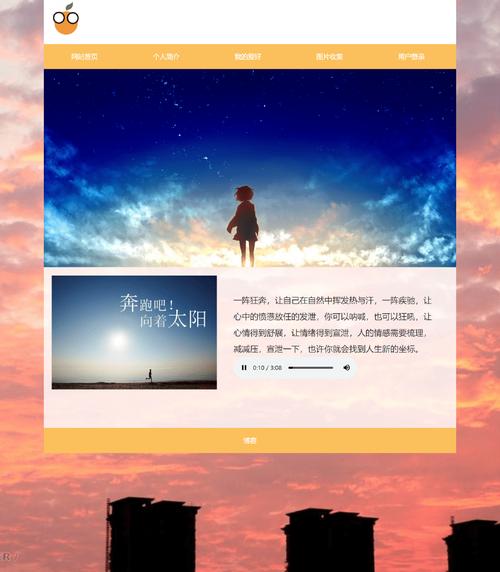
(图片来源网络,侵删)
特点:
- 醒目的产品标题和介绍
- 功能特性列表
- CTA(行动号召)按钮
- 简洁的页脚
代码:
<!DOCTYPE html>
<html lang="zh-CN">
<head>
<meta charset="UTF-8">
<meta name="viewport" content="width=device-width, initial-scale=1.0">产品名称 - 改变您的工作方式</title>
<style>
/* --- 全局样式 --- */
* {
margin: 0;
padding: 0;
box-sizing: border-box;
font-family: 'Helvetica Neue', Arial, sans-serif;
}
body {
line-height: 1.6;
color: #333;
background-color: #fdfdfd;
}
.container {
width: 90%;
max-width: 1100px;
margin: 0 auto;
padding: 40px 20px;
}
h1, h2 {
margin-bottom: 20px;
color: #2c3e50;
}
/* --- 头部 --- */
header {
text-align: center;
padding: 60px 0;
background: linear-gradient(135deg, #667eea 0%, #764ba2 100%);
color: white;
}
header h1 {
font-size: 3rem;
margin-bottom: 15px;
}
header p {
font-size: 1.2rem;
max-width: 600px;
margin: 0 auto;
}
/* --- 主要内容 --- */
main {
padding: 60px 0;
}
.features {
display: grid;
grid-template-columns: repeat(auto-fit, minmax(300px, 1fr));
gap: 40px;
margin-top: 50px;
}
.feature-card {
background: #fff;
padding: 30px;
border-radius: 10px;
box-shadow: 0 4px 15px rgba(0,0,0,0.08);
text-align: center;
transition: transform 0.3s ease;
}
.feature-card:hover {
transform: translateY(-5px);
}
.feature-icon {
font-size: 3rem;
margin-bottom: 20px;
}
.feature-card h3 {
font-size: 1.5rem;
margin-bottom: 15px;
color: #2c3e50;
}
.cta-section {
text-align: center;
background: #f8f9fa;
padding: 60px 20px;
border-radius: 10px;
margin-top: 60px;
}
.cta-section h2 {
font-size: 2.2rem;
margin-bottom: 20px;
}
.btn-primary {
display: inline-block;
background: #667eea;
color: white;
padding: 15px 40px;
border: none;
border-radius: 50px;
text-decoration: none;
font-weight: bold;
font-size: 1.1rem;
transition: background 0.3s, transform 0.2s;
}
.btn-primary:hover {
background: #5a67d8;
transform: scale(1.05);
}
/* --- 页脚 --- */
footer {
text-align: center;
padding: 30px;
background: #2c3e50;
color: #ecf0f1;
}
</style>
</head>
<body>
<header>
<div class="container">
<h1>智能任务管理器</h1>
<p>一款简单、高效、美观的任务管理工具,帮助您和您的团队轻松应对每一个挑战。</p>
</div>
</header>
<main>
<div class="container">
<h2>为什么选择我们?</h2>
<div class="features">
<div class="feature-card">
<div class="feature-icon">🚀</div>
<h3>极速高效</h3>
<p>优化的算法和简洁的界面,让您专注于任务本身,而不是工具本身。</p>
</div>
<div class="feature-card">
<div class="feature-icon">👥</div>
<h3>团队协作</h3>
<p>实时同步,任务分配清晰,让团队沟通零障碍,项目进度一目了然。</p>
</div>
<div class="feature-card">
<div class="feature-icon">🔒</div>
<h3>安全可靠</h3>
<p>采用银行级加密技术,保障您的数据安全,让您用得放心。</p>
</div>
</div>
<section class="cta-section">
<h2>准备好提升您的工作效率了吗?</h2>
<p>立即免费注册,开启高效工作新篇章。</p>
<a href="#" class="btn-primary">免费开始</a>
</section>
</div>
</main>
<footer>
<p>© 2025 智能任务管理器. 保留所有权利.</p>
</footer>
</body>
</html>
如何使用这些模板?
- 复制代码:选择您喜欢的模板,将全部代码复制下来。
- 创建文件:
- 在您的电脑上新建一个文本文档。
- 将复制的代码粘贴进去。
- 将文件名修改为
index.html或portfolio.html等您喜欢的名字,注意后缀必须是.html。
- :
- 用记事本、VS Code、Sublime Text 等任何代码编辑器打开这个
.html文件。 - 修改其中的文本,我的个人主页”、“张三”、“your.email@example.com”等,换成您自己的信息。
- 如果需要,也可以替换图片链接(URL)为您自己的图片。
- 用记事本、VS Code、Sublime Text 等任何代码编辑器打开这个
- 预览和上传:
- 保存文件后,直接用 Chrome、Firefox 等浏览器打开它,就能看到效果。
- 如果您想让别人在网上看到,可以将这个文件上传到任何支持静态文件的网站托管服务(如 GitHub Pages, Netlify, Vercel 等)。
希望这些模板能帮到您!如果您有更具体的需求,也可以告诉我,我可以帮您定制。
(图片来源网络,侵删)


