功能特点
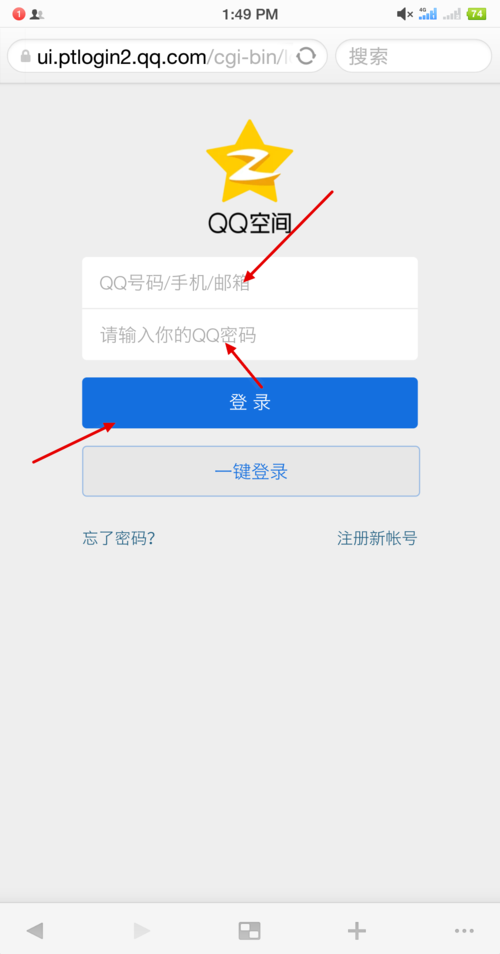
- UI还原度高: 模仿了QQ登录的经典布局,包括Logo、输入框、登录按钮、二维码登录、注册和找回密码链接。
- 交互体验:
- 输入框获得焦点时,边框高亮并显示“清除”按钮。
- 点击“清除”按钮可以清空输入内容。
- “记住密码”和“自动登录”可以多选。
- 可以在“账号密码登录”和“二维码登录”之间切换。
- 使用了平滑的过渡动画。
- 响应式设计: 在小屏幕设备(如手机)上,布局会自动调整,提供更好的移动端体验。
- 代码结构清晰: 使用了语义化的HTML5标签,CSS和JavaScript代码分离,易于理解和修改。
HTML 源码
你可以直接将以下代码复制到一个 .html 文件中,然后用浏览器打开即可看到效果。
(图片来源网络,侵删)
<!DOCTYPE html>
<html lang="zh-CN">
<head>
    <meta charset="UTF-8">
    <meta name="viewport" content="width=device-width, initial-scale=1.0">仿QQ快速登录</title>
    <style>
        /* --- 全局样式和变量 --- */
        :root {
            --qq-primary-color: #12b7f5;
            --qq-hover-color: #0da5e6;
            --qq-bg-color: #f4f5f7;
            --qq-container-bg: #ffffff;
            --qq-text-color: #333333;
            --qq-text-light-color: #999999;
            --qq-border-color: #e5e5e5;
            --input-height: 42px;
            --border-radius: 4px;
        }
        * {
            margin: 0;
            padding: 0;
            box-sizing: border-box;
        }
        body {
            font-family: -apple-system, BlinkMacSystemFont, "Segoe UI", "PingFang SC", "Hiragino Sans GB", "Microsoft YaHei", "Helvetica Neue", Helvetica, Arial, sans-serif;
            background-color: var(--qq-bg-color);
            color: var(--qq-text-color);
            display: flex;
            justify-content: center;
            align-items: center;
            min-height: 100vh;
            padding: 20px;
        }
        /* --- 登录容器 --- */
        .login-container {
            background-color: var(--qq-container-bg);
            border-radius: 10px;
            box-shadow: 0 0 20px rgba(0, 0, 0, 0.08);
            width: 100%;
            max-width: 400px;
            overflow: hidden;
        }
        /* --- Logo区域 --- */
        .logo-section {
            text-align: center;
            padding: 30px 0 20px;
        }
        .qq-logo {
            width: 100px;
            height: 100px;
            background-color: var(--qq-primary-color);
            border-radius: 50%;
            display: inline-flex;
            justify-content: center;
            align-items: center;
            color: white;
            font-size: 60px;
            font-weight: bold;
            margin-bottom: 10px;
        }
        .login-title {
            font-size: 24px;
            font-weight: 300;
        }
        /* --- 登录表单区域 --- */
        .login-form-section {
            padding: 0 30px 30px;
        }
        /* 登录方式切换 */
        .login-method-switch {
            display: flex;
            justify-content: center;
            margin-bottom: 25px;
            border-bottom: 1px solid var(--qq-border-color);
        }
        .login-method-btn {
            background: none;
            border: none;
            padding: 10px 25px;
            font-size: 16px;
            color: var(--qq-text-light-color);
            cursor: pointer;
            position: relative;
            transition: color 0.3s;
        }
        .login-method-btn.active {
            color: var(--qq-primary-color);
            font-weight: 500;
        }
        .login-method-btn.active::after {
            content: '';
            position: absolute;
            bottom: -1px;
            left: 0;
            width: 100%;
            height: 2px;
            background-color: var(--qq-primary-color);
            animation: slideIn 0.3s ease;
        }
        @keyframes slideIn {
            from { width: 0; }
            to { width: 100%; }
        }
        /* 表单内容 */
        .form-content {
            display: none;
        }
        .form-content.active {
            display: block;
            animation: fadeIn 0.3s ease;
        }
        @keyframes fadeIn {
            from { opacity: 0; }
            to { opacity: 1; }
        }
        /* 输入框组 */
        .input-group {
            position: relative;
            margin-bottom: 20px;
        }
        .input-icon {
            position: absolute;
            left: 12px;
            top: 50%;
            transform: translateY(-50%);
            color: var(--qq-text-light-color);
        }
        .login-input {
            width: 100%;
            height: var(--input-height);
            padding: 0 12px 0 40px;
            border: 1px solid var(--qq-border-color);
            border-radius: var(--border-radius);
            font-size: 16px;
            transition: all 0.3s;
            outline: none;
        }
        .login-input:focus {
            border-color: var(--qq-primary-color);
        }
        /* 清除按钮 */
        .clear-btn {
            position: absolute;
            right: 12px;
            top: 50%;
            transform: translateY(-50%);
            background: none;
            border: none;
            color: var(--qq-text-light-color);
            cursor: pointer;
            font-size: 16px;
            display: none;
        }
        .login-input:not(:placeholder-shown) ~ .clear-btn {
            display: block;
        }
        /* 记住密码和自动登录 */
        .options-group {
            display: flex;
            justify-content: space-between;
            align-items: center;
            margin-bottom: 25px;
        }
        .checkbox-group {
            display: flex;
            align-items: center;
        }
        .checkbox-group input[type="checkbox"] {
            width: 16px;
            height: 16px;
            margin-right: 6px;
            cursor: pointer;
        }
        .checkbox-group label {
            cursor: pointer;
            font-size: 14px;
            color: var(--qq-text-light-color);
        }
        .forgot-password {
            font-size: 14px;
            color: var(--qq-text-light-color);
            text-decoration: none;
            transition: color 0.3s;
        }
        .forgot-password:hover {
            color: var(--qq-primary-color);
        }
        /* 登录按钮 */
        .login-btn {
            width: 100%;
            height: var(--input-height);
            background-color: var(--qq-primary-color);
            color: white;
            border: none;
            border-radius: var(--border-radius);
            font-size: 16px;
            font-weight: 500;
            cursor: pointer;
            transition: background-color 0.3s;
        }
        .login-btn:hover {
            background-color: var(--qq-hover-color);
        }
        /* 注册和其他链接 */
        .register-links {
            text-align: center;
            margin-top: 20px;
            font-size: 14px;
            color: var(--qq-text-light-color);
        }
        .register-links a {
            color: var(--qq-primary-color);
            text-decoration: none;
            margin: 0 5px;
            transition: opacity 0.3s;
        }
        .register-links a:hover {
            opacity: 0.8;
            text-decoration: underline;
        }
        /* --- 二维码登录区域 --- */
        .qr-login-container {
            display: flex;
            flex-direction: column;
            align-items: center;
            padding: 20px 0;
        }
        .qr-code-box {
            width: 180px;
            height: 180px;
            background-color: #f0f0f0;
            border: 1px solid var(--qq-border-color);
            border-radius: var(--border-radius);
            margin-bottom: 15px;
            display: flex;
            justify-content: center;
            align-items: center;
            font-size: 14px;
            color: var(--qq-text-light-color);
        }
        .qr-tips {
            font-size: 14px;
            color: var(--qq-text-light-color);
            text-align: center;
            margin-bottom: 10px;
        }
        .qr-switch-btn {
            font-size: 14px;
            color: var(--qq-primary-color);
            background: none;
            border: none;
            cursor: pointer;
            text-decoration: underline;
        }
        /* --- 响应式设计 --- */
        @media (max-width: 480px) {
            body {
                padding: 10px;
            }
            .login-container {
                border-radius: 0;
                max-width: 100%;
            }
            .logo-section {
                padding: 20px 0 15px;
            }
            .qq-logo {
                width: 80px;
                height: 80px;
                font-size: 50px;
            }
            .login-form-section {
                padding: 0 20px 20px;
            }
        }
    </style>
</head>
<body>
    <main class="login-container">
        <!-- Logo 区域 -->
        <header class="logo-section">
            <div class="qq-logo">Q</div>
            <h1 class="login-title">快速登录</h1>
        </header>
        <!-- 登录表单区域 -->
        <section class="login-form-section">
            <!-- 登录方式切换 -->
            <div class="login-method-switch">
                <button class="login-method-btn active" data-method="account">账号密码登录</button>
                <button class="login-method-btn" data-method="qr">二维码登录</button>
            </div>
            <!-- 账号密码登录表单 -->
            <div id="account-login" class="form-content active">
                <form id="loginForm">
                    <div class="input-group">
                        <span class="input-icon">👤</span>
                        <input
                            type="text"
                            class="login-input"
                            id="username"
                            placeholder="QQ号/手机号/邮箱"
                            autocomplete="username"
                        >
                        <button type="button" class="clear-btn" id="clearUsername">×</button>
                    </div>
                    <div class="input-group">
                        <span class="input-icon">🔒</span>
                        <input
                            type="password"
                            class="login-input"
                            id="password"
                            placeholder="密码"
                            autocomplete="current-password"
                        >
                        <button type="button" class="clear-btn" id="clearPassword">×</button>
                    </div>
                    <div class="options-group">
                        <div class="checkbox-group">
                            <input type="checkbox" id="remember" name="remember">
                            <label for="remember">记住密码</label>
                        </div>
                        <a href="#" class="forgot-password">忘记密码?</a>
                    </div>
                    <button type="submit" class="login-btn">登录</button>
                </form>
            </div>
            <!-- 二维码登录表单 -->
            <div id="qr-login" class="form-content">
                <div class="qr-login-container">
                    <div class="qr-code-box">
                        <span>二维码加载中...</span>
                    </div>
                    <p class="qr-tips">使用手机QQ扫描二维码登录</p>
                    <button class="qr-switch-btn">切换到账号密码登录</button>
                </div>
            </div>
            <!-- 注册和帮助链接 -->
            <div class="register-links">
                <a href="#">新用户注册</a> |
                <a href="#">遇到问题?</a>
            </div>
        </section>
    </main>
    <script>
        document.addEventListener('DOMContentLoaded', function () {
            // --- 登录方式切换 ---
            const methodBtns = document.querySelectorAll('.login-method-btn');
            const formContents = document.querySelectorAll('.form-content');
            methodBtns.forEach(btn => {
                btn.addEventListener('click', () => {
                    const targetMethod = btn.getAttribute('data-method');
                    // 移除所有 active 类
                    methodBtns.forEach(b => b.classList.remove('active'));
                    formContents.forEach(f => f.classList.remove('active'));
                    // 为当前点击的按钮和对应的内容添加 active 类
                    btn.classList.add('active');
                    document.getElementById(`${targetMethod}-login`).classList.add('active');
                });
            });
            // --- 二维码登录中的切换按钮 ---
            const qrSwitchBtn = document.querySelector('.qr-switch-btn');
            qrSwitchBtn.addEventListener('click', () => {
                methodBtns.forEach(b => b.classList.remove('active'));
                formContents.forEach(f => f.classList.remove('active'));
                document.querySelector('[data-method="account"]').classList.add('active');
                document.getElementById('account-login').classList.add('active');
            });
            // --- 清除按钮功能 ---
            const clearButtons = document.querySelectorAll('.clear-btn');
            clearButtons.forEach(btn => {
                btn.addEventListener('click', (e) => {
                    e.preventDefault(); // 阻止按钮的默认行为
                    const inputId = btn.id.replace('clear', '').toLowerCase();
                    const input = document.getElementById(inputId);
                    input.value = '';
                    input.focus(); // 清除后聚焦到输入框
                });
            });
            // --- 表单提交 ---
            const loginForm = document.getElementById('loginForm');
            loginForm.addEventListener('submit', function (e) {
                e.preventDefault(); // 阻止表单默认提交行为
                const username = document.getElementById('username').value;
                const password = document.getElementById('password').value;
                const remember = document.getElementById('remember').checked;
                // 这里可以添加实际的登录逻辑,AJAX 请求
                if (username && password) {
                    console.log('登录信息:', { username, password, remember });
                    alert(`登录功能已触发!\n账号: ${username}\n记住密码: ${remember}`);
                } else {
                    alert('请输入账号和密码!');
                }
            });
        });
    </script>
</body>
</html>
如何使用和修改
- 保存文件: 将上面的全部代码复制并粘贴到一个新的文本文件中,将其命名为
qq-login.html或任何你喜欢的.html后缀名。 - 打开文件: 直接用 Chrome、Firefox、Edge 等现代浏览器打开这个文件,即可看到效果。
- 修改样式:
- 所有样式都定义在
<style>标签内,你可以通过修改 CSS 变量(在root中定义)来快速改变主题色、背景色等,--qq-primary-color。 - 修改
.login-container的max-width可以调整登录框的宽度。
- 所有样式都定义在
- 修改功能:
- 登录逻辑目前只是
console.log和alert,你可以将loginForm的submit事件监听器中的代码替换为你的后端 API 调用(如使用fetch或axios)。 - 二维码登录区域目前只是一个静态占位符,你需要用 JavaScript 动态生成二维码图片(可以使用
qrcode.js等库)并实现轮询或 WebSocket 来检查扫码状态。
- 登录逻辑目前只是
- 图标: 我使用了 Emoji (👤, 🔒, ×) 作为输入框图标和清除按钮,如果你想使用图标字体(如 Font Awesome)或 SVG,只需替换掉
<span class="input-icon">...</span>和<button class="clear-btn">...</button>中的内容即可。
(图片来源网络,侵删)


