最终效果预览
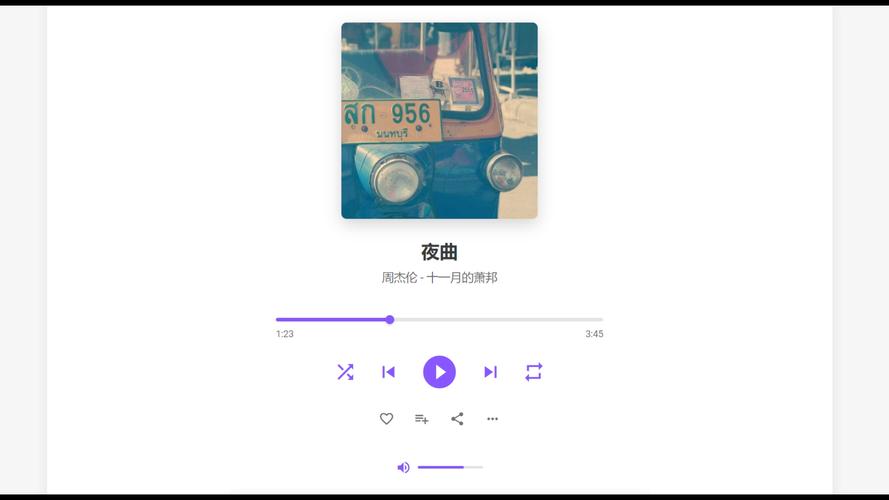
这是一个静态图片,展示了播放器的外观,下面的代码将实现这个效果。

(图片来源网络,侵删)
第一步:HTML 结构 (index.html)
这是播放器的骨架,定义了所有需要的元素,如播放按钮、进度条、音量控制和播放列表。
<!DOCTYPE html>
<html lang="zh-CN">
<head>
    <meta charset="UTF-8">
    <meta name="viewport" content="width=device-width, initial-scale=1.0">现代音乐播放器</title>
    <link rel="stylesheet" href="style.css">
    <!-- 引入一个简单的图标库,这里使用 Font Awesome -->
    <link rel="stylesheet" href="https://cdnjs.cloudflare.com/ajax/libs/font-awesome/6.4.0/css/all.min.css">
</head>
<body>
    <div class="music-player">
        <!-- 专辑封面区域 -->
        <div class="album-cover">
            <img src="https://via.placeholder.com/300" alt="专辑封面" id="albumArt">
        </div>
        <!-- 歌曲信息区域 -->
        <div class="song-info">
            <h2 id="songTitle">歌曲标题</h2>
            <p id="artistName">艺术家</p>
        </div>
        <!-- 进度条区域 -->
        <div class="progress-container">
            <span id="currentTime">0:00</span>
            <div class="progress-bar" id="progressBar">
                <div class="progress" id="progress"></div>
            </div>
            <span id="duration">0:00</span>
        </div>
        <!-- 控制按钮区域 -->
        <div class="controls">
            <button id="shuffleBtn" class="control-btn"><i class="fas fa-random"></i></button>
            <button id="prevBtn" class="control-btn"><i class="fas fa-step-backward"></i></button>
            <button id="playPauseBtn" class="play-pause-btn"><i class="fas fa-play"></i></button>
            <button id="nextBtn" class="control-btn"><i class="fas fa-step-forward"></i></button>
            <button id="repeatBtn" class="control-btn"><i class="fas fa-redo"></i></button>
        </div>
        <!-- 音量控制区域 -->
        <div class="volume-container">
            <i class="fas fa-volume-up"></i>
            <input type="range" id="volumeSlider" min="0" max="100" value="70">
        </div>
        <!-- 播放列表区域 -->
        <div class="playlist-container">
            <h3>播放列表</h3>
            <ul id="playlist">
                <!-- 播放列表项将通过 JavaScript 动态生成 -->
            </ul>
        </div>
    </div>
    <!-- 音频元素 -->
    <audio id="audioPlayer"></audio>
    <!-- 引入 JavaScript 文件 -->
    <script src="script.js"></script>
</body>
</html>
第二步:CSS 样式 (style.css)
这部分代码负责美化播放器,使其看起来现代、美观,您可以根据自己的喜好调整颜色和布局。
/* 全局样式 */
body {
    font-family: 'Arial', sans-serif;
    background-color: #f0f2f5;
    display: flex;
    justify-content: center;
    align-items: center;
    min-height: 100vh;
    margin: 0;
    color: #333;
}
/* 播放器主容器 */
.music-player {
    background-color: #fff;
    border-radius: 20px;
    box-shadow: 0 10px 30px rgba(0, 0, 0, 0.1);
    padding: 30px;
    width: 90%;
    max-width: 450px;
    text-align: center;
}
/* 专辑封面 */
.album-cover {
    margin-bottom: 20px;
}
.album-cover img {
    width: 250px;
    height: 250px;
    border-radius: 15px;
    object-fit: cover;
    box-shadow: 0 5px 15px rgba(0, 0, 0, 0.2);
}
/* 歌曲信息 */
.song-info {
    margin-bottom: 25px;
}
.song-info h2 {
    font-size: 1.8em;
    margin: 0;
    color: #1a1a1a;
}
.song-info p {
    font-size: 1.1em;
    color: #888;
    margin-top: 5px;
}
/* 进度条 */
.progress-container {
    display: flex;
    align-items: center;
    margin-bottom: 25px;
    font-size: 0.9em;
    color: #666;
}
.progress-bar {
    flex-grow: 1;
    height: 6px;
    background-color: #e0e0e0;
    border-radius: 3px;
    margin: 0 10px;
    cursor: pointer;
    position: relative;
}
.progress {
    height: 100%;
    background-color: #1db954; /* Spotify 绿色 */
    border-radius: 3px;
    width: 0%;
    transition: width 0.1s linear;
}
/* 控制按钮 */
.controls {
    display: flex;
    justify-content: center;
    align-items: center;
    gap: 20px;
    margin-bottom: 25px;
}
.control-btn {
    background: none;
    border: none;
    color: #666;
    font-size: 1.2em;
    cursor: pointer;
    transition: color 0.2s;
}
.control-btn:hover {
    color: #1db954;
}
.control-btn.active {
    color: #1db954;
}
.play-pause-btn {
    background-color: #1db954;
    color: white;
    width: 60px;
    height: 60px;
    border-radius: 50%;
    border: none;
    font-size: 1.5em;
    cursor: pointer;
    transition: background-color 0.2s, transform 0.2s;
}
.play-pause-btn:hover {
    background-color: #1ed760;
    transform: scale(1.05);
}
/* 音量控制 */
.volume-container {
    display: flex;
    align-items: center;
    justify-content: center;
    gap: 10px;
    margin-bottom: 20px;
    color: #666;
}
.volume-container input[type="range"] {
    width: 100px;
    cursor: pointer;
}
/* 播放列表 */
.playlist-container {
    background-color: #f8f8f8;
    border-radius: 10px;
    padding: 15px;
    max-height: 200px;
    overflow-y: auto;
}
.playlist-container h3 {
    margin-top: 0;
    margin-bottom: 15px;
    color: #1a1a1a;
    text-align: left;
}
#playlist {
    list-style: none;
    padding: 0;
    margin: 0;
    text-align: left;
}
#playlist li {
    padding: 10px;
    border-radius: 5px;
    cursor: pointer;
    transition: background-color 0.2s;
    display: flex;
    justify-content: space-between;
    align-items: center;
}
#playlist li:hover {
    background-color: #e8e8e8;
}
#playlist li.active {
    background-color: #e8f5e9;
    color: #1db954;
    font-weight: bold;
}
/* 响应式设计 */
@media (max-width: 480px) {
    .music-player {
        padding: 20px;
    }
    .album-cover img {
        width: 200px;
        height: 200px;
    }
}
第三步:JavaScript 功能 (script.js)
这是播放器的核心逻辑,处理所有交互,如播放/暂停、切换歌曲、更新进度等。
// 获取所有需要的 DOM 元素
const audioPlayer = document.getElementById('audioPlayer');
const playPauseBtn = document.getElementById('playPauseBtn');
const prevBtn = document.getElementById('prevBtn');
const nextBtn = document.getElementById('nextBtn');
const progressBar = document.getElementById('progress');
const progressBarContainer = document.getElementById('progressBar');
const currentTimeEl = document.getElementById('currentTime');
const durationEl = document.getElementById('duration');
const volumeSlider = document.getElementById('volumeSlider');
const albumArt = document.getElementById('albumArt');
const songTitle = document.getElementById('songTitle');
const artistName = document.getElementById('artistName');
const playlist = document.getElementById('playlist');
const shuffleBtn = document.getElementById('shuffleBtn');
const repeatBtn = document.getElementById('repeatBtn');
// 播放列表数据
const songs = [
    {
        title: '夏日微风',
        artist: '自然之声',
        src: 'https://www.soundhelix.com/examples/mp3/SoundHelix-Song-1.mp3',
        cover: 'https://via.placeholder.com/300?text=Song+1'
    },
    {
        title: '城市夜景',
        artist: '都市节拍',
        src: 'https://www.soundhelix.com/examples/mp3/SoundHelix-Song-2.mp3',
        cover: 'https://via.placeholder.com/300?text=Song+2'
    },
    {
        title: '雨后彩虹',
        artist: '梦想家',
        src: 'https://www.soundhelix.com/examples/mp3/SoundHelix-Song-3.mp3',
        cover: 'https://via.placeholder.com/300?text=Song+3'
    }
];
let currentSongIndex = 0;
let isPlaying = false;
let isShuffled = false;
let isRepeating = false;
// 初始化播放器
function init() {
    loadSong(currentSongIndex);
    createPlaylist();
    audioPlayer.volume = volumeSlider.value / 100;
}
// 加载歌曲
function loadSong(index) {
    const song = songs[index];
    audioPlayer.src = song.src;
    songTitle.textContent = song.title;
    artistName.textContent = song.artist;
    albumArt.src = song.cover;
    // 更新播放列表高亮
    updatePlaylistHighlight();
}
// 创建播放列表
function createPlaylist() {
    playlist.innerHTML = '';
    songs.forEach((song, index) => {
        const li = document.createElement('li');
        li.textContent = `${song.title} - ${song.artist}`;
        li.addEventListener('click', () => {
            currentSongIndex = index;
            loadSong(currentSongIndex);
            play();
        });
        playlist.appendChild(li);
    });
}
// 更新播放列表高亮
function updatePlaylistHighlight() {
    const items = playlist.querySelectorAll('li');
    items.forEach((item, index) => {
        if (index === currentSongIndex) {
            item.classList.add('active');
        } else {
            item.classList.remove('active');
        }
    });
}
// 播放/暂停功能
function playPause() {
    if (isPlaying) {
        pause();
    } else {
        play();
    }
}
function play() {
    audioPlayer.play();
    isPlaying = true;
    playPauseBtn.innerHTML = '<i class="fas fa-pause"></i>';
}
function pause() {
    audioPlayer.pause();
    isPlaying = false;
    playPauseBtn.innerHTML = '<i class="fas fa-play"></i>';
}
// 上一首/下一首
function nextSong() {
    if (isShuffled) {
        currentSongIndex = Math.floor(Math.random() * songs.length);
    } else {
        currentSongIndex = (currentSongIndex + 1) % songs.length;
    }
    loadSong(currentSongIndex);
    play();
}
function prevSong() {
    currentSongIndex = (currentSongIndex - 1 + songs.length) % songs.length;
    loadSong(currentSongIndex);
    play();
}
// 更新进度条
function updateProgress() {
    const { currentTime, duration } = audioPlayer;
    const progressPercent = (currentTime / duration) * 100;
    progressBar.style.width = `${progressPercent}%`;
    // 更新时间显示
    currentTimeEl.textContent = formatTime(currentTime);
    durationEl.textContent = formatTime(duration);
}
// 格式化时间 (秒 -> mm:ss)
function formatTime(seconds) {
    const minutes = Math.floor(seconds / 60);
    const remainingSeconds = Math.floor(seconds % 60);
    return `${minutes}:${remainingSeconds < 10 ? '0' : ''}${remainingSeconds}`;
}
// 设置进度条
function setProgress(e) {
    const width = this.clientWidth;
    const clickX = e.offsetX;
    const duration = audioPlayer.duration;
    audioPlayer.currentTime = (clickX / width) * duration;
}
// 音量控制
function setVolume() {
    audioPlayer.volume = volumeSlider.value / 100;
}
// 切换随机播放
function toggleShuffle() {
    isShuffled = !isShuffled;
    shuffleBtn.classList.toggle('active', isShuffled);
}
// 切换循环播放
function toggleRepeat() {
    isRepeating = !isRepeating;
    repeatBtn.classList.toggle('active', isRepeating);
    audioPlayer.loop = isRepeating;
}
// 事件监听器
playPauseBtn.addEventListener('click', playPause);
nextBtn.addEventListener('click', nextSong);
prevBtn.addEventListener('click', prevSong);
audioPlayer.addEventListener('timeupdate', updateProgress);
audioPlayer.addEventListener('ended', () => {
    if (isRepeating) {
        play(); // 如果是循环模式,重新播放当前歌曲
    } else {
        nextSong(); // 否则播放下一首
    }
});
progressBarContainer.addEventListener('click', setProgress);
volumeSlider.addEventListener('input', setVolume);
shuffleBtn.addEventListener('click', toggleShuffle);
repeatBtn.addEventListener('click', toggleRepeat);
// 初始化播放器
init();
如何使用
- 创建文件:创建三个文件,分别命名为
index.html、style.css和script.js,并将上面的代码分别复制粘贴进去。 - 放置文件:将这三个文件放在同一个文件夹中。
- 打开:用浏览器打开
index.html文件,即可看到并使用这个音乐播放器。
如何替换你自己的音乐
要使用你自己的音乐,你需要修改 script.js 文件中的 songs 数组。
(图片来源网络,侵删)
- 准备音乐文件:将你的音乐文件(如
.mp3)放在一个文件夹中。 - 准备封面图片:将你的专辑封面图片(如
.jpg,.png)也放在同一个文件夹中。 - 更新路径:修改
songs数组中的src和cover属性,指向你自己的文件路径。
如果你的文件结构如下:
my-music-player/
├── index.html
├── style.css
├── script.js
└── my-songs/
    ├── song1.mp3
    ├── cover1.jpg
    ├── song2.mp3
    └── cover2.jpg
那么你需要将 script.js 修改为:
// ... (其他代码保持不变) ...
const songs = [
    {
        title: '我的第一首歌',
        artist: '我的艺术家',
        src: 'my-songs/song1.mp3',
        cover: 'my-songs/cover1.jpg'
    },
    {
        title: '我的第二首歌',
        artist: '我的艺术家',
        src: 'my-songs/song2.mp3',
        cover: 'my-songs/cover2.jpg'
    }
];
// ... (其他代码保持不变) ...
这样,播放器就会加载并播放你自己的音乐了。
(图片来源网络,侵删)


