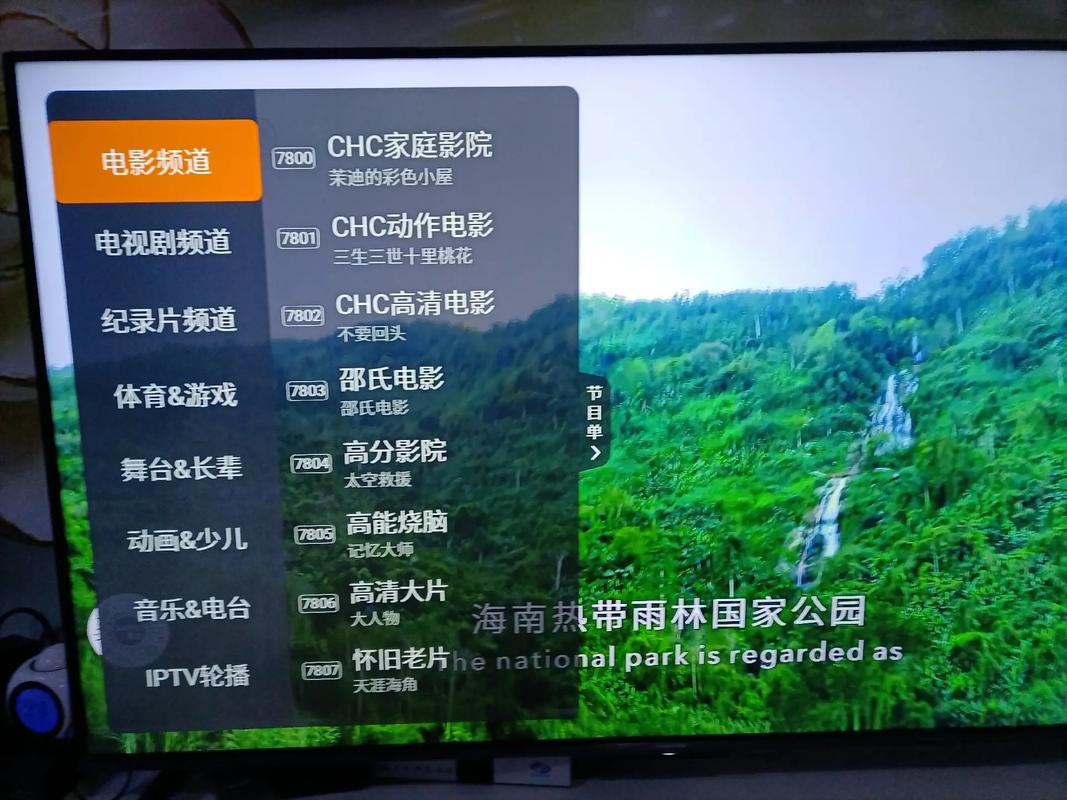
Windows 8 风格的核心设计语言是 “Modern UI”,也被称为 “Metro”,它的主要特点是:

(图片来源网络,侵删)
- 大色块与鲜明色彩:使用充满活力的纯色背景。
- 无衬线字体:通常使用“Segoe UI”字体,清晰、现代。
- 基于网格的布局以“磁贴”(Tiles)的形式组织,支持不同尺寸。
- 内容优先:减少不必要的装饰,突出图片、文字等核心内容。
- 流畅的动画与交互:磁贴具有悬停效果、点击动画和内容切换动画。
我们将创建一个单页应用,包含以下部分:
- 顶部导航栏:固定在顶部,包含网站Logo、搜索框和用户菜单。
- 区:使用网格布局展示电视频道磁贴。
- 侧边栏/应用栏:固定在右侧,提供分类筛选、个人收藏等功能。
- 播放器弹窗:点击频道磁贴后,全屏或弹出播放器。
HTML 代码结构
这是模板的核心HTML文件,包含了所有必要的结构和占位内容。
<!DOCTYPE html>
<html lang="zh-CN">
<head>
<meta charset="UTF-8">
<meta name="viewport" content="width=device-width, initial-scale=1.0">电视直播 - Win8风格</title>
<!-- 引入字体图标库 (Font Awesome) -->
<link rel="stylesheet" href="https://cdnjs.cloudflare.com/ajax/libs/font-awesome/6.4.0/css/all.min.css">
<style>
/* 全局样式和变量 */
:root {
--bg-color: #000000;
--text-color: #FFFFFF;
--accent-color-1: #00BCF2; /* 蓝色 */
--accent-color-2: #FF6B6B; /* 红色 */
--accent-color-3: #4ECDC4; /* 青色 */
--accent-color-4: #FFD166; /* 黄色 */
--tile-shadow: 0 2px 5px rgba(0,0,0,0.2);
--hover-shadow: 0 5px 15px rgba(0,0,0,0.4);
}
* {
margin: 0;
padding: 0;
box-sizing: border-box;
}
body {
font-family: "Segoe UI", "Microsoft YaHei", sans-serif;
background-color: var(--bg-color);
color: var(--text-color);
overflow-x: hidden;
}
/* 顶部导航栏 */
.top-nav {
position: fixed;
top: 0;
left: 0;
right: 0;
height: 60px;
background-color: rgba(0, 0, 0, 0.8);
backdrop-filter: blur(10px);
display: flex;
align-items: center;
padding: 0 20px;
z-index: 1000;
border-bottom: 1px solid rgba(255, 255, 255, 0.1);
}
.logo {
font-size: 24px;
font-weight: bold;
color: var(--accent-color-1);
margin-right: auto;
}
.search-box {
position: relative;
margin-right: 20px;
}
.search-box input {
background-color: rgba(255, 255, 255, 0.1);
border: 1px solid rgba(255, 255, 255, 0.2);
color: var(--text-color);
padding: 8px 35px 8px 15px;
border-radius: 20px;
outline: none;
width: 250px;
transition: all 0.3s ease;
}
.search-box input:focus {
background-color: rgba(255, 255, 255, 0.2);
border-color: var(--accent-color-1);
width: 300px;
}
.search-box i {
position: absolute;
right: 15px;
top: 50%;
transform: translateY(-50%);
color: rgba(255, 255, 255, 0.5);
}
.user-menu {
display: flex;
align-items: center;
}
.user-avatar {
width: 35px;
height: 35px;
border-radius: 50%;
background-color: var(--accent-color-3);
display: flex;
align-items: center;
justify-content: center;
cursor: pointer;
margin-left: 15px;
}
/* 主内容区 */
.main-content {
margin-top: 80px; /* 为顶部导航栏留出空间 */
padding: 20px;
min-height: calc(100vh - 80px);
}
.content-header {
margin-bottom: 20px;
}
.content-header h1 {
font-size: 32px;
font-weight: 300;
margin-bottom: 10px;
}
.content-header p {
color: rgba(255, 255, 255, 0.6);
}
/* 磁贴网格布局 */
.tiles-grid {
display: grid;
grid-template-columns: repeat(auto-fill, minmax(200px, 1fr));
gap: 20px;
}
/* 电视频道磁贴 */
.channel-tile {
position: relative;
height: 150px;
border-radius: 10px;
overflow: hidden;
cursor: pointer;
transition: all 0.3s cubic-bezier(0.4, 0, 0.2, 1);
box-shadow: var(--tile-shadow);
}
.channel-tile:hover {
transform: translateY(-5px);
box-shadow: var(--hover-shadow);
}
.channel-tile.wide {
grid-column: span 2;
}
.channel-tall {
grid-row: span 2;
}
.tile-image {
width: 100%;
height: 100%;
object-fit: cover;
filter: brightness(0.7);
}
.tile-overlay {
position: absolute;
bottom: 0;
left: 0;
right: 0;
padding: 15px;
background: linear-gradient(to top, rgba(0,0,0,0.9), transparent);
transform: translateY(100%);
transition: transform 0.3s ease;
}
.channel-tile:hover .tile-overlay {
transform: translateY(0);
}
.tile-title {
font-size: 18px;
font-weight: 500;
margin-bottom: 5px;
}
.tile-info {
font-size: 14px;
color: rgba(255, 255, 255, 0.7);
}
.live-badge {
position: absolute;
top: 10px;
right: 10px;
background-color: var(--accent-color-2);
color: white;
padding: 4px 10px;
border-radius: 15px;
font-size: 12px;
font-weight: bold;
display: flex;
align-items: center;
gap: 5px;
}
.live-badge::before {
content: '';
width: 8px;
height: 8px;
background-color: white;
border-radius: 50%;
animation: pulse 2s infinite;
}
@keyframes pulse {
0% { opacity: 1; }
50% { opacity: 0.5; }
100% { opacity: 1; }
}
/* 右侧边栏 */
.sidebar {
position: fixed;
right: 0;
top: 60px;
width: 250px;
height: calc(100vh - 60px);
background-color: rgba(20, 20, 20, 0.9);
backdrop-filter: blur(10px);
padding: 20px;
border-left: 1px solid rgba(255, 255, 255, 0.1);
transform: translateX(100%);
transition: transform 0.3s ease;
z-index: 999;
}
.sidebar.active {
transform: translateX(0);
}
.sidebar-toggle {
position: fixed;
right: 20px;
top: 80px;
background-color: var(--accent-color-1);
color: white;
border: none;
width: 50px;
height: 50px;
border-radius: 50%;
font-size: 20px;
cursor: pointer;
box-shadow: var(--tile-shadow);
z-index: 1001;
transition: all 0.3s ease;
}
.sidebar-toggle:hover {
background-color: #00a8e0;
transform: scale(1.1);
}
.sidebar h3 {
margin-bottom: 15px;
font-weight: 400;
font-size: 18px;
color: var(--accent-color-1);
}
.category-list {
list-style: none;
}
.category-list li {
padding: 10px 0;
border-bottom: 1px solid rgba(255, 255, 255, 0.05);
cursor: pointer;
transition: all 0.2s ease;
}
.category-list li:hover {
padding-left: 10px;
color: var(--accent-color-1);
}
/* 播放器弹窗 */
.player-modal {
position: fixed;
top: 0;
left: 0;
width: 100%;
height: 100%;
background-color: rgba(0, 0, 0, 0.95);
display: flex;
align-items: center;
justify-content: center;
z-index: 2000;
opacity: 0;
visibility: hidden;
transition: all 0.3s ease;
}
.player-modal.active {
opacity: 1;
visibility: visible;
}
.video-player {
width: 90%;
max-width: 1200px;
height: 70vh;
background-color: #000;
border-radius: 10px;
overflow: hidden;
position: relative;
}
.video-placeholder {
width: 100%;
height: 100%;
object-fit: contain;
background-color: #111;
}
.close-player {
position: absolute;
top: 20px;
right: 20px;
background-color: rgba(255, 255, 255, 0.1);
color: white;
border: none;
width: 40px;
height: 40px;
border-radius: 50%;
font-size: 20px;
cursor: pointer;
transition: all 0.3s ease;
}
.close-player:hover {
background-color: var(--accent-color-2);
transform: rotate(90deg);
}
</style>
</head>
<body>
<!-- 顶部导航栏 -->
<nav class="top-nav">
<div class="logo">
<i class="fas fa-tv"></i> LiveTV
</div>
<div class="search-box">
<input type="text" placeholder="搜索频道...">
<i class="fas fa-search"></i>
</div>
<div class="user-menu">
<i class="fas fa-bell" style="font-size: 20px; cursor: pointer; margin-right: 15px;"></i>
<div class="user-avatar">
<i class="fas fa-user"></i>
</div>
</div>
</nav>
<!-- 主内容区 -->
<main class="main-content">
<div class="content-header">
<h1>推荐频道</h1>
<p>发现您喜爱的电视节目</p>
</div>
<!-- 磁贴网格 -->
<div class="tiles-grid">
<!-- 示例磁贴 1 - 宽磁贴 -->
<div class="channel-tile wide" onclick="openPlayer('CCTV-1 综合频道')">
<img src="https://via.placeholder.com/600x300/00BCF2/FFFFFF?text=CCTV-1" alt="CCTV-1" class="tile-image">
<div class="live-badge">LIVE</div>
<div class="tile-overlay">
<div class="tile-title">CCTV-1 综合频道</div>
<div class="tile-info">中国中央电视台综合频道</div>
</div>
</div>
<!-- 示例磁贴 2 -->
<div class="channel-tile" onclick="openPlayer('湖南卫视')">
<img src="https://via.placeholder.com/200x150/FF6B6B/FFFFFF?text=湖南卫视" alt="湖南卫视" class="tile-image">
<div class="live-badge">LIVE</div>
<div class="tile-overlay">
<div class="tile-title">湖南卫视</div>
<div class="tile-info">娱乐、电视剧</div>
</div>
</div>
<!-- 示例磁贴 3 -->
<div class="channel-tile" onclick="openPlayer('东方卫视')">
<img src="https://via.placeholder.com/200x150/4ECDC4/FFFFFF?text=东方卫视" alt="东方卫视" class="tile-image">
<div class="live-badge">LIVE</div>
<div class="tile-overlay">
<div class="tile-title">东方卫视</div>
<div class="tile-info">新闻、财经</div>
</div>
</div>
<!-- 示例磁贴 4 -->
<div class="channel-tile" onclick="openPlayer('浙江卫视')">
<img src="https://via.placeholder.com/200x150/FFD166/000000?text=浙江卫视" alt="浙江卫视" class="tile-image">
<div class="live-badge">LIVE</div>
<div class="tile-overlay">
<div class="tile-title">浙江卫视</div>
<div class="tile-info">综艺、电视剧</div>
</div>
</div>
<!-- 示例磁贴 5 - 高磁贴 -->
<div class="channel-tile channel-tall" onclick="openPlayer('电影频道')">
<img src="https://via.placeholder.com/200x350/9B59B6/FFFFFF?text=电影频道" alt="电影频道" class="tile-image">
<div class="live-badge">LIVE</div>
<div class="tile-overlay">
<div class="tile-title">电影频道</div>
<div class="tile-info">经典电影、新片速递</div>
</div>
</div>
<!-- 示例磁贴 6 -->
<div class="channel-tile" onclick="openPlayer('体育频道')">
<img src="https://via.placeholder.com/200x150/E74C3C/FFFFFF?text=体育频道" alt="体育频道" class="tile-image">
<div class="live-badge">LIVE</div>
<div class="tile-overlay">
<div class="tile-title">体育频道</div>
<div class="tile-info">赛事直播、体育新闻</div>
</div>
</div>
<!-- 可以继续添加更多磁贴... -->
</div>
</main>
<!-- 侧边栏切换按钮 -->
<button class="sidebar-toggle" onclick="toggleSidebar()">
<i class="fas fa-bars"></i>
</button>
<!-- 右侧边栏 -->
<aside class="sidebar" id="sidebar">
<h3><i class="fas fa-th-large"></i> 频道分类</h3>
<ul class="category-list">
<li onclick="filterChannels('all')"><i class="fas fa-globe"></i> 全部频道</li>
<li onclick="filterChannels('news')"><i class="fas fa-newspaper"></i> 新闻资讯</li>
<li onclick="filterChannels('entertainment')"><i class="fas fa-laugh"></i> 娱乐综艺</li>
<li onclick="filterChannels('sports')"><i class="fas fa-football-ball"></i> 体育赛事</li>
<li onclick="filterChannels('movie')"><i class="fas fa-film"></i> 电影频道</li>
<li onclick="filterChannels('life')"><i class="fas fa-leaf"></i> 生活时尚</li>
<li onclick="filterChannels('tech')"><i class="fas fa-microchip"></i> 科技数码</li>
</ul>
<h3 style="margin-top: 30px;"><i class="fas fa-heart"></i> 我的收藏</h3>
<ul class="category-list">
<li><i class="fas fa-star"></i> CCTV-1</li>
<li><i class="fas fa-star"></i> 湖南卫视</li>
<li><i class="fas fa-star"></i> 体育频道</li>
</ul>
</aside>
<!-- 播放器弹窗 -->
<div class="player-modal" id="playerModal">
<div class="video-player">
<!-- 实际项目中这里应替换为 <video> 标签或视频播放器JS SDK -->
<img src="https://via.placeholder.com/1200x675/000000/FFFFFF?text=视频播放区域" alt="视频播放" class="video-placeholder">
<button class="close-player" onclick="closePlayer()">
<i class="fas fa-times"></i>
</button>
</div>
</div>
<script>
// 打开播放器
function openPlayer(channelName) {
const modal = document.getElementById('playerModal');
modal.classList.add('active');
// 这里可以添加逻辑,根据 channelName 加载对应的直播流
console.log('正在播放: ' + channelName);
document.body.style.overflow = 'hidden'; // 防止背景滚动
}
// 关闭播放器
function closePlayer() {
const modal = document.getElementById('playerModal');
modal.classList.remove('active');
document.body.style.overflow = 'auto'; // 恢复背景滚动
}
// 切换侧边栏
function toggleSidebar() {
const sidebar = document.getElementById('sidebar');
sidebar.classList.toggle('active');
}
// 频道筛选 (示例功能)
function filterChannels(category) {
// 实际项目中,这里会通过JS动态隐藏/显示磁贴或重新请求数据
console.log('筛选分类: ' + category);
// 示例:显示一个提示
const tiles = document.querySelectorAll('.channel-tile');
tiles.forEach(tile => {
// 简单的淡入淡出效果
tile.style.opacity = '0.5';
setTimeout(() => {
tile.style.opacity = '1';
}, 300);
});
toggleSidebar(); // 筛选后关闭侧边栏
}
// 点击模态框背景关闭播放器
document.getElementById('playerModal').addEventListener('click', function(e) {
if (e.target === this) {
closePlayer();
}
});
// ESC键关闭播放器
document.addEventListener('keydown', function(e) {
if (e.key === 'Escape') {
closePlayer();
const sidebar = document.getElementById('sidebar');
if (sidebar.classList.contains('active')) {
toggleSidebar();
}
}
});
</script>
</body>
</html>
如何使用和定制这个模板
-
保存文件:将上面的代码复制并保存为一个
.html文件(livetv.html),然后用浏览器打开即可看到效果。 -
替换图片和链接:
 (图片来源网络,侵删)
- 频道Logo/封面:将
<img>标签中的src属性(https://via.placeholder.com/...)替换为您自己准备的频道封面图片URL。 - 播放器视频源:在
openPlayer函数中,您需要获取真实的直播流地址(通常是.m3u8或.flv格式),并将其赋值给<video>标签的src属性或使用视频播放器插件(如DPlayer、Video.js)来加载。
- 频道Logo/封面:将
-
频道数据:
-
目前频道是硬编码在HTML中的,在实际项目中,您应该通过 JavaScript (Fetch API, Axios) 从后端API获取频道列表,然后动态生成这些磁贴。
-
示例JS代码片段:
async function loadChannels() {
    const response = await fetch('/api/channels');
    const channels = await response.json();
    const grid = document.querySelector('.tiles-grid');
    channels.forEach(channel => {
        const tile = document.createElement('div');
        tile.className = 'channel-tile';
        tile.onclick = () => openPlayer(channel.name);
        // ... 拼接tile的HTML结构 ...
        grid.appendChild(tile);
    });
}
loadChannels();
-
-
CSS变量定制:
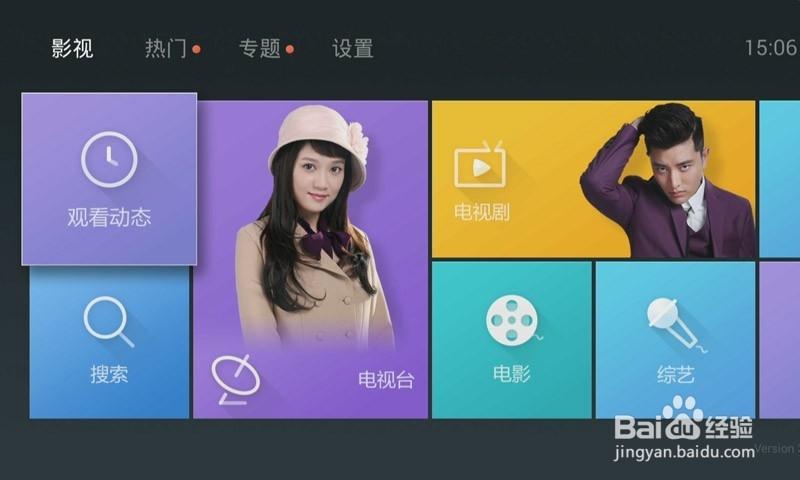 (图片来源网络,侵删)
- 在
<style>标签的root选择器中,我定义了一些CSS变量(如--accent-color-1),您可以通过修改这些变量的值来快速改变整个网站的主题色,而无需逐个修改样式。
- 在
-
功能扩展:
- 搜索功能:为
<input>添加onkeyup事件监听,根据输入内容筛选频道。 - 收藏功能:点击收藏图标时,将频道ID存入
localStorage,并在“我的收藏”列表中动态显示。 - 分类筛选:完善
filterChannels函数,让它真正根据频道数据的分类属性来显示/隐藏磁贴。
- 搜索功能:为
这个模板完美复刻了Windows 8 Modern UI的设计精髓,同时保证了良好的用户体验和交互性,非常适合作为在线电视直播网站的前端基础。


