下面我将从基础原理、默认模板、创建自定义模板、进阶技巧四个方面,全面为你讲解 WordPress 分类页面模板。
基础原理:WordPress 如何查找分类模板?
WordPress 使用一个非常清晰且优先级明确的模板层级系统来决定加载哪个文件,当你访问一个分类页面时,它会按以下顺序查找文件,一旦找到第一个匹配的文件,就会立即加载并停止搜索:
-
category-{slug}.php(最具体){slug}是分类的别名,如果你的分类别名是news,WordPress 会首先查找category-news.php。- 优点:可以为特定分类创建完全独特的样式和布局。
-
category-{id}.php{id}是分类的数字 ID,ID 为 5 的分类,WordPress 会查找category-5.php。- 优点:当你不确定分类别名时,可以使用 ID 来定位。
-
category.php(通用模板)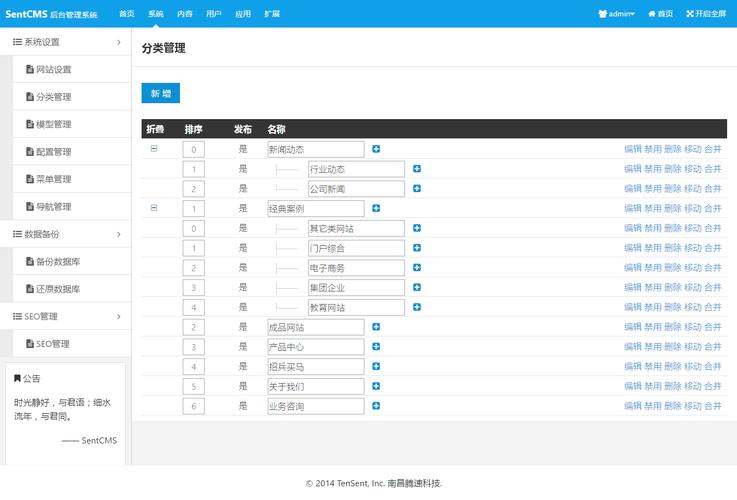 (图片来源网络,侵删)
- 如果以上两个特定模板都不存在,WordPress 会加载这个通用的分类模板。
- 用途:这是所有分类页面的默认模板,如果你只想对所有分类页面做统一的修改,编辑这个文件就足够了。
-
archive.php(后备模板)- 如果连
category.php也不存在,WordPress 会尝试加载archive.php。archive.php是所有归档页面(包括分类、标签、作者、日期等)的通用模板。
- 如果连
-
index.php(最终后备)- 如果以上所有模板都不存在,WordPress 最终会回退到
index.php,也就是你的首页模板。
- 如果以上所有模板都不存在,WordPress 最终会回退到
要自定义分类页面,最佳实践是复制 index.php 文件,重命名为 category.php,然后在这个新文件上进行修改,如果你想让某个分类与众不同,再创建 category-{slug}.php。
默认的 category.php 模板结构
一个基础的 category.php 文件通常包含以下结构,你可以直接复制到你当前主题的文件夹中。
<?php
/**
 * Template Name: 分类页面模板
 * 说明:这是用于显示分类文章列表的模板文件。
 */
// 1. 加载网站头部
get_header(); ?>
    <div id="primary" class="content-area">
        <main id="main" class="site-main" role="main">
            <?php
            // 2. 如果有文章,则开始循环
            if ( have_posts() ) :
                // 3. 显示分类标题和描述
                ?>
                <header class="page-header">
                    <?php
                        // 获取当前分类对象
                        $the_category = get_queried_object();
                        // 显示分类标题
                        single_cat_title( '<h1 class="page-title">', '</h1>' );
                        // 显示分类描述
                        $description = term_description();
                        if ( ! empty( $description ) ) :
                            ?>
                            <div class="taxonomy-description"><?php echo $description; ?></div>
                            <?php
                        endif;
                    ?>
                </header><!-- .page-header -->
                <?php
                // 4. 开始文章循环 (The Loop)
                while ( have_posts() ) :
                    the_post();
                    /*
                     * 可以在此处加载一个用于单篇文章显示的模板部分。
                     * get_template_part( 'template-parts/content', get_post_format() );
                     * 这会尝试加载 content.php, content-video.php, content-audio.php 等。
                     */
                    get_template_part( 'template-parts/content', get_post_format() );
                endwhile;
                // 5. 显示文章分页导航
                the_posts_navigation();
            else :
                // 6. 如果该分类下没有文章,显示提示信息
                get_template_part( 'template-parts/content', 'none' );
            endif;
            ?>
        </main><!-- #main -->
    </div><!-- #primary -->
<?php
// 7. 加载网站侧边栏和底部
get_sidebar();
get_footer();
代码解析:
get_header()/get_footer()/get_sidebar():加载主题的头部、底部和侧边栏模板。have_posts()/while ( have_posts() ) : the_post();:标准的 WordPress 循环,用于获取并显示文章。get_queried_object():非常重要!这个函数可以获取当前正在被查看的对象,在分类页面,它返回一个包含该分类所有信息的对象(ID、名称、描述、别名等)。single_cat_title( '<h1 class="page-title">', '</h1>' ):直接输出当前分类的标题,并用<h1>标签包裹。term_description():获取当前分类的描述文本。get_template_part( 'template-parts/content', ... ):这是一种现代 WordPress 主题开发方式,将文章的内容部分抽离到单独的文件中(如content.php),便于管理和复用。the_posts_navigation():显示“上一页/下一页”的分页导航。get_template_part( 'template-parts/content', 'none' ):当没有文章时,显示一个自定义的“无内容”提示。
如何创建自定义分类模板
假设你有一个名为“产品”的分类,你希望它的产品列表展示方式与博客文章不同(显示为卡片网格,而不是列表)。
步骤 1:创建特定分类模板
- 在你的主题文件夹中,复制
category.php文件。 - 将其重命名为
category-products.php(假设你的“产品”分类的别名是products)。
步骤 2:修改模板内容
打开 category-products.php,修改其内容,你可以改变 HTML 结构、CSS 类名,或者使用不同的查询。
<?php
/**
 * Template Name: 产品分类页面
 * 说明:专门用于显示“产品”分类的页面模板。
 */
get_header(); ?>
    <div id="primary" class="product-archive-content-area">
        <main id="main" class="site-main" role="main">
            <?php if ( have_posts() ) : ?>
                <header class="page-header">
                    <?php
                        single_cat_title( '<h1 class="page-title">', '</h1>' );
                        $description = term_description();
                        if ( $description ) :
                            ?>
                            <div class="taxonomy-description"><?php echo $description; ?></div>
                            <?php
                        endif;
                    ?>
                </header>
                <!-- 使用自定义的网格布局 -->
                <div class="product-grid">
                    <?php while ( have_posts() ) : the_post(); ?>
                        <div class="product-card">
                            <?php
                                // 显示特色图片
                                if ( has_post_thumbnail() ) {
                                    the_post_thumbnail( 'medium' );
                                }
                                // 显示文章标题
                                the_title( '<h2 class="entry-title"><a href="' . esc_url( get_permalink() ) . '" rel="bookmark">', '</a></h2>' );
                                // 显示文章摘要
                                the_excerpt();
                            ?>
                        </div>
                    <?php endwhile; ?>
                </div>
                <?php the_posts_navigation(); ?>
            <?php else : ?>
                <?php get_template_part( 'template-parts/content', 'none' ); ?>
            <?php endif; ?>
        </main><!-- #main -->
    </div><!-- #primary -->
<?php
get_sidebar();
get_footer();
当你访问 your-site.com/category/products/ 时,WordPress 会自动加载这个全新的 category-products.php 模板,展示一个漂亮的卡片式布局。
进阶技巧与常见问题
如何在分类页面排除某些子分类?
你可能想在父分类页面只显示其直接子分类的文章,而不是孙分类或更深层次的分类,可以使用 pre_get_posts 这个钩子来实现。
将以下代码添加到你的主题的 functions.php 文件中:
/**
 * 在分类页面排除特定子分类
 */
function exclude_child_categories( $query ) {
    // 只在主查询且是分类页面时执行
    if ( $query->is_category() && $query->is_main_query() ) {
        // 获取当前分类对象
        $current_category = get_queried_object();
        // 获取当前分类的所有直接子分类的ID数组
        $child_cats = get_term_children( $current_category->term_id, 'category' );
        // 如果有子分类,则排除它们
        if ( ! is_wp_error( $child_cats ) && ! empty( $child_cats ) ) {
            $query->set( 'category__not_in', $child_cats );
        }
    }
}
add_action( 'pre_get_posts', 'exclude_child_categories' );
如何修改分类页面的每页文章数量?
同样使用 pre_get_posts 钩子。
/**
 * 修改分类页面的每页文章数量
 */
function custom_posts_per_page( $query ) {
    if ( $query->is_category() && $query->is_main_query() ) {
        $query->set( 'posts_per_page', 12 ); // 设置为12篇
    }
}
add_action( 'pre_get_posts', 'custom_posts_per_page' );
如何在分类页面显示自定义字段?
如果你的文章使用了自定义字段(通过 ACF 插件),你可以在循环中轻松调用它们。
<?php while ( have_posts() ) : the_post(); ?>
    <article>
        <h2><a href="<?php the_permalink(); ?>"><?php the_title(); ?></a></h2>
        <p><?php the_excerpt(); ?></p>
        <?php
        // 假设你有一个自定义字段名为 'product_price'
        $price = get_field('product_price');
        if ( $price ) {
            echo '<p class="price">价格:' . esc_html($price) . '</p>';
        }
        ?>
    </article>
<?php endwhile; ?>
| 任务 | 推荐方法 |
|---|---|
| 统一修改所有分类页面 | 编辑主题根目录下的 category.php 文件。 |
| 为单个分类创建独特布局 | 创建 category-{slug}.php 或 category-{id}.php 文件。 |
| 修改分类页面的查询逻辑 | 在 functions.php 中使用 pre_get_posts 钩子。 |
| 修改文章的显示方式 | 在 category.php 的循环内使用 get_template_part() 调用内容模板,或直接在循环内编写 HTML。 |
掌握了分类页面模板,你就能让 WordPress 网站的分类结构更加清晰、内容展示更加灵活和美观。


