JavaScript 正则表达式教程
目录
- 什么是正则表达式?
- 创建正则表达式
- 正则表达式核心:元字符
- 1 字符匹配
- 2 字符类
- 3 量词
- 4 定位符(锚点)
- 5 分组和捕获
- 正则表达式标志
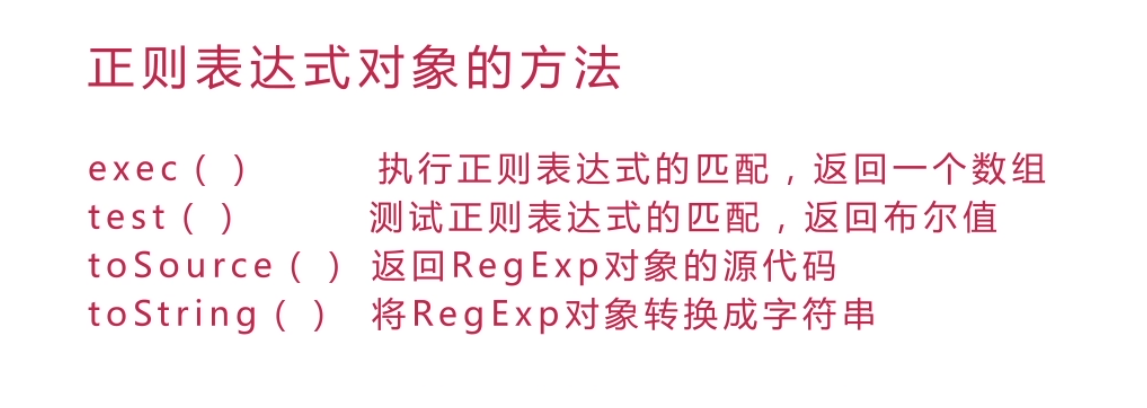
- JavaScript 中的正则方法
- 1
test()- 测试匹配 - 2
match()- 查找匹配项 - 3
matchAll()- 查找所有匹配项(ES2025) - 4
search()- 查找匹配索引 - 5
replace()- 替换匹配项 - 6
split()- 拆分字符串
- 1
- 高级技巧
- 1 反向引用
- 2 非捕获分组
- 3 前瞻与后顾
- 实用示例
- 1 验证邮箱格式
- 2 提取 URL 中的域名
- 3 格式化电话号码
- 在线工具推荐
什么是正则表达式?
正则表达式,简称 Regex 或 RegExp,是一种用于匹配、查找、替换字符串中字符组合的强大模式。
想象一下,你需要在一段很长的文本中找到所有符合特定规则的词,比如所有以 "a" 开头、以 "e" 结尾的单词,用传统字符串方法会非常繁琐,而正则表达式可以用一个简洁的 /a.*e/ 来精确描述这个规则,并高效地完成任务。
创建正则表达式
在 JavaScript 中,创建正则表达式有两种方式:
字面量
这是最常用、最简洁的方式。
const regex = /pattern/flags;
pattern:你的正则表达式模式。flags:修饰符(标志),用于控制匹配行为。
示例:
const regex = /hello/; // 匹配 "hello" 这个字符串
构造函数
当你需要动态构建正则表达式时(模式来自用户输入),可以使用 RegExp 构造函数。
const regex = new RegExp('pattern', 'flags');
示例:
const greeting = 'hello';
const dynamicRegex = new RegExp(greeting); // 匹配 "hello"
正则表达式核心:元字符
元字符是正则表达式中的“语法”,它们不代表自身,而是有特殊的含义。
1 字符匹配
- (点号):匹配除换行符以外的任意单个字符。
/h.llo/.test('hallo'); // true /h.llo/.test('h llo'); // true /h.llo/.test('h\nllo'); // false \(反斜杠):转义字符,如果你想匹配 、、 等特殊字符本身,需要在它前面加上\。/price: \d+/.test('price: 100'); // true /price: \d+/.test('price: d'); // false
2 字符类
使用 [] 来定义一个字符集合,匹配其中的任意一个字符。
[abc]:匹配a或b或c。/[bt]rain/.test('brain'); // true /[bt]rain/.test('train'); // true[^abc]:匹配除了a,b,c之外的任意字符。/[^0-9]/.test('a'); // true /[^0-9]/.test('1'); // false[a-z]:匹配任意小写字母。[A-Z]:匹配任意大写字母。[0-9]:匹配任意数字,这和\d是等价的。[a-zA-Z0-9_]:匹配任意字母、数字或下划线,这和\w是等价的。\d:匹配任意数字 (Digit),等价于[0-9]。\w:匹配任意“单词字符” (Word character),包括字母、数字、下划线,等价于[A-Za-z0-9_]。\s:匹配任意空白字符 (Space character),包括空格、制表符、换行符等。\D:匹配任意非数字,等价于[^0-9]。\W:匹配任意非单词字符,等价于[^A-Za-z0-9_]。\S:匹配任意非空白字符。
3 量词
量词用来指定前面的元素需要出现多少次。
- 匹配前面的元素0次或多次。
/go*gle/.test('ggle'); // true (0次o) /go*gle/.test('gogle'); // true (1次o) /go*gle/.test('gooogle'); // true (多次o) - 匹配前面的元素1次或多次(至少一次)。
/go+gle/.test('ggle'); // false (至少需要1个o) /go+gle/.test('gogle'); // true - 匹配前面的元素0次或1次。
/colou?r/.test('color'); // true (u出现0次) /colou?r/.test('colour'); // true (u出现1次) {n}:精确匹配前面的元素 n 次。/\d{3}/.test('123'); // true /\d{3}/.test('12'); // false{n,}:匹配前面的元素至少 n 次。/\d{2,}/.test('123'); // true /\d{2,}/.test('1'); // false{n,m}:匹配前面的元素至少 n 次,但不超过 m 次。/\d{2,4}/.test('123'); // true /\d{2,4}/.test('12345'); // false (超过了4次)
4 定位符(锚点)
定位符用于匹配字符串的特定位置,而不是字符。
^:匹配字符串的开头。/^hello/.test('hello world'); // true /^hello/.test('say hello'); // false- 匹配字符串的。
/world$/.test('hello world'); // true /world$/.test('worldly'); // false \b:匹配单词边界(一个单词的开始或结束)。/\bcat\b/.test('the cat is here'); // true /\bcat\b/.test('the category is here'); // false (因为 'cat' 是 'category' 的一部分)\B:匹配非单词边界。
5 分组和捕获
使用 将模式的一部分括起来,形成一个分组。
(x):捕获分组,它会将括号内匹配到的内容“捕获”下来,存储在一个临时的缓冲区中,可以通过反向引用来使用。(?:x):非捕获分组,它只用于分组,但不会创建反向引用,性能稍好。
示例:
// 匹配 "abc" 出现两次
/(abc){2}/.test('abcabc'); // true
// 提取日期中的年、月、日
const dateStr = '2025-10-27';
const dateRegex = /(\d{4})-(\d{2})-(\d{2})/;
const match = dateStr.match(dateRegex);
console.log(match);
// 输出: ["2025-10-27", "2025", "10", "27"]
// match[0] 是整个匹配的字符串
// match[1] 是第一个捕获组
// match[2] 是第二个捕获组
// ...
正则表达式标志
标志是写在 后面的字母,用于控制匹配的全局行为。
g(Global - 全局):匹配所有符合条件的项,而不仅仅是第一个。'hello world, hello everyone'.replace(/hello/, 'hi'); // "hi world, hello everyone" 'hello world, hello everyone'.replace(/hello/g, 'hi'); // "hi world, hi everyone"
i(Case-insensitive - 忽略大小写):匹配时忽略大小写。/hello/i.test('Hello'); // true /hello/i.test('HELLO'); // truem(Multi-line - 多行):使^和 匹配每一行的开头和结尾,而不仅仅是整个字符串的开头和结尾。const multilineText = `first line second line third line`; /^line/.test(multilineText); // false /^line/m.test(multilineText); // true
标志可以组合使用,/gi 表示全局且忽略大小写。
JavaScript 中的正则方法
JavaScript 的 String 和 RegExp 对象都提供了使用正则表达式的方法。
1 test()
- 所属对象:
RegExp - 功能:测试一个字符串是否匹配正则表达式。
- 返回值:
true或false。 - 用法:
regex.test(string)
const regex = /hello/;
console.log(regex.test('hello world')); // true
console.log(regex.test('hi world'));   // false
2 match()
- 所属对象:
String - 功能:在字符串中查找匹配正则表达式的项。
- 返回值:如果找到匹配项,返回一个数组;否则返回
null。 - 用法:
string.match(regex)
不带 g 标志时:
返回的数组包含整个匹配项和所有捕获组。
const str = '2025-10-27';
const regex = /(\d{4})-(\d{2})-(\d{2})/;
const result = str.match(regex);
console.log(result);
// ["2025-10-27", "2025", "10", "27", index: 0, input: "2025-10-27", groups: undefined]
带 g 标志时:
返回的数组只包含所有匹配的字符串,没有捕获组信息。
const str = 'apple banana orange';
const result = str.match(/\b\w{5}\b/g); // 查找所有5个字母的单词
console.log(result); // ["apple", "banana", "orange"]
3 matchAll() (ES2025)
- 所属对象:
String - 功能:返回一个包含所有匹配项的迭代器(Iterator)。
- 返回值:一个迭代器,每次迭代返回一个匹配结果的数组。
- 用法:
string.matchAll(regex) - 注意:
matchAll必须与g标志一起使用,否则会抛出错误。
const str = 'test1, test2, test3';
const regex = /test(\d)/g;
const matches = str.matchAll(regex);
for (const match of matches) {
  console.log(match);
  /*
  输出:
  ["test1", "1", index: 0, input: "test1, test2, test3", groups: undefined]
  ["test2", "2", index: 6, input: "test1, test2, test3", groups: undefined]
  ["test3", "3", index: 12, input: "test1, test2, test3", groups: undefined]
  */
}
4 search()
- 所属对象:
String - 功能:在字符串中查找第一个匹配正则表达式的子串。
- 返回值:匹配到的子串的起始索引;如果没有找到,返回
-1。 - 用法:
string.search(regex)
const str = 'Hello world, welcome to the universe.';
const index = str.search(/welcome/);
console.log(index); // 13
5 replace()
- 所属对象:
String - 功能:替换字符串中匹配正则表达式的子串。
- 返回值:一个新字符串,替换后的结果。
- 用法:
string.replace(regex|substr, newSubstr|function)
// 简单替换
const str1 = 'hello world';
const newStr1 = str1.replace(/hello/, 'hi');
console.log(newStr1); // "hi world"
// 全局替换
const str2 = 'apple apple apple';
const newStr2 = str2.replace(/apple/g, 'orange');
console.log(newStr2); // "orange orange orange"
// 使用回调函数进行动态替换
const str3 = 'item1, item2, item3';
const newStr3 = str3.replace(/item(\d)/g, (match, p1) => {
  return `product-${p1}`;
});
console.log(newStr3); // "product-1, product-2, product-3"
6 split()
- 所属对象:
String - 功能:使用正则表达式作为分隔符来拆分字符串。
- 返回值:一个由拆分后的子串组成的数组。
- 用法:
string.split(regex|separator)
const str = 'apple,banana;orange|grape';
const fruits = str.split(/[,;|]/);
console.log(fruits); // ["apple", "banana", "orange", "grape"]
高级技巧
1 反向引用
在替换字符串时,可以使用 $n (n 是数字) 来引用第 n 个捕获组。
// 交换两个单词
const str = 'hello world';
const swapped = str.replace(/(\w+)\s(\w+)/, '$2 $1');
console.log(swapped); // "world hello"
2 非捕获分组
当你只想用 来分组,但不想捕获它时,使用 ,这在复杂的正则中可以提高性能。
// 只想匹配 "color" 或 "colour",但不想捕获 "ou"
const regex = /colou?r/; // 等价
const regex2 = /col(?:ou)?r/; // 更明确,且无捕获组
3 前瞻与后顾
这是一种“零宽断言”,它匹配一个位置,但不消耗任何字符,也就是说匹配结果中不包含这部分内容。
x(?=y)(正向肯定/先行断言):匹配x,但前提是x后面跟着y。// 匹配 "foo" 后面跟着 "bar" 的 "foo" /foo(?=bar)/.test('foobar'); // true /foo(?=bar)/.test('foobaz'); // falsex(?!y)(正向否定/先行断言):匹配x,但前提是x后面不跟着y。// 匹配 "foo" 后面不跟着 "bar" 的 "foo" /foo(?!bar)/.test('foobaz'); // true /foo(?!bar)/.test('foobar'); // false(?<=y)x(反向肯定/后行断言):匹配x,但前提是x前面是y。// 匹配 "bar" 前面跟着 "foo" 的 "bar" /(?<=foo)bar/.test('foobar'); // true /(?<=foo)bar/.test('bazbar'); // false(?<!y)x(反向否定/后行断言):匹配x,但前提是x前面不是y。// 匹配 "bar" 前面不跟着 "foo" 的 "bar" /(?<!foo)bar/.test('bazbar'); // true /(?<!foo)bar/.test('foobar'); // false
实用示例
1 验证邮箱格式
一个常见的邮箱验证正则表达式:
function isValidEmail(email) {
  const emailRegex = /^[a-zA-Z0-9._%+-]+@[a-zA-Z0-9.-]+\.[a-zA-Z]{2,}$/;
  return emailRegex.test(email);
}
console.log(isValidEmail('test@example.com')); // true
console.log(isValidEmail('test.example.com')); // false (缺少 @)
console.log(isValidEmail('test@.com'));        // false (域名无效)
2 提取 URL 中的域名
const url = 'https://www.example.com/path/to/page?query=1';
const domainRegex = /https?:\/\/([^\/]+)/;
const match = url.match(domainRegex);
console.log(match[1]); // "www.example.com"
3 格式化电话号码
将 1234567890 格式化为 (123) 456-7890。
const phoneStr = '1234567890';
const formattedPhone = phoneStr.replace(/(\d{3})(\d{3})(\d{4})/, '($1) $2-$3');
console.log(formattedPhone); // "(123) 456-7890"
在线工具推荐
- Regex101:https://regex101.com/
- 强烈推荐!提供实时的解释、调试、测试和常用正则库。
- RegExr:https://regexr.com/
另一个优秀的在线工具,有交互式教程。
- JavaScript.info - Regular expressions:https://javascript.info/regular-expressions
非常详细的文档和示例。
正则表达式是一个极其强大的工具,虽然初学时可能感觉语法晦涩,但一旦掌握,它将极大地提升你处理文本数据的能力。
学习路径建议:
- 从简单开始:先掌握 、
[]、、、 和^、。 - 多用
test()和replace():这两个方法最常用,能帮你快速验证和修改字符串。 - 理解分组和捕获:这是从“能用”到“好用”的关键一步。
- 善用在线工具:遇到复杂的正则,不要凭空想象,用工具来验证和构建。
- 多看、多练、多总结:尝试去分析别人写的正则,并自己动手解决实际问题。
正则表达式就像一门新的语言,需要不断练习才能熟练,祝你学习愉快!


