single.php 是 WordPress 主题中一个极其核心的模板文件,它的作用非常明确:用于显示单篇文章的页面。
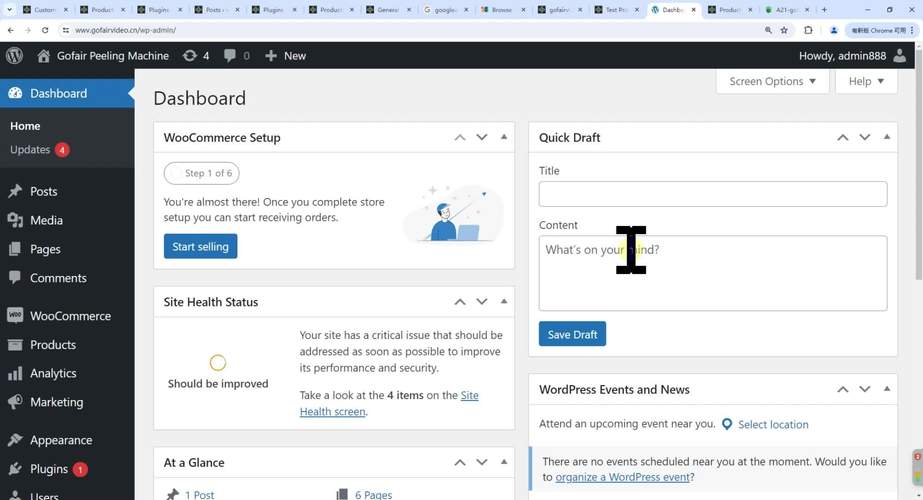
当你点击一篇博客文章的标题、摘要中的“阅读更多”链接,或者任何直接指向该文章固定链接的地方时,WordPress 就会调用 single.php 来为你展示这篇文章的完整内容。
single.php 的核心作用与重要性
- 用户体验的核心:这是读者与你博客内容进行深度交互的主要场所,一个好的
single.php设计能极大地提升阅读体验。 - 内容展示的舞台:它不仅要显示文章的正文,还需要展示文章的标题、作者信息、发布时间、分类/标签、评论、相关文章等一系列辅助信息。
- SEO 优化的重要阵地:在
single.php中可以合理地设置文章的标题 (<title>)、描述 (meta description) 和关键词 (meta keywords),这对搜索引擎优化至关重要。
single.php 的基本结构与常用函数
一个标准的 single.php 文件通常由三部分构成:头部、内容主体 和 底部。
A. 头部
通常直接调用主题的 header.php 文件,包含网站的整体结构,如 <head> 标签、导航菜单、Logo 等。
<?php get_header(); ?>
B. 内容主体
这是 single.php 的核心部分,代码通常在一个 while ( have_posts() ) : the_post(); 循环中,这个循环确保即使通过特殊查询(如 WP_Query)访问,也能正确显示单篇文章。
以下是 single.php 内容主体中最常用和最重要的函数,按逻辑顺序排列:
<?php
if ( have_posts() ) :
    while ( have_posts() ) : the_post();
        // 1. 文章标题
        the_title( '<h1 class="entry-title">', '</h1>' );
        // 2. 文章元信息(作者、日期、分类等)
        ?>
        <div class="entry-meta">
            <?php
            esc_html_e( 'Posted by', 'your-theme-textdomain' ); ?>
            <span class="author vcard">
                <a class="url fn n" href="<?php echo esc_url( get_author_posts_url( get_the_author_meta( 'ID' ) ) ); ?>">
                    <?php the_author(); ?>
                </a>
            </span>
            <span class="meta-separator">|</span>
            <time class="entry-date" datetime="<?php echo esc_attr( get_the_date( 'c' ) ); ?>">
                <?php echo esc_html( get_the_date() ); ?>
            </time>
            <span class="meta-separator">|</span>
            <?php esc_html_e( 'in', 'your-theme-textdomain' ); ?>
            <span class="cat-links">
                <?php the_category( ', ' ); ?>
            </span>
        </div>
        <?php
        // 3. 文章正文内容
        the_content();
        // 4. 文章分页 (用于长篇文章)
        wp_link_pages( array(
            'before' => '<div class="page-links">' . esc_html__( 'Pages:', 'your-theme-textdomain' ),
            'after'  => '</div>',
        ) );
        // 5. 文章底部的元信息(标签、编辑链接等)
        ?>
        <footer class="entry-footer">
            <?php
            // 文章标签
            if ( 'post' === get_post_type() ) {
                /* translators: used between list items, there is a space after the comma */
                $tags_list = get_the_tag_list( '', esc_html_x( ', ', 'list item separator', 'your-theme-textdomain' ) );
                if ( $tags_list ) {
                    /* translators: 1: SVG icon, 2: list of tags. */
                    printf( '<span class="tags-links">' . esc_html__( '%1$s%2$s', 'your-theme-textdomain' ) . '</span>', '<svg class="svg-icon" width="16" height="16" aria-hidden="true" role="img" focusable="false" viewBox="0 0 24 24" xmlns="http://www.w3.org/2000/svg"><path fill="none" d="M0 0h24v24H0V0z"></path><path d="M21.41 11.58l-9-9C12.05 2.22 11.55 2 11 2H4c-1.1 0-2 .9-2 2v7c0 .55.22 1.05.59 1.42l9 9c.36.36.86.58 1.41.58.55 0 1.05-.22 1.41-.59l7-7c.37-.36.59-.86.59-1.41 0-.55-.23-1.06-.59-1.42zM5.5 7C4.67 7 4 6.33 4 5.5S4.67 4 5.5 4 7 4.67 7 5.5 6.33 7 5.5 7z"></path></svg>', $tags_list ); // phpcs:ignore WordPress.Security.EscapeOutput.OutputNotEscaped
                }
            }
            // 编辑文章链接 (登录后显示)
            edit_post_link(
                sprintf(
                    wp_kses(
                        /* translators: %s: Name of current post. Only visible to screen readers. */
                        __( 'Edit <span class="screen-reader-text">%s</span>', 'your-theme-textdomain' ),
                        array(
                            'span' => array(
                                'class' => array(),
                            ),
                        )
                    ),
                    get_the_title()
                ),
                '<span class="edit-link">',
                '</span>'
            );
            ?>
        </footer>
        <?php
        // 6. 作者简介
        // 需要在后台 -> 用户 -> 个人资料中勾选“显示用户个人资料”
        if ( is_singular( 'post' ) && get_the_author_meta( 'description' ) ) {
            get_template_part( 'template-parts/content', 'author-bio' );
        }
        // 7. 相关文章
        // 通常通过插件或自定义函数实现
        // get_template_part( 'template-parts/content', 'related-posts' );
        // 8. 评论模板
        if ( comments_open() || get_comments_number() ) :
            comments_template();
        endif;
    endwhile; // end of the loop.
else :
    // 如果没有文章,显示404内容
    get_template_part( 'content', 'none' );
endif;
?>
C. 底部
调用主题的 sidebar.php (侧边栏) 和 footer.php (页脚)。
<?php get_sidebar(); ?>
<?php get_footer(); ?>
single.php 的高级用法与最佳实践
A. 使用模板层次结构
single.php 并不是唯一的单文章模板,WordPress 有一个强大的模板层次结构,允许你为特定类型的内容创建更专门的模板。
-
single-{post_type}.php:这是最重要的扩展,如果你有一个自定义文章类型("product"),WordPress 会优先查找并使用single-product.php文件来显示产品,而不是通用的single.php。 (图片来源网络,侵删)
single-book.php用于显示书籍,single-movie.php用于显示电影。
-
single-{slug}.php:可以针对某个特定文章的别名(slug)创建模板,如果你想为别名 "hello-world" 的文章做一个特殊页面,可以创建single-hello-world.php。(此用法较少,但存在)
B. 使用 get_template_part()
为了代码的模块化和可重用性,强烈建议将 single.php 中的不同部分拆分成独立的模板文件。
将作者简介拆分成 author-bio.php:
- 在
single.php中调用:get_template_part( 'template-parts/content', 'author-bio' );
- 在主题目录下创建
template-parts/content-author-bio.php文件,并编写该部分的代码。
这样做的好处是:
- 清晰:
single.php文件更简洁,逻辑更清晰。 - 复用:
author-bio.php可以在archive.php或其他页面中重复使用。 - 维护:修改作者简介的样式时,只需修改一个文件。
C. SEO 优化
在 single.php 中,你需要动态地设置页面的 <title> 和 Meta 描述,这通常通过 SEO 插件(如 Yoast SEO, Rank Math)完成,但如果你需要手动实现,可以在 header.php 中通过条件判断来实现。
// 在 header.php 的 <title> 标签处
<?php
if ( is_single() ) {
    $title = get_the_title() . ' | ' . get_bloginfo( 'name', 'display' );
    $description = get_the_excerpt(); // 使用文章摘要作为描述
} else {
    // 默认标题和描述
    $title = wp_get_document_title();
    $description = get_bloginfo( 'description' );
}
?><?php echo esc_html( $title ); ?></title>
<meta name="description" content="<?php echo esc_attr( $description ); ?>">
完整的 single.php 示例
这是一个结构清晰、注释完整的 single.php 示例,你可以基于此进行修改。
<?php
/**
 * 单篇文章模板
 *
 * 当访问单篇文章时,此模板文件被加载。
 *
 * @link https://developer.wordpress.org/themes/basics/template-hierarchy/
 *
 * @package WordPress
 * @subpackage Your_Theme
 * @since Your Theme 1.0
 */
get_header(); // 加载头部文件
?>
<div id="primary" class="content-area">
    <main id="main" class="site-main">
        <?php
        if ( have_posts() ) :
            // 开始文章循环
            while ( have_posts() ) :
                the_post();
                // 加载文章内容模板 (推荐模块化)
                // get_template_part( 'template-parts/content', get_post_type() );
                // 如果不想拆分,直接在这里写内容:
                ?>
                <article id="post-<?php the_ID(); ?>" <?php post_class(); ?>>
                    <header class="entry-header">
                        <?php
                        // 如果是单页,不显示标题
                        if ( ! is_page() ) {
                            the_title( '<h1 class="entry-title">', '</h1>' );
                        }
                        ?>
                    </header><!-- .entry-header -->
                    <?php if ( has_post_thumbnail() ) : ?>
                        <div class="post-thumbnail">
                            <?php the_post_thumbnail( 'large' ); ?>
                        </div>
                    <?php endif; ?>
                    <div class="entry-content">
                        <?php
                        the_content(
                            sprintf(
                                wp_kses(
                                    /* translators: %s: Name of current post. Only visible to screen readers. */
                                    __( 'Continue reading<span class="screen-reader-text"> "%s"</span>', 'your-theme-textdomain' ),
                                    array(
                                        'span' => array(
                                            'class' => array(),
                                        ),
                                    )
                                ),
                                get_the_title()
                            )
                        );
                        // 文章分页
                        wp_link_pages(
                            array(
                                'before' => '<div class="page-links">' . esc_html__( 'Pages:', 'your-theme-textdomain' ),
                                'after'  => '</div>',
                            )
                        );
                        ?>
                    </div><!-- .entry-content -->
                    <footer class="entry-footer">
                        <?php
                        // 文章元信息
                        your_theme_posted_on();
                        your_theme_posted_by();
                        // 文章标签
                        your_theme_entry_tags();
                        ?>
                    </footer><!-- .entry-footer -->
                </article><!-- #post-<?php the_ID(); ?> -->
                <?php
                // 作者简介
                if ( is_singular( 'post' ) && get_the_author_meta( 'description' ) ) {
                    get_template_part( 'template-parts/content', 'author-bio' );
                }
                // 相关文章
                your_theme_related_posts();
                // 评论模板
                if ( comments_open() || get_comments_number() ) {
                    comments_template();
                        }
            endwhile; // 结束文章循环
        else :
            // 如果没有找到文章,加载“无内容”模板
            get_template_part( 'template-parts/content', 'none' );
        endif;
        ?>
    </main><!-- #main -->
</div><!-- #primary -->
<?php
get_sidebar(); // 加载侧边栏
get_footer(); // 加载页脚
single.php 是 WordPress 主题开发中必须精通的模板,理解它的作用、掌握其核心函数、并学会使用模板层次结构和模块化开发,是构建一个功能完善、用户体验良好、易于维护的优秀 WordPress 网站的关键一步。


