这份源码将使用 HTML 来构建页面结构,CSS 来设置游戏样式,以及 JavaScript 来实现所有的游戏逻辑,包括鸟的物理、管道的生成与移动、碰撞检测和计分系统。
(图片来源网络,侵删)
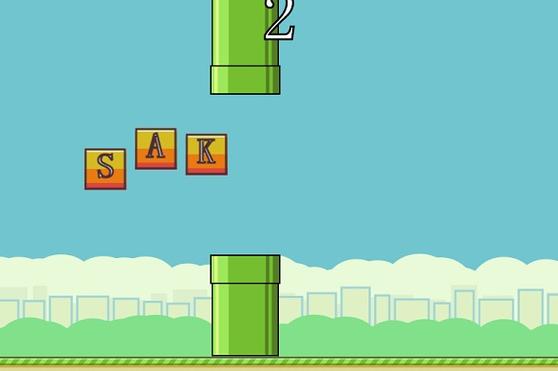
最终效果预览
您可以直接将下面的代码保存为三个文件(index.html, style.css, script.js),然后在浏览器中打开 index.html 即可运行游戏。
第一步:HTML 文件 (index.html)
这是游戏的骨架,定义了画布、分数显示和开始提示。
<!DOCTYPE html>
<html lang="zh-CN">
<head>
    <meta charset="UTF-8">
    <meta name="viewport" content="width=device-width, initial-scale=1.0">Flappy Bird 网页版</title>
    <link rel="stylesheet" href="style.css">
</head>
<body>
    <div class="game-container">
        <h1>Flappy Bird</h1>
        <div class="score-container">
            <span>得分: <span id="score">0</span></span>
            <span>最高分: <span id="highScore">0</span></span>
        </div>
        <canvas id="gameCanvas" width="400" height="600"></canvas>
        <div id="startScreen" class="screen">
            <p>点击或按空格键开始</p>
        </div>
        <div id="gameOverScreen" class="screen hidden">
            <p>游戏结束!</p>
            <p>你的得分: <span id="finalScore">0</span></p>
            <button id="restartButton">重新开始</button>
        </div>
    </div>
    <script src="script.js"></script>
</body>
</html>
第二步:CSS 文件 (style.css)
这是游戏的样式表,让游戏看起来更美观。
body {
    display: flex;
    justify-content: center;
    align-items: center;
    height: 100vh;
    margin: 0;
    background-color: #70c5ce;
    font-family: 'Arial', sans-serif;
}
.game-container {
    text-align: center;
    position: relative;
}
h1 {
    color: white;
    text-shadow: 2px 2px 4px rgba(0,0,0,0.5);
    margin-bottom: 10px;
}
.score-container {
    color: white;
    font-size: 20px;
    margin-bottom: 10px;
    text-shadow: 1px 1px 2px rgba(0,0,0,0.5);
}
#gameCanvas {
    border: 2px solid #333;
    background-color: #70c5ce; /* 天空蓝 */
    display: block;
    margin: 0 auto;
}
.screen {
    position: absolute;
    top: 50%;
    left: 50%;
    transform: translate(-50%, -50%);
    background-color: rgba(0, 0, 0, 0.7);
    color: white;
    padding: 20px;
    border-radius: 10px;
    text-align: center;
}
#gameOverScreen p {
    margin: 10px 0;
    font-size: 24px;
}
#restartButton {
    padding: 10px 20px;
    font-size: 18px;
    cursor: pointer;
    border: none;
    border-radius: 5px;
    background-color: #ffcc00;
    color: #333;
    transition: background-color 0.3s;
}
#restartButton:hover {
    background-color: #e6b800;
}
.hidden {
    display: none;
}
第三步:JavaScript 文件 (script.js)
这是游戏的核心,包含了所有的逻辑。
(图片来源网络,侵删)
// 获取画布和上下文
const canvas = document.getElementById('gameCanvas');
const ctx = canvas.getContext('2d');
// 获取UI元素
const scoreElement = document.getElementById('score');
const highScoreElement = document.getElementById('highScore');
const finalScoreElement = document.getElementById('finalScore');
const startScreen = document.getElementById('startScreen');
const gameOverScreen = document.getElementById('gameOverScreen');
const restartButton = document.getElementById('restartButton');
// 游戏状态
let gameState = 'start'; // 'start', 'playing', 'gameOver'
let score = 0;
let highScore = localStorage.getItem('flappyHighScore') || 0;
highScoreElement.textContent = highScore;
// 鸟的属性
const bird = {
    x: 50,
    y: canvas.height / 2,
    width: 34,
    height: 24,
    velocity: 0,
    gravity: 0.5,
    jumpPower: -8,
    color: '#ffcc00'
};
// 管道数组
let pipes = [];
const pipeWidth = 52;
const pipeGap = 150; // 上下管道之间的间隙
const pipeSpeed = 2;
// 初始化游戏
function init() {
    score = 0;
    scoreElement.textContent = score;
    bird.y = canvas.height / 2;
    bird.velocity = 0;
    pipes = [];
    gameState = 'playing';
    startScreen.classList.add('hidden');
    gameOverScreen.classList.add('hidden');
}
// 游戏主循环
function gameLoop() {
    if (gameState === 'playing') {
        update();
    }
    draw();
    requestAnimationFrame(gameLoop);
}
// 更新游戏状态
function update() {
    // 更新鸟的位置
    bird.velocity += bird.gravity;
    bird.y += bird.velocity;
    // 生成新管道
    if (pipes.length === 0 || pipes[pipes.length - 1].x < canvas.width - 200) {
        generatePipe();
    }
    // 更新管道位置
    for (let i = pipes.length - 1; i >= 0; i--) {
        pipes[i].x -= pipeSpeed;
        // 检查得分
        if (!pipes[i].passed && pipes[i].x + pipeWidth < bird.x) {
            pipes[i].passed = true;
            score++;
            scoreElement.textContent = score;
        }
        // 移除屏幕外的管道
        if (pipes[i].x + pipeWidth < 0) {
            pipes.splice(i, 1);
        }
    }
    // 碰撞检测
    checkCollisions();
}
// 绘制游戏画面
function draw() {
    // 清空画布
    ctx.clearRect(0, 0, canvas.width, canvas.height);
    // 绘制背景
    ctx.fillStyle = '#70c5ce';
    ctx.fillRect(0, 0, canvas.width, canvas.height);
    // 绘制管道
    ctx.fillStyle = '#2ecc71'; // 绿色管道
    pipes.forEach(pipe => {
        // 上管道
        ctx.fillRect(pipe.x, 0, pipeWidth, pipe.topHeight);
        // 下管道
        ctx.fillRect(pipe.x, pipe.topHeight + pipeGap, pipeWidth, canvas.height - pipe.topHeight - pipeGap);
    });
    // 绘制鸟
    ctx.fillStyle = bird.color;
    // 使用一个简单的矩形代替鸟,方便绘制
    ctx.fillRect(bird.x, bird.y, bird.width, bird.height);
    // 可以在这里绘制一个三角形或图片来代替矩形
    // ctx.beginPath();
    // ctx.moveTo(bird.x, bird.y + bird.height / 2);
    // ctx.lineTo(bird.x + bird.width, bird.y);
    // ctx.lineTo(bird.x + bird.width, bird.y + bird.height);
    // ctx.closePath();
    // ctx.fill();
}
// 生成管道
function generatePipe() {
    const topHeight = Math.random() * (canvas.height - pipeGap - 100) + 50; // 确保管道不会太短或太长
    pipes.push({
        x: canvas.width,
        topHeight: topHeight,
        passed: false
    });
}
// 碰撞检测
function checkCollisions() {
    // 检查是否撞到上下边界
    if (bird.y + bird.height > canvas.height || bird.y < 0) {
        gameOver();
        return;
    }
    // 检查是否撞到管道
    for (let pipe of pipes) {
        if (
            bird.x < pipe.x + pipeWidth &&
            bird.x + bird.width > pipe.x
        ) {
            if (
                bird.y < pipe.topHeight ||
                bird.y + bird.height > pipe.topHeight + pipeGap
            ) {
                gameOver();
                return;
            }
        }
    }
}
// 游戏结束
function gameOver() {
    gameState = 'gameOver';
    finalScoreElement.textContent = score;
    gameOverScreen.classList.remove('hidden');
    // 更新最高分
    if (score > highScore) {
        highScore = score;
        highScoreElement.textContent = highScore;
        localStorage.setItem('flappyHighScore', highScore);
    }
}
// 事件监听
document.addEventListener('keydown', (e) => {
    if (e.code === 'Space') {
        e.preventDefault(); // 防止页面滚动
        if (gameState === 'start') {
            init();
        } else if (gameState === 'playing') {
            bird.velocity = bird.jumpPower;
        } else if (gameState === 'gameOver') {
            init();
        }
    }
});
canvas.addEventListener('click', () => {
    if (gameState === 'start') {
        init();
    } else if (gameState === 'playing') {
        bird.velocity = bird.jumpPower;
    } else if (gameState === 'gameOver') {
        init();
    }
});
restartButton.addEventListener('click', init);
// 启动游戏循环
gameLoop();
如何运行
- 创建文件: 在你的电脑上创建一个新的文件夹,
flappy-bird-game。 - 保存代码: 在该文件夹中创建三个文件,分别命名为
index.html、style.css和script.js。 - 复制粘贴: 将上面提供的代码分别复制粘贴到对应的文件中。
- 打开游戏: 找到
index.html文件,用任意现代浏览器(如 Chrome, Firefox, Edge)打开它即可开始游戏。
游戏玩法
- 开始游戏: 点击画布或按空格键。
- 控制小鸟: 每次点击或按空格键,小鸟就会向上飞一小段。
- 目标: 控制小鸟穿过管道之间的缝隙,每成功穿过一组管道得1分。
- 结束: 当小鸟撞到管道、地面或天花板时,游戏结束。
- 重新开始: 游戏结束后,点击 "重新开始" 按钮或按空格键再次挑战。
代码逻辑简述
index.html: 定义了游戏所需的DOM元素,主要是<canvas>用于绘图,以及用于显示分数和游戏提示的<div>。style.css: 使用 Flexbox 将游戏居中,设置了背景色、画布边框和文字样式,让界面看起来更整洁。script.js:- 初始化: 获取所有需要的DOM元素,设置初始的游戏状态(如最高分从
localStorage读取)。 gameLoop(): 这是游戏的心跳,它通过requestAnimationFrame不断调用自身,形成动画循环,在每一帧中,它会先update()(更新逻辑),draw()(绘制画面)。update(): 负责更新所有游戏对象的状态,它让小鸟受重力影响下落,让管道向左移动,并检查是否生成了新管道或需要移除旧管道,它还调用checkCollisions()来判断游戏是否应该结束。draw(): 负责在画布上绘制所有东西,它会先清空画布,然后依次绘制背景、管道和小鸟。generatePipe(): 随机生成一组上下管道,并设置一个随机的顶部管道高度,确保游戏难度变化。checkCollisions(): 检查小鸟是否与边界或任何管道发生碰撞,如果碰撞,则调用gameOver()。gameOver(): 更改游戏状态,显示游戏结束画面,并更新最高分记录。- 事件监听: 监听键盘(空格键)和鼠标(点击)事件,让玩家可以控制小鸟跳跃和开始/重新开始游戏。
- 初始化: 获取所有需要的DOM元素,设置初始的游戏状态(如最高分从
这份源码是一个很好的起点,你可以基于它进行修改和扩展,比如添加音效、使用图片代替简单的图形、增加难度递增机制等。
(图片来源网络,侵删)


