第一步:理解hao123的核心特点
在开始写代码前,我们先分析一下hao123这类网址导航网站的核心特征:
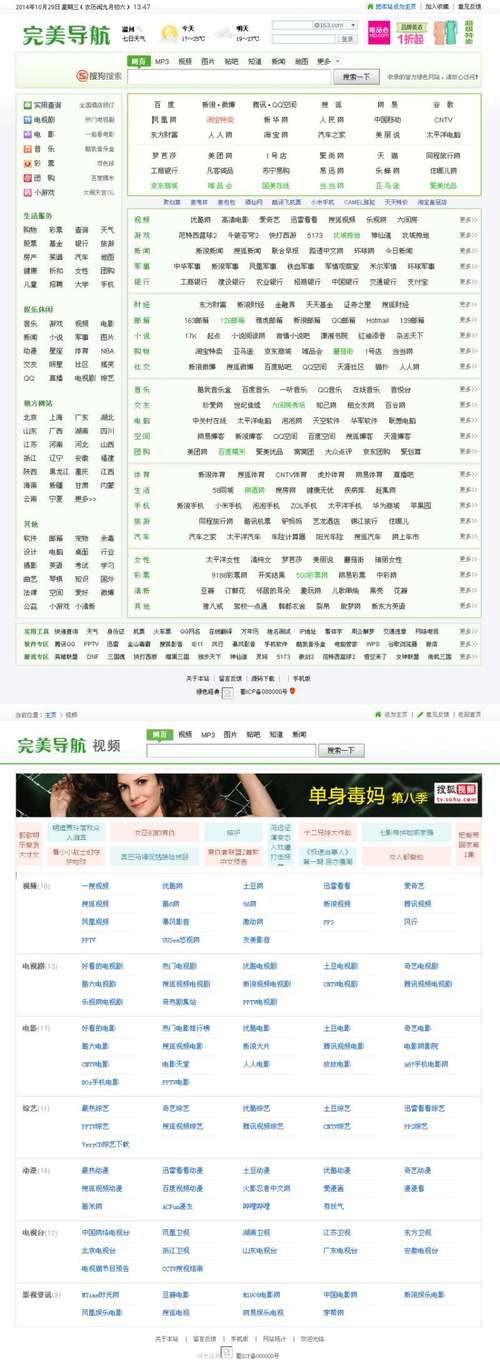
(图片来源网络,侵删)
- 简洁明了的布局:通常分为顶部导航栏、主体内容区(分为多个模块)和底部信息。
- 以图标和链接为主:核心是展示网站Logo和对应的超链接。
- 模块化设计:将不同类型的网站(如常用工具、视频、购物等)分门别类,放在不同的“盒子”里。
- 响应式设计:能在不同尺寸的屏幕(电脑、平板、手机)上都有良好的显示效果。
- 可选功能:如天气、搜索框、设为首页/收藏等。
第二步:搭建项目基础结构
创建一个基本的HTML文件,这个文件将是我们所有内容的容器。
- 创建一个文件夹,
myhao123。 - 在文件夹中创建以下文件:
index.html(网页主体)style.css(样式表)script.js(JavaScript脚本)
第三步:编写HTML骨架 (index.html)
HTML是网页的骨架,我们将按照顶部、主体、底部的顺序来构建。
<!DOCTYPE html>
<html lang="zh-CN">
<head>
<meta charset="UTF-8">
<meta name="viewport" content="width=device-width, initial-scale=1.0">我的网址导航 - myhao123</title>
<link rel="stylesheet" href="style.css">
<!-- 引入一个图标库,这里使用Font Awesome -->
<link rel="stylesheet" href="https://cdnjs.cloudflare.com/ajax/libs/font-awesome/6.0.0-beta3/css/all.min.css">
</head>
<body>
<!-- 顶部导航栏 -->
<header>
<div class="logo">
<a href="#">我的网址导航</a>
</div>
<nav class="main-nav">
<a href="#">主页</a>
<a href="#">游戏</a>
<a href="#">视频</a>
<a href="#">小说</a>
</nav>
</header>
<!-- 主体内容区 -->
<main>
<!-- 搜索框模块 -->
<section class="search-box">
<input type="text" id="search-input" placeholder="请输入搜索关键词...">
<button id="search-button"><i class="fas fa-search"></i></button>
</section>
<!-- 常用网站模块 -->
<section class="site-module">
<h2>常用网站</h2>
<div class="site-grid">
<a href="https://www.baidu.com" target="_blank">
<img src="https://www.baidu.com/favicon.ico" alt="百度">
<span>百度</span>
</a>
<a href="https://www.taobao.com" target="_blank">
<img src="https://www.taobao.com/favicon.ico" alt="淘宝">
<span>淘宝</span>
</a>
<a href="https://www.jd.com" target="_blank">
<img src="https://www.jd.com/favicon.ico" alt="京东">
<span>京东</span>
</a>
<a href="https://www.tmall.com" target="_blank">
<img src="https://www.tmall.com/favicon.ico" alt="天猫">
<span>天猫</span>
</a>
<!-- 可以继续添加更多 -->
</div>
</section>
<!-- 工具类网站模块 -->
<section class="site-module">
<h2>常用工具</h2>
<div class="site-grid">
<a href="https://translate.google.com" target="_blank">
<img src="https://www.google.com/favicon.ico" alt="谷歌翻译">
<span>谷歌翻译</span>
</a>
<a href="https://www.photopea.com" target="_blank">
<i class="fas fa-image"></i>
<span>在线PS</span>
</a>
<a href="https://www.github.com" target="_blank">
<img src="https://github.com/favicon.ico" alt="GitHub">
<span>GitHub</span>
</a>
<!-- 可以继续添加更多 -->
</div>
</section>
<!-- 可以添加更多模块,如“视频网站”、“购物网站”等 -->
</main>
<!-- 底部信息 -->
<footer>
<p>© 2025 我的网址导航. All rights reserved. | <a href="#">关于我们</a> | <a href="#">设置首页</a> | <a href="#">加入收藏</a></p>
</footer>
<script src="script.js"></script>
</body>
</html>
代码解释:
<header>: 顶部,包含Logo和主导航。<main>: 主体内容,包含所有网站模块。<section class="site-module">: 每个网站分类都是一个区块,方便CSS样式控制。<div class="site-grid">: 使用网格布局来排列网站图标和链接。<a>: 超链接,target="_blank"表示在新标签页中打开。<img>: 网站图标,很多网站都提供了favicon.ico作为其官方图标。<i class="fas fa-...">: 使用Font Awesome图标库,当网站没有提供图标时,可以用通用图标代替。
第四步:添加CSS样式 (style.css)
CSS负责美化我们的网页,让它看起来更美观、更专业。
(图片来源网络,侵删)
/* 全局样式 */
body {
    font-family: -apple-system, BlinkMacSystemFont, "Segoe UI", Roboto, "Helvetica Neue", Arial, sans-serif;
    margin: 0;
    background-color: #f4f4f4;
    color: #333;
}
/* 顶部导航栏 */
header {
    background-color: #fff;
    box-shadow: 0 2px 5px rgba(0,0,0,0.1);
    padding: 15px 20px;
    display: flex;
    justify-content: space-between;
    align-items: center;
}
.logo a {
    font-size: 24px;
    font-weight: bold;
    color: #3385ff;
    text-decoration: none;
}
.main-nav a {
    margin-left: 20px;
    color: #666;
    text-decoration: none;
}
.main-nav a:hover {
    color: #3385ff;
}
区 */
main {
    max-width: 1200px;
    margin: 20px auto;
    padding: 0 20px;
}
/* 搜索框 */
.search-box {
    text-align: center;
    margin-bottom: 30px;
}
#search-input {
    width: 50%;
    padding: 12px 20px;
    font-size: 16px;
    border: 2px solid #ddd;
    border-radius: 25px;
    outline: none;
}
#search-input:focus {
    border-color: #3385ff;
}
#search-button {
    padding: 12px 25px;
    font-size: 16px;
    color: #fff;
    background-color: #3385ff;
    border: none;
    border-radius: 25px;
    cursor: pointer;
    margin-left: -5px;
}
/* 网站模块 */
.site-module {
    background-color: #fff;
    border-radius: 8px;
    padding: 20px;
    margin-bottom: 20px;
    box-shadow: 0 1px 3px rgba(0,0,0,0.05);
}
.site-module h2 {
    margin-top: 0;
    font-size: 18px;
    color: #666;
    border-bottom: 2px solid #f0f0f0;
    padding-bottom: 10px;
}
/* 网站网格布局 */
.site-grid {
    display: grid;
    grid-template-columns: repeat(auto-fill, minmax(100px, 1fr)); /* 自适应网格 */
    gap: 20px;
    text-align: center;
}
.site-grid a {
    display: flex;
    flex-direction: column;
    align-items: center;
    text-decoration: none;
    color: #666;
    transition: transform 0.2s;
}
.site-grid a:hover {
    transform: translateY(-5px); /* 鼠标悬停时上移 */
}
.site-grid img, .site-grid i {
    width: 48px;
    height: 48px;
    margin-bottom: 5px;
}
.site-grid i {
    font-size: 36px;
    color: #888;
}
.site-grid span {
    font-size: 14px;
}
/* 底部 */
footer {
    text-align: center;
    padding: 20px;
    background-color: #fff;
    margin-top: 40px;
    color: #999;
    font-size: 14px;
}
footer a {
    color: #3385ff;
    text-decoration: none;
}
代码解释:
- Flexbox (
display: flex): 用于顶部导航栏,让Logo和导航菜单并排且对齐。 - Grid (
display: grid): 用于网站图标列表,可以非常方便地创建响应式的列布局。 box-shadow: 为元素添加阴影,增加层次感。hover: 鼠标悬停时的样式,用于交互反馈。border-radius: 圆角,让界面更柔和。
第五步:添加JavaScript交互 (script.js)
JavaScript可以为网页添加动态功能,比如搜索功能。
// 获取搜索框和按钮的DOM元素
const searchInput = document.getElementById('search-input');
const searchButton = document.getElementById('search-button');
// 定义搜索引擎URL(这里以百度为例)
const searchEngineUrl = 'https://www.baidu.com/s?wd=';
// 为搜索按钮添加点击事件监听器
searchButton.addEventListener('click', performSearch);
// 为搜索框添加回车键事件监听器
searchInput.addEventListener('keyup', function(event) {
    // 如果按下的是回车键 (keyCode 13)
    if (event.key === 'Enter') {
        performSearch();
    }
});
// 执行搜索的函数
function performSearch() {
    const searchTerm = searchInput.value.trim(); // 获取搜索词并去除首尾空格
    if (searchTerm) {
        // 拼接完整的搜索URL并跳转
        window.location.href = searchEngineUrl + encodeURIComponent(searchTerm);
    } else {
        // 如果搜索框为空,可以给出提示或清空
        alert('请输入搜索关键词!');
        searchInput.focus();
    }
}
代码解释:
document.getElementById(...): 通过ID获取页面元素。addEventListener: 为元素添加事件监听器,如click(点击)和keyup(按键释放)。window.location.href: 用于跳转到指定的URL。encodeURIComponent(): 对搜索词进行编码,确保特殊字符不会破坏URL结构。
第六步:进阶功能与优化
当你完成了基础版本后,可以尝试添加更多功能来提升用户体验。
-
天气组件:
- 使用免费的天气API(如和风天气、OpenWeatherMap等)获取你所在城市的天气信息。
- 通过JavaScript动态地在页面上显示天气、温度和图标。
-
添加/删除网站:
- 在每个网站链接旁添加一个“删除”按钮(用CSS隐藏,hover时显示)。
- 点击删除按钮时,使用JavaScript从DOM中移除对应的
<a>元素。 - 可以更进一步,使用
localStorage来保存用户自定义的网站列表,这样刷新页面后设置依然存在。
-
更强大的响应式设计:
- 使用CSS媒体查询 (
@media),在小屏幕设备上(如手机)改变布局。 - 将导航栏从水平变为垂直,或者将网站网格的列数减少。
- 使用CSS媒体查询 (
-
背景图:
- 可以给
<body>添加一张高质量的背景图,并设置合适的透明度,让页面更美观。
- 可以给
-
设置首页/收藏功能:
- 在底部添加“设为首页”和“加入收藏”的链接。
- “设为首页”的代码如下:
<a href="javascript:void(0);" onclick="setHome(this)">设为首页</a>
function setHome(obj) {
    var url = window.location.href;
    try {
        obj.style.behavior = 'url(#default#homepage)';
        obj.setHomePage(url);
    } catch (e) {
        if (window.netscape) {
            try {
                netscape.security.PrivilegeManager.enablePrivilege("UniversalXPConnect");
            } catch (e) {
                alert("此操作被浏览器拒绝!\n请在浏览器地址栏输入“about:config”并回车\n然后将 [signed.applets.codebase_principal_support]的值设置为'true',双击即可。");
            }
            var prefs = Components.classes['@mozilla.org/preferences-service;1'].getService(Components.interfaces.nsIPrefBranch);
            prefs.setCharPref('browser.startup.homepage', url);
        } else {
            alert("您的浏览器不支持,请按照以下步骤操作:1.打开浏览器设置,2.在主页设置中输入:" + url);
        }
    }
}
通过以上步骤,你已经从零开始,制作出了一个功能基本完备、外观整洁的网址导航网页,这个过程涵盖了前端开发的三大核心技术:
- HTML: 负责内容和结构。
- CSS: 负责样式和布局。
- JavaScript: 负责交互和动态功能。
你可以基于这个框架,不断添加新的模块和功能,最终打造出完全属于你自己的个性化导航主页,祝你学习愉快!


