为什么选择 Apache HttpClient?
虽然 Java 标准库中有 HttpURLConnection,但 Apache HttpClient (现在由 Apache 软件基金会维护,是 org.apache.httpcomponents.client5 包下的版本) 功能更强大、更灵活、更易于使用,尤其是在处理连接池、复杂的请求头、重定向和会话管理方面。
准备工作:添加 Maven 依赖
你需要在你的 pom.xml 文件中添加 HttpClient 5 的核心依赖。
<dependencies>
    <!-- HttpClient 5 核心库 -->
    <dependency>
        <groupId>org.apache.httpcomponents.client5</groupId>
        <artifactId>httpclient5</artifactId>
        <version>5.3.1</version> <!-- 请使用最新版本 -->
    </dependency>
    <!-- 一个推荐的 HTTP 协议处理器,支持 HTTP/1.1 和 HTTP/2 -->
    <dependency>
        <groupId>org.apache.httpcomponents.client5</groupId>
        <artifactId>httpclient5-http2</artifactId>
        <version>5.3.1</version>
    </dependency>
    <!-- 为了方便地将响应体转换为字符串,可以使用 httpclient5-fluent -->
    <!-- 这是一个可选依赖,但能简化代码 -->
    <dependency>
        <groupId>org.apache.httpcomponents.client5</groupId>
        <artifactId>httpclient5-fluent</artifactId>
        <version>5.3.1</version>
    </dependency>
</dependencies>
基础示例:GET 请求并获取源码
这是最简单的抓取方式,适用于大多数静态网页。
使用 HttpComponentsClientHttpRequestExecutor (标准方式)
这种方式更底层,但能让你更好地控制请求的每一个细节。
import org.apache.hc.client5.http.classic.methods.HttpGet;
import org.apache.hc.client5.http.impl.classic.CloseableHttpClient;
import org.apache.hc.client5.http.impl.classic.CloseableHttpResponse;
import org.apache.hc.client5.http.impl.classic.HttpClients;
import org.apache.hc.core5.http.io.entity.EntityUtils;
import org.apache.hc.core5.http.ParseException;
import java.io.IOException;
public class BasicScraper {
    public static void main(String[] args) {
        // 1. 创建 HttpClient 实例
        // 使用 try-with-resources 确保 HttpClient 和 Response 被正确关闭
        try (CloseableHttpClient httpClient = HttpClients.createDefault()) {
            // 2. 创建 HTTP GET 请求
            String targetUrl = "https://www.example.com";
            HttpGet request = new HttpGet(targetUrl);
            // 3. 可选:设置请求头,模拟浏览器访问
            request.addHeader("User-Agent", "Mozilla/5.0 (Windows NT 10.0; Win64; x64) AppleWebKit/537.36 (KHTML, like Gecko) Chrome/91.0.4472.124 Safari/537.36");
            request.addHeader("Accept", "text/html,application/xhtml+xml,application/xml;q=0.9,image/webp,*/*;q=0.8");
            // 4. 执行请求,并获取响应
            try (CloseableHttpResponse response = httpClient.execute(request)) {
                // 5. 检查响应状态码
                // 200 表示成功
                System.out.println("Response Code: " + response.getCode());
                // 6. 获取响应实体(即网页内容)
                if (response.getEntity() != null) {
                    // 将响应实体转换为字符串
                    // EntityUtils.toString 会自动处理资源的释放
                    String responseBody = EntityUtils.toString(response.getEntity());
                    // 7. 输出源码(这里只打印前 500 个字符)
                    System.out.println(responseBody.substring(0, 500));
                }
            }
        } catch (IOException | ParseException e) {
            e.printStackTrace();
        }
    }
}
使用 HttpComponentsClientHttpRequestExecutor (更简洁的方式)
如果你只是想简单地获取一个 URL 的内容,httpclient5-fluent 提供了非常简洁的 API。
import org.apache.hc.client5.http.fluent.Request;
import org.apache.hc.client5.http.fluent.Response;
import org.apache.hc.core5.http.ContentType;
import org.apache.hc.core5.http.ParseException;
import java.io.IOException;
public class FluentScraper {
    public static void main(String[] args) {
        String targetUrl = "https://www.example.com";
        try {
            // 使用 fluent API 执行 GET 请求
            Response response = Request.get(targetUrl)
                    .addHeader("User-Agent", "Mozilla/5.0...")
                    .execute();
            // 获取响应体并解析为字符串
            String responseBody = response.returnContent().asString();
            // 输出源码
            System.out.println(responseBody.substring(0, 500));
        } catch (IOException | ParseException e) {
            e.printStackTrace();
        }
    }
}
进阶示例:处理 POST 请求、参数和 JSON
抓取网页时,有时需要登录或者提交表单,这时就需要使用 POST 请求。
import org.apache.hc.client5.http.classic.methods.HttpPost;
import org.apache.hc.client5.http.entity.UrlEncodedFormEntity;
import org.apache.hc.client5.http.impl.classic.CloseableHttpClient;
import org.apache.hc.client5.http.impl.classic.CloseableHttpResponse;
import org.apache.hc.client5.http.impl.classic.HttpClients;
import org.apache.hc.core5.http.ContentType;
import org.apache.hc.core5.http.HttpEntity;
import org.apache.hc.core5.http.NameValuePair;
import org.apache.hc.core5.http.io.entity.EntityUtils;
import org.apache.hc.core5.http.io.entity.StringEntity;
import org.apache.hc.core5.http.message.BasicNameValuePair;
import org.apache.hc.core5.net.URIBuilder;
import java.io.IOException;
import java.net.URI;
import java.net.URISyntaxException;
import java.nio.charset.StandardCharsets;
import java.util.ArrayList;
import java.util.List;
public class AdvancedScraper {
    public static void main(String[] args) {
        try (CloseableHttpClient httpClient = HttpClients.createDefault()) {
            // 示例1:发送 URL 编码的表单数据 (application/x-www-form-urlencoded)
            HttpPost postRequest1 = new HttpPost("https://example.com/login");
            List<NameValuePair> params = new ArrayList<>();
            params.add(new BasicNameValuePair("username", "testuser"));
            params.add(new BasicNameValuePair("password", "testpass123"));
            // 将参数列表编码为实体
            postRequest1.setEntity(new UrlEncodedFormEntity(params, StandardCharsets.UTF_8));
            try (CloseableHttpResponse response1 = httpClient.execute(postRequest1)) {
                System.out.println("Login Response Code: " + response1.getCode());
                String result1 = EntityUtils.toString(response1.getEntity());
                System.out.println(result1);
            }
            // 示例2:发送 JSON 数据 (application/json)
            HttpPost postRequest2 = new HttpPost("https://api.example.com/data");
            postRequest2.setHeader("Content-Type", "application/json");
            postRequest2.setHeader("Accept", "application/json");
            String jsonPayload = "{\"key\":\"value\", \"number\":123}";
            // 将字符串编码为实体
            postRequest2.setEntity(new StringEntity(jsonPayload, ContentType.APPLICATION_JSON));
            try (CloseableHttpResponse response2 = httpClient.execute(postRequest2)) {
                System.out.println("API Response Code: " + response2.getCode());
                String result2 = EntityUtils.toString(response2.getEntity());
                System.out.println(result2);
            }
        } catch (IOException e) {
            e.printStackTrace();
        }
    }
}
关键点与最佳实践
1 设置请求头 (User-Agent, Accept等)
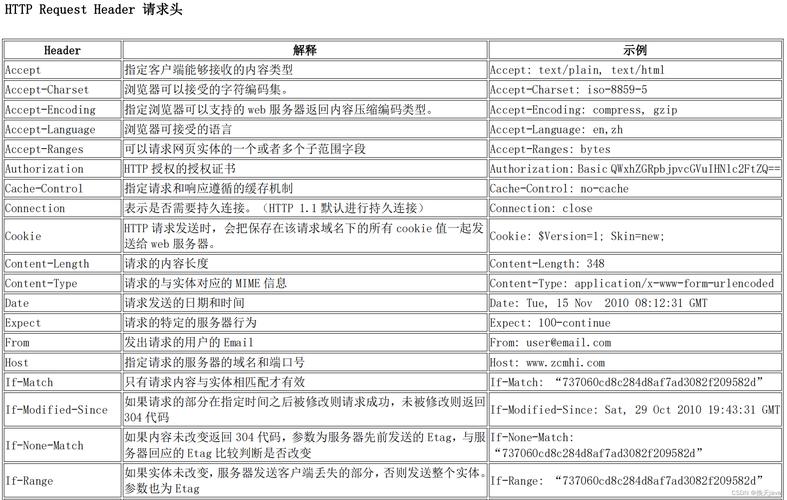
很多网站会检查 User-Agent 来判断请求是否来自真实浏览器。User-Agent 是默认的,可能会被拒绝访问或返回错误内容,模拟一个常见的浏览器 User-Agent 是一个好习惯。
request.addHeader("User-Agent", "Mozilla/5.0...");
request.addHeader("Accept", "text/html,application/xhtml+xml,application/xml;q=0.9,*/*;q=0.8");
request.addHeader("Accept-Language", "en-US,en;q=0.5");
2 处理字符编码
网页的字符编码通常在 HTTP 响应头 Content-Type 中指定,Content-Type: text/html; charset=utf-8。
EntityUtils.toString()的妙用:EntityUtils.toString(response.getEntity())会自动尝试从Content-Type中解析字符集,如果找不到,它会使用 ISO-8859-1 作为默认值,这可能导致乱码。- 手动指定编码:如果遇到乱码,可以手动指定编码:
String responseBody = EntityUtils.toString(response.getEntity(), "UTF-8");
3 使用连接池
在高并发或频繁请求的场景下,为每个请求都创建和销毁 HttpClient 是非常低效的,应该创建一个单例的 HttpClient 并重用。
import org.apache.hc.client5.http.impl.PoolingHttpClientConnectionManager;
import org.apache.hc.client5.http.impl.classic.CloseableHttpClient;
import org.apache.hc.client5.http.impl.classic.HttpClients;
import org.apache.hc.core5.pool.PoolConcurrencyPolicy;
import org.apache.hc.core5.reactor.ConnectingIOReactor;
import org.apache.hc.core5.reactor.ConnectingIOReactorFactory;
import org.apache.hc.core5.reactor.IOReactorConfig;
public class HttpClientManager {
    private static CloseableHttpClient httpClient;
    static {
        try {
            // 创建连接池管理器
            PoolingHttpClientConnectionManager cm = new PoolingHttpClientConnectionManager();
            cm.setMaxTotal(100); // 最大连接数
            cm.setDefaultMaxPerRoute(20); // 每个路由(如对同一个主机的并发)的最大连接数
            // 配置 HttpClient
            httpClient = HttpClients.custom()
                    .setConnectionManager(cm)
                    .build();
        } catch (Exception e) {
            throw new RuntimeException("Failed to initialize HttpClient", e);
        }
    }
    public static CloseableHttpClient getHttpClient() {
        return httpClient;
    }
}
然后在你的代码中直接使用 HttpClientManager.getHttpClient()。
4 处理 Cookies 和会话
当你需要登录后访问需要权限的页面时,必须保持会话,HttpClient 可以自动处理 Cookies。
// 创建一个可以自动处理 Cookies 的 HttpClient
CloseableHttpClient httpClient = HttpClients.custom()
        .setDefaultCookieStore(new BasicCookieStore()) // 使用一个内存中的 Cookie 存储
        .build();
// 第一次请求(登录)
HttpPost loginRequest = new HttpPost("https://example.com/login");
// ... 设置登录参数 ...
// 执行登录请求
httpClient.execute(loginRequest);
// 第二次请求(访问受保护的页面)
HttpGet protectedPageRequest = new HttpGet("https://example.com/dashboard");
// httpClient 会自动带上第一次登录时获取的 Cookies
CloseableHttpResponse response = httpClient.execute(protectedPageRequest);
// ...
5 处理重定向
默认情况下,HttpClient 会自动处理 HTTP 3xx 重定向,你可以通过配置来控制这个行为。
// 禁用自动重定向
CloseableHttpClient httpClient = HttpClients.custom()
        .setRedirectStrategy(new NoRedirectStrategy())
        .build();
// 或者自定义重定向策略
CloseableHttpClient httpClient = HttpClients.custom()
        .setRedirectStrategy(new LaxRedirectStrategy()) // LaxRedirectStrategy 是一个更宽松的策略
        .build();
6 超时设置
为了避免因为网络问题或服务器无响应而导致程序长时间阻塞,必须设置连接和请求的超时时间。
// 使用 RequestConfig
RequestConfig requestConfig = RequestConfig.custom()
        .setConnectTimeout(5000) // 连接超时 (毫秒)
        .setConnectionRequestTimeout(5000) // 从连接池获取连接的超时
        .setResponseTimeout(10000) // 等待响应的超时
        .build();
HttpGet request = new HttpGet("https://example.com");
request.setConfig(requestConfig);
try (CloseableHttpResponse response = httpClient.execute(request)) {
    // ...
}
重要提醒:合法性与道德
在使用 HttpClient 抓取网页时,请务必遵守以下原则:
- 检查
robots.txt:在抓取一个网站之前,请先访问https://www.example.com/robots.txt,这个文件会告知爬虫哪些页面可以抓取,哪些不可以。 - 尊重
robots.txt:即使技术上可以抓取,也应该遵守网站的规则。 - 设置合理的请求频率:不要在短时间内向同一个服务器发送大量请求,这会给对方服务器造成巨大压力,甚至可能导致你的 IP 被封禁,在请求之间加入适当的延迟(
Thread.sleep(1000))。 - 不要用于非法用途:抓取数据用于个人学习、研究或合法的商业分析是可以的,但用于恶意竞争、数据窃取等非法行为是绝对禁止的。
希望这份详细的指南能帮助你顺利使用 Apache HttpClient 抓取网页源码!


